How 360 Degree Views Work on Product Pages (2026 Guide)

.webp)
Last updated: February 2026
What You Will Learn
What a 360 degree view really is (and what it is not)
How 360 degree product photos are captured and processed
How 360 degree product viewers work on your product page
UX and design best practices that increase engagement
Performance, SEO, and measurement for 360 views
When 360 is worth it (and when it is not)
A practical implementation checklist for e-commerce teams
You spend weeks getting a product ready, then a customer hits your product page and still cannot answer a simple question: “What does this look like from the side?” For items where shape and detail matter, product photos can feel like a guessing game. That is where a 360 degree view earns its keep. It reduces uncertainty, keeps shoppers on the page longer, and cuts down the “I thought it was bigger” type of returns.
Here’s the thing: a 360 view is not magic, and it is not the same as 3D. It is a smart, structured sequence of images that your site displays as an interactive spin. If it is captured poorly or implemented badly, it can slow your page down and make the product look worse than it does in real life.
This guide breaks down how 360 degree views actually work on product pages, from capture to file output to viewer behavior. You will also learn when 360 pays off, when it is overkill, and how to roll it out without derailing your content production.
What a 360 degree view really is (and what it is not)
.webp)
A 360 degree view is usually a set of 24 to 72 still images shot around a product, displayed as an interactive spin. When a shopper drags or swipes, your viewer swaps frames quickly enough to feel like motion.
Think of it like a flipbook. You are not rendering a 3D model in real time. You are showing a pre-captured sequence, which is why lighting, color, and alignment consistency matter so much.
360 view vs 3D model vs video
Now, when it comes to choosing the right format, the differences are practical:
360 product view: fast to understand, typically lighter than video, and shows true product photography detail when shot well.
3D model: can be more interactive (zoom, explode, materials), but usually costs more and needs a 3D pipeline.
Video: great for storytelling, but less “shopper-controlled” and can hide details depending on the edit.
If you are building out your broader image strategy, your 360s should sit alongside your core product photos, not replace them.
For more context on formats and use cases, see 360 view and 360 product view.
How 360 degree product photos are captured and processed
What many businesses overlook is that the “spin” experience is won or lost before you ever upload anything. A 360 sequence is only as good as the consistency between frames.
Capture: turntable, camera, and repeatable lighting
Most teams use 360 degree product photography equipment like a motorized turntable, a fixed camera position, and controlled lighting. The goal is to keep perspective constant while the product rotates in equal increments.
From a practical standpoint, you are trying to remove variables: no shifting shadows, no exposure drift, no product wobble, no changing focal length. If your frame-to-frame alignment is off, shoppers feel it as “jitter” when they drag.
How many frames do you need?
Common setups include:
24 frames (15 degrees per step): acceptable for many categories, smaller file footprint.
36 frames (10 degrees): a smoother spin, often a sweet spot for detail products.
72 frames (5 degrees): premium smoothness, but heavier to load and manage.
Consider this: the right number is the minimum that makes the product feel stable and “real” on mobile. Extra frames that do not add clarity just add weight.
Processing: background, cropping, and naming
After capture, you usually batch process the sequence: crop to consistent bounds, correct color, remove dust, and standardize the background. The “same background every frame” rule is important because your viewer is essentially animating tiny differences.
This is one place AI can help without changing the nature of your 360 capture. For example, tools like ProductAI can quickly generate clean backplates or environments for single images, and you can use the same concept to keep catalog visuals consistent. One example is the AI Background Generator, which can speed up background exploration for your hero images before you commit to a full shoot plan.
If your 360 frames are a bit soft after resizing, you can also use a tool like Increase Image Resolution to recover clarity, then re-export in your target dimensions.
How 360 degree product viewers work on your product page
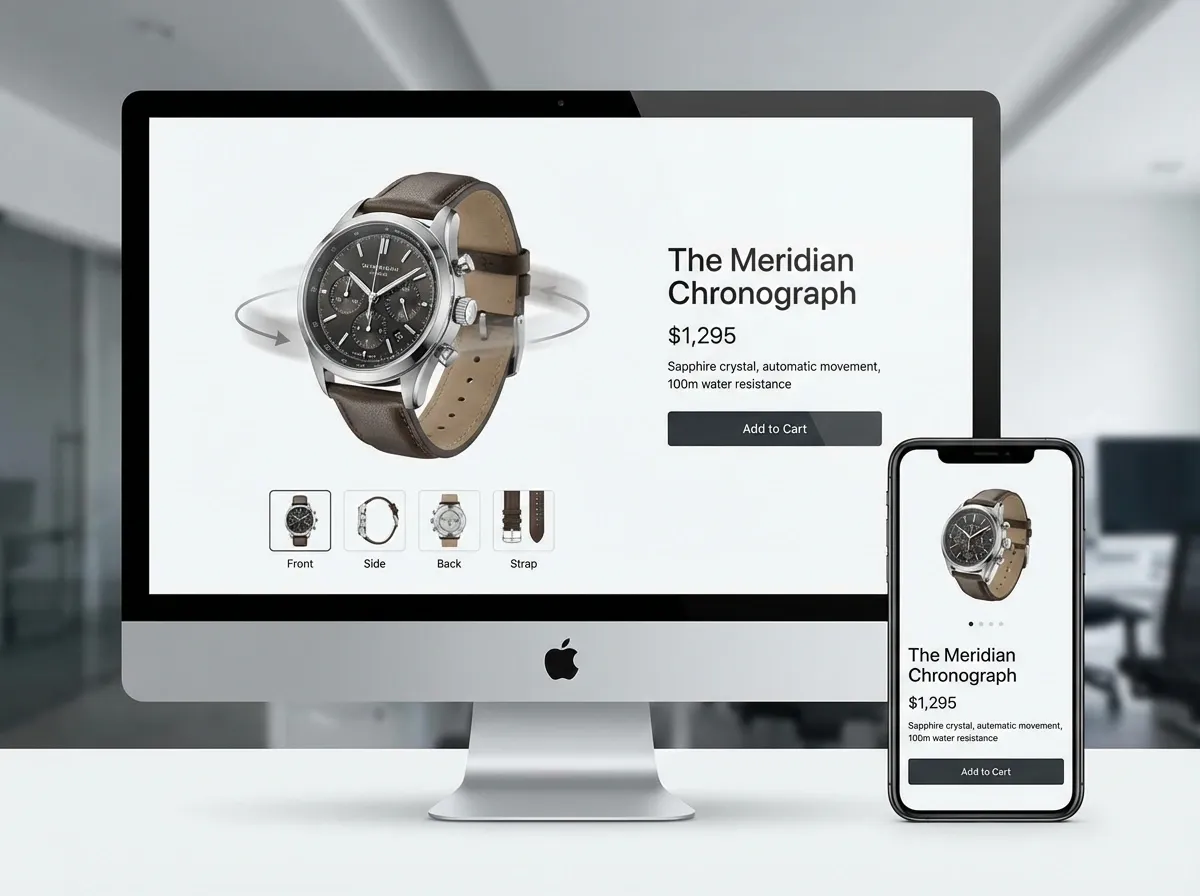
A 360 degree product viewer is basically a small app that preloads a set of images, then swaps them based on user input. The viewer handles drag direction, inertia, and sometimes zoom.
Typical delivery methods
In practice, you will see one of three approaches:
Image sequence: the classic approach, often a folder of numbered images (001, 002, 003…).
Sprite sheet: frames are packed into one or more large images, then the viewer shifts the viewport. This can reduce requests, but can be heavy per file.
Hybrid: a few resolution tiers, loading low-res first then swapping to higher-res on idle.
The reality is that the best choice depends on your platform and your performance constraints. Shopify storefronts, headless builds, and marketplaces all behave differently.
Touch behavior and mobile reality
Most shoppers will interact on mobile. Your viewer needs to support swipe without fighting page scroll, and it needs to start fast on 4G. That is why preloading strategy matters: load enough frames to feel responsive, but not so many that you delay the entire product page.
UX and design best practices that increase engagement
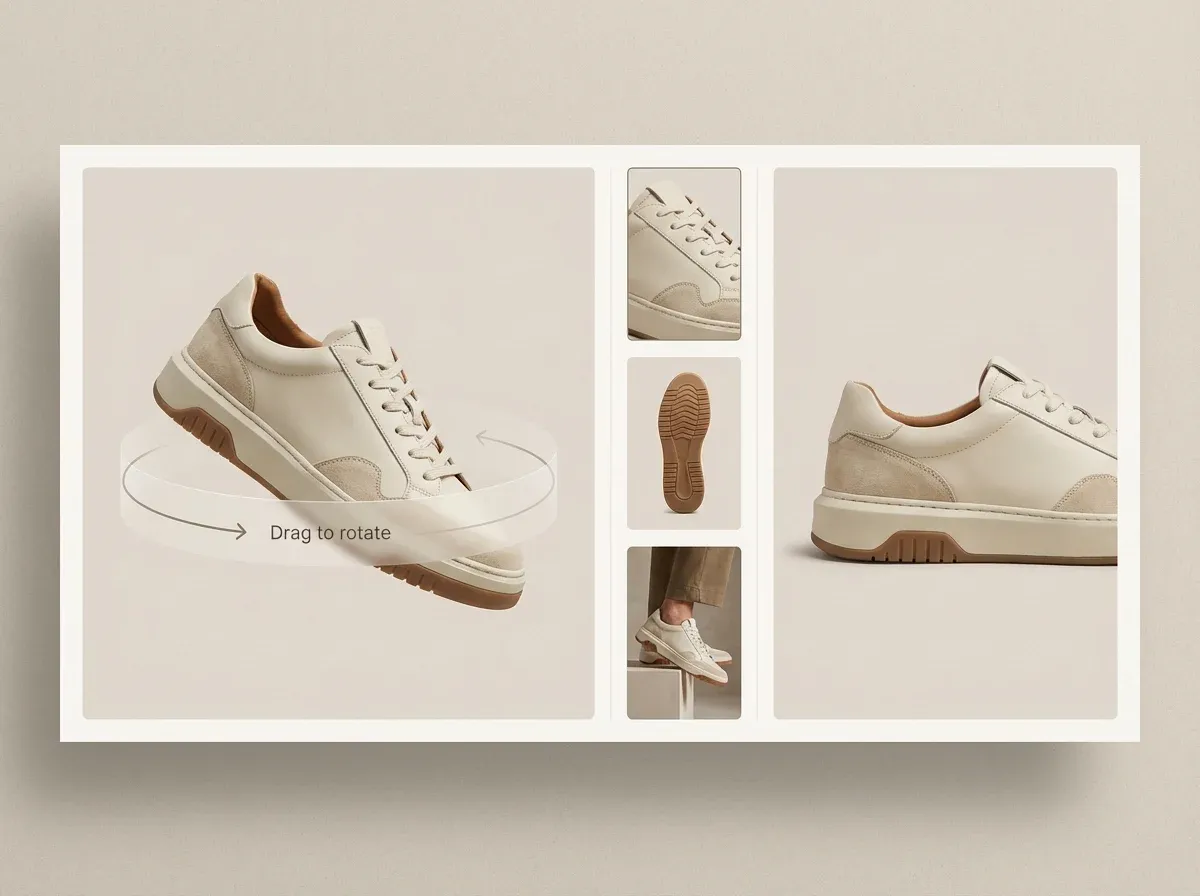
A 360 degree product view is only valuable if shoppers discover it and understand how to use it. Your job is to make interaction obvious without being annoying.
Make the affordance clear
Add a subtle “Drag to rotate” hint that disappears after the first interaction. If you hide your 360 behind a tiny icon, most shoppers will never see it.
Place the 360 alongside your standard gallery, not in a separate tab. If the user has to work to find it, adoption drops.
Start frame choice matters more than you think
Choose a starting angle that sells the product. A weak first frame (flat, unflattering, or confusing) reduces trust and reduces the likelihood that someone will drag at all.
If you are producing both stills and spins, align your hero still with the first 360 frame. That avoids the “jump cut” feeling when users switch formats.
Zoom, hotspots, and detail
Zoom can be helpful, but it can also highlight capture issues. Only enable zoom if your frames are sharp and your compression is controlled. Hotspots (clickable markers) can work for technical products, but keep them minimal. Too many markers turns the experience into a UI tutorial instead of shopping.
If you want a deeper guide on building the image set that supports these interactions, read 360 product photography.
Performance, SEO, and measurement for 360 views
360s can lift confidence, but they can also slow your product pages if you treat them like “just more images.” Speed is part of conversion rate.
Performance: what to optimize first
Start with the basics: compress frames, use modern formats where supported, lazy-load below-the-fold assets, and preload a small subset of frames so the first interaction feels instant.
Keep your frame dimensions appropriate for the largest expected display size. If your viewer is 900px wide, shipping 3000px frames to mobile is a quiet margin killer.
SEO: what Google actually sees
Search engines generally index the product page content, not the “spin experience.” Your 360 view helps SEO indirectly by improving engagement signals and reducing pogo-sticking. Still, make sure your standard images have proper alt text and that your core product photos communicate the product clearly without requiring interaction.
Measurement: how to prove ROI
Track 360 interactions as events: “360 started,” “frames rotated,” “zoom used,” and “time in viewer.” Then connect those to add-to-cart rate and return rate by SKU. Consider testing 360 on a subset of products first, then expanding once you see a consistent lift.
When 360 is worth it (and when it is not)
.webp)
Not every catalog needs a 360 degree view. It is a production and maintenance commitment.
360 tends to pay off for
Products where shape drives purchase confidence: footwear, bags, jewelry, electronics, collectibles.
Higher AOV items where hesitation is costly.
Products with strong tactile cues: materials, texture, fit details, closures.
SKUs with frequent “not as expected” returns.
360 is often overkill for
Commoditized products where price and shipping speed are the main decision factors.
Very low margin SKUs where added production cost is hard to recover.
Items that look identical from most angles (some flat-pack or simple items).
Now, when it comes to marketplaces, constraints change. If Amazon is important for you, review amazon 360 product view so you plan for platform rules, asset requirements, and what is actually supported in your category.
A practical implementation checklist for e-commerce teams
If you are rolling 360 out across a store, you want repeatable process more than “perfect” one-off results.
Step-by-step rollout
Pick test SKUs: choose 10 to 25 products where uncertainty is a known conversion blocker.
Standardize capture: lock camera settings, lighting placement, distance, and turntable increments.
Define output specs: frame count, pixel size, format, compression target, naming pattern.
Choose viewer approach: image sequence vs sprite sheet based on your stack and speed goals.
Instrument analytics: track interactions and tie them to conversion and returns.
A/B test presentation: placement in gallery, hint text, first frame, and whether zoom is enabled.
Operationalize: document the process so new products do not become a scramble.
If you are also upgrading your static imagery at the same time, keep the creative rules consistent across both. A practical reference is ProductAI’s blog post Tips for Professional AI-Generated Product Photos, which covers how small choices like lighting direction and context affect perceived quality.
And if you are debating whether your 360 should be on white, lifestyle, or a location set, this guide on Location Backgrounds for Product Photography can help you decide based on brand and clarity.
One quick note on AI: platforms like ProductAI focus on generating high-quality product imagery and variations quickly. That is useful for scaling your supporting stills and creative testing, while 360 capture still usually relies on a consistent physical setup to keep frames aligned.
Frequently Asked Questions
What is a 360 degree view on a product page?
A 360 degree view is an interactive “spin” that lets shoppers rotate a product by dragging or swiping. Under the hood, it is typically a sequence of still images taken at equal rotation steps around the product. The website’s 360 viewer switches between frames based on the shopper’s input to simulate motion. It is designed to reduce uncertainty about shape and details, especially for products where a single hero photo leaves too many questions.
Is a 360 degree product view the same as a 3D model?
No. A 360 degree product view usually displays real photos captured from multiple angles, while a 3D model is a digital asset rendered in real time. The shopper experience can look similar at first glance, but the production pipeline is different. 360 photo spins depend on consistent lighting, alignment, and frame processing. 3D models can enable deeper interactions like material changes or exploded views, but they usually require additional modeling skills and budget.
How many photos do you need for 360 degree product photos?
Most 360 degree product photos use 24, 36, or 72 frames. Fewer frames load faster but can look “steppy” when dragged. More frames feel smoother but increase file weight and processing time. A good rule is to start with 36 frames for products with visible detail, then adjust based on performance and shopper feedback. What matters most is consistency between frames. A perfectly aligned 24-frame set can outperform a jittery 72-frame set.
What equipment is needed for 360 degree product photography?
A typical setup includes a tripod, a camera (or a high-end phone in some cases), controlled lighting, and a motorized turntable for consistent rotation steps. You will also want a stable shooting surface and markers to keep placement consistent between products. For reflective items, add diffusion and flags to control highlights. The goal is repeatability. If each product requires reinventing the setup, 360 becomes expensive to scale across a catalog.
How does a 360 degree product viewer work technically?
A 360 degree product viewer loads a set of frames, then maps user gestures (drag, swipe) to frame index changes. Many viewers preload a subset of frames so the first interaction feels instant, then load the rest in the background. Some implementations use sprite sheets to reduce the number of requests, while others load individual images for flexibility and caching. The best choice depends on your platform, CDN behavior, and how aggressively you need to protect page speed.
Do 360 degree views improve conversion rates?
They can, but it depends on the product and execution. 360 degree views tend to help when shoppers hesitate because they cannot assess shape, build quality, or key details from standard angles. They also help when your customer service team gets repetitive “can I see the back?” questions. The downside is performance: if your 360 makes the page slow or the product look inconsistent, conversion can drop. That is why testing on selected SKUs first is smart.
Are 360 views bad for site speed?
They can be if you ship dozens of large frames with no compression, no lazy-loading, and no preload strategy. The fix is mostly operational: compress frames, keep dimensions appropriate, use modern formats where possible, and load the experience progressively. Treat your 360 asset bundle like a mini-app, not like extra gallery images. If you do that, you can keep interaction smooth without sacrificing your product page’s core loading metrics.
Can AI generate a 360 degree view of a product?
AI can help with parts of the workflow, but a true, accurate 360 of a specific physical product usually still relies on consistent capture. AI generation may introduce small shape changes or inconsistencies frame-to-frame, which looks terrible in a spin. Where AI is genuinely useful is speeding up your supporting imagery: generating background variations for hero shots, cleaning up assets, or improving resolution. Think of AI as a scale tool for creative production, not a replacement for alignment-critical 360 capture.
What is the difference between “360 product photography” and “product photography 360 view”?
They usually refer to the same concept: capturing a product from multiple angles around a full rotation so it can be displayed as a spin. People use different phrasing depending on whether they are thinking about the production side (360 product photography) or the on-site experience (product photography 360 view). When you are planning, separate the two: production requirements (lighting, frame count, processing) and implementation requirements (viewer, speed, analytics) are different workstreams.
How do you add a 360 view to Amazon listings?
Amazon support varies by category and program, and it is not as simple as uploading a random spin widget. You typically need to follow Amazon’s specific requirements for interactive media and the accepted asset formats. Start by reading amazon 360 product view so you understand what is available for your catalog and what restrictions apply. Plan for extra QA, because marketplace image rules are stricter than your own storefront.
Key Takeaways
A 360 degree view is usually a sequence of still images, not a real-time 3D render.
Consistency between frames (lighting, alignment, crop) matters more than high frame counts.
The viewer experience is about speed: preload smartly and avoid shipping oversized frames.
Measure 360 interactions and tie them to add-to-cart rate and return rate by SKU.
Use 360 where shape and detail drive confidence, not as a blanket catalog requirement.
Conclusion
A good 360 degree view does one job: it answers visual questions that your standard photos cannot, without slowing the page down or confusing the shopper. If you treat it as a system, capture process, file specs, viewer behavior, and measurement, it becomes a reliable conversion lever for the right products. If you treat it as a gimmick, it becomes another heavy asset that your team struggles to maintain.
Start small. Pick a handful of SKUs where shoppers regularly hesitate, produce clean frames, and implement a viewer that loads progressively. Then measure what happens to engagement, add-to-cart, and returns. Once you have a repeatable workflow, scaling 360 across more products is straightforward.
If you want to explore faster ways to produce supporting imagery, try ProductAI’s free tools and see how it fits your workflow.
Last updated: February 2026
About the Author
Giles Thomas, Ecommerce & AI Product Photography Expert – Founder, AcquireConvert.
Giles helps e-commerce teams improve conversion rates through better product-page experiences and visual merchandising. His work focuses on practical, performance-aware image workflows—so features like 360 degree views increase shopper confidence without sacrificing site speed.

Hi, I'm Giles Thomas.
Founder of AcquireConvert, the place where ecommerce entrepreneurs & marketers go to learn growth. I'm also the founder of Shopify agency Whole Design Studios.