360 Image That Spin: How to Make Them (2026 Guide)

.webp)
Last updated: February 2026
What You Will Learn
What a 360 image is and when it is worth it
Turntable, camera, lighting: the setup that actually works
A practical capture workflow (step by step)
360 product photography software and viewers
Editing, background consistency, and site speed
Where AI helps (and where it does not) for 360 spins
Quality checks and common issues
You finally launch a new product. Your paid social is dialed in, your landing page is fast, and the reviews are solid. Then you look at your product page and realize the images are doing the bare minimum. Customers cannot tell scale, finish, or what the product looks like from the side, and your return rate starts creeping up.
A 360 image that spins is one of the cleanest ways to fix that, especially for products where shape and details matter: footwear, bags, electronics, beauty tools, and anything reflective.
Here is the thing. 360 product photography is not just “more images.” It is a system: consistent lighting, repeatable rotation, the right number of frames, compression that does not destroy detail, and a viewer that behaves nicely on mobile. Get it right and you reduce pre purchase uncertainty. Get it wrong and you ship a slow, glitchy experience that hurts conversions.
What a 360 image is (and what it is not)
.webp)
A 360 image on a product page is usually a “spin set”: a sequence of still photos taken at incremental angles, then played back as the shopper drags or swipes. You are not creating a 3D model. You are creating a controlled illusion of rotation.
That distinction matters for cost, speed, and expectations. A spin set is faster to produce and can look extremely realistic because it is real photography. A true 3D model is more flexible for zoom, lighting changes, and AR, but it is a different pipeline.
When 360 images for ecommerce are worth the effort
From a practical standpoint, 360 pays off when the product has meaningful side details, a premium finish, or fit concerns. Think of it this way: if a customer would pick it up and turn it in their hands in a store, your product page needs to do the same job.
If you sell simple, flat items (books, posters, basic apparel on a model), your money might be better spent on stronger lifestyle photography and tighter product photos basics first.
360 view vs 360 spin vs 360 rotation
You will see different terms used interchangeably, but they often describe the same shopper experience. A 360 view usually describes the interactive viewer on site. A 360 spin is the frame sequence itself. 360 rotation often refers to the capture method: rotate the product at fixed increments and keep everything else locked.
Turntable, camera, lighting: the setup that makes 360 easy
The biggest mistake teams make is thinking 360 requires exotic gear. The reality is consistency matters more than fancy kit. If your product stays centered, your lighting does not drift, and your exposure does not change, you can produce a clean spin set with modest equipment.
Choosing a 360 product photography turntable
A 360 product photography turntable can be manual or motorized. Manual works for small volumes and larger items, but it is slower and introduces human inconsistency. Motorized turntables are better if you want repeatable results, batch workflows, and less post production alignment.
Stability: no wobble, no micro shifts at each click
Markings or step control: so you can reliably shoot 24, 36, or 72 frames
Weight rating: especially for heavier products like appliances or furniture parts
Surface finish: matte helps avoid reflections that “crawl” during rotation
Camera and lens: what you actually need
You can shoot a 360 image set on a modern phone, but you will fight focus breathing, auto exposure shifts, and compression artifacts. A mirrorless or DSLR makes life easier because you can lock exposure, focus, and white balance.
A standard focal length (roughly 50mm full frame equivalent) is a safe default for product spins. It avoids wide angle distortion that makes products look “fatter” at some angles.
Lighting and background: design for repeatability
Consistent lighting is the whole game. Use continuous lights or strobes with fixed power. Keep the light positions locked. If you can, shoot inside a light tent for small products to reduce harsh reflections and shadows that jump between frames.
Background choice affects both brand perception and editing time. White is common for marketplaces. Branded colors work for DTC, but they demand cleaner masking and more careful shadow control.
How to create a 360 spin image: a step-by-step workflow
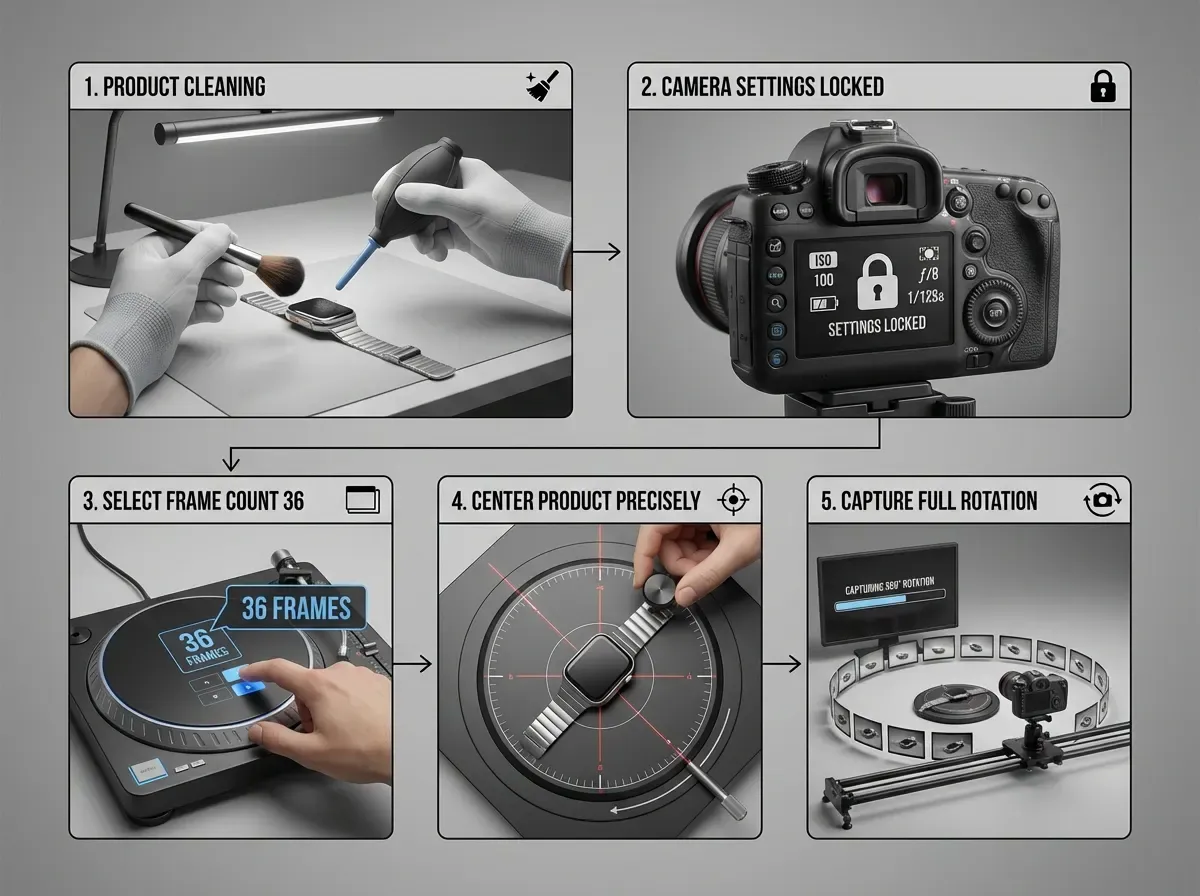
Consider this workflow your baseline. Once you have it dialed in, you can scale to multiple SKUs and hand parts of it to a junior team member without quality falling apart.
Step 1: Prep the product like it is going on a billboard
Clean it. Remove stickers. Check seams and dust. If you are shooting glossy items, wear gloves and keep microfiber cloths nearby. Small imperfections become “animated” in a 360 spin because the viewer keeps looking.
Step 2: Lock your camera settings
Manual exposure (no flicker between frames)
Manual focus (focus once, then do not touch)
Fixed white balance (avoid color temperature shifts)
Tripod, fixed height, fixed framing
Step 3: Decide your frame count (this drives quality and page weight)
Most e-commerce 360 spins use 24 or 36 frames. 24 is lighter and usually smooth enough on mobile. 36 feels more premium and reduces “jump” on detailed products. 72 frames looks great but can get heavy fast unless you compress well.
Step 4: Keep the product centered and level
Centering issues are what make spins feel cheap. Use a small dot marker on the turntable (outside the crop) to help you keep alignment. If the product is tall, consider a support behind it that can be edited out later.
Step 5: Shoot the full rotation without changing anything
Now, when it comes to speed, batch shooting wins. Shoot one SKU completely before changing lighting or camera position. Then move to the next SKU with the same setup. You will thank yourself during editing.
360 image software: stitching, viewers, and what to look for
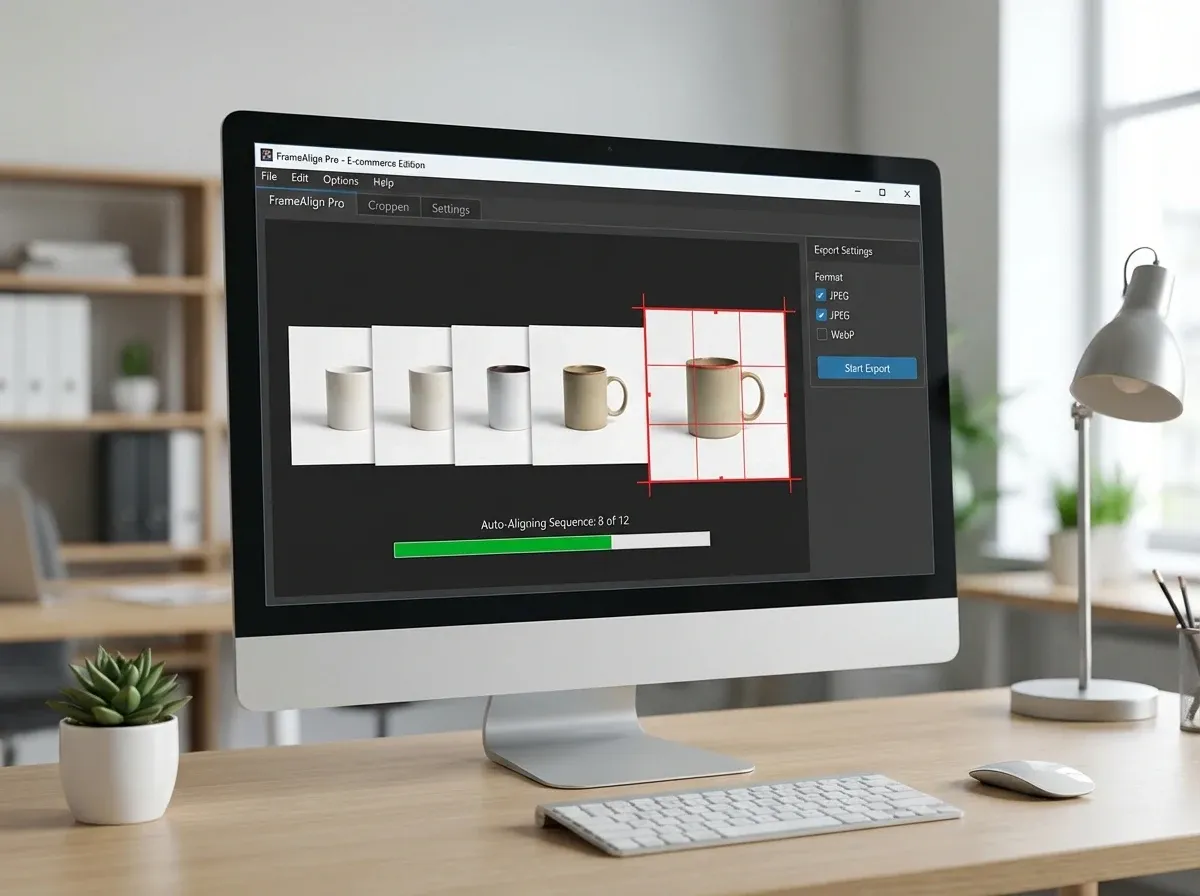
A spin set needs two layers of software: production software (to crop, align, and export the frames) and a viewer (to display it on site).
What good 360 product photography software should do
Batch rename and sequence frames correctly
Auto align to reduce “wobble”
Crop consistently across all frames
Export web friendly formats (usually JPEG or WebP)
Support multiple resolutions for responsive delivery
Viewer essentials for e-commerce
What many businesses overlook is that the viewer is part of conversion rate optimization. It must load quickly, respond smoothly to touch, and not block add to cart. Autoplay can look slick, but it can also annoy shoppers and burn bandwidth. I usually recommend drag to spin as the default, with optional autoplay on hover for desktop.
Editing and optimization: where most 360 spins win or lose
You can capture a perfect set and still publish a poor experience if the frames are inconsistent or too heavy. This is where your workflow turns into a repeatable asset, not a one off.
Background consistency and masking
If you are removing backgrounds manually across 36 frames, costs add up quickly. One approach is to keep a clean physical background and minimize post. Another approach is to batch background edits with AI, then QA the edges.
Tools like ProductAI are one example of how teams speed up variations and consistency. If you want quick lifestyle scenes for hero frames while keeping your spin set clean, a tool like the AI Background Generator can help you prototype looks without booking a new set.
Compress without killing detail
Your goal is “fast enough that nobody notices.” For most products, that means aggressive compression plus a reasonable frame count. Test on a mid range Android phone over 4G, not just your office WiFi.
Resolution and zoom strategy
In practice, you usually want two sizes: a smaller set for initial load and a larger set when the shopper zooms. If your source frames are slightly soft, upscaling can help for zoom use cases. The Increase Image Resolution tool is one way to generate higher res variants, but always compare against the original to make sure texture still looks real.
AI and 360 images: what is real today vs what is hype
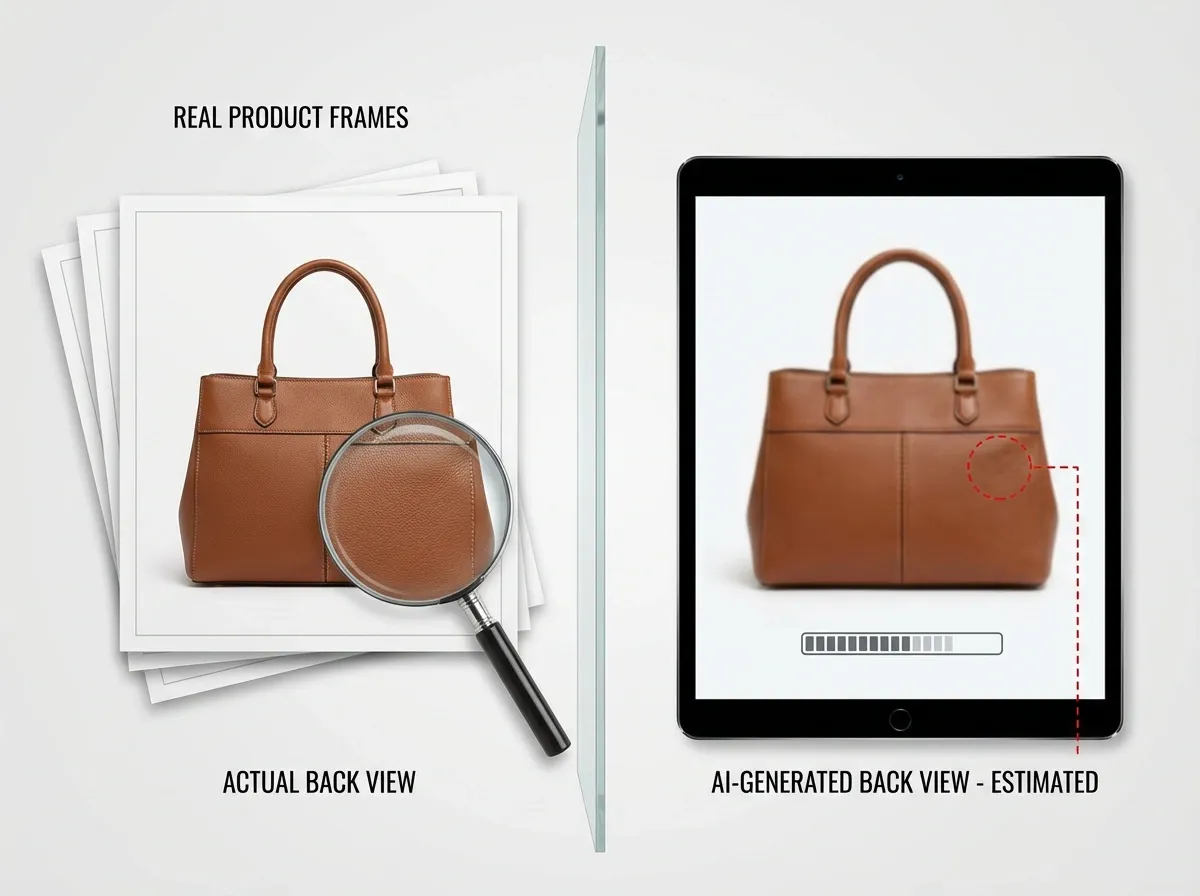
You will see searches for “ai 360 image generator” and “image to 360 ai” spike because everyone wants a one click solution. The reality is more nuanced.
Where AI helps immediately
AI is excellent at the unglamorous parts of 360: background cleanup, consistency tweaks, and generating supporting visuals around the spin set. That is valuable because it reduces your per SKU effort and lets you test more creative for ads and PDP modules.
Where AI struggles (for now)
A true “ai 360 image” created from one photo often guesses what the back and sides should look like. That is risky for e-commerce because it can create inaccurate details, which can increase returns and damage trust. For regulated categories, it can also create compliance problems.
A realistic hybrid approach
Shoot real rotation frames for truth and texture. Use AI to speed up the rest: backgrounds, hero variations, seasonal themes, and quick experiments. If you are budgeting, compare that hybrid workflow against what you would pay for reshoots. This is where guides like Product Photography Pricing: How Much Should It Cost help you sanity check your numbers.
QA and troubleshooting: get the “premium” feel
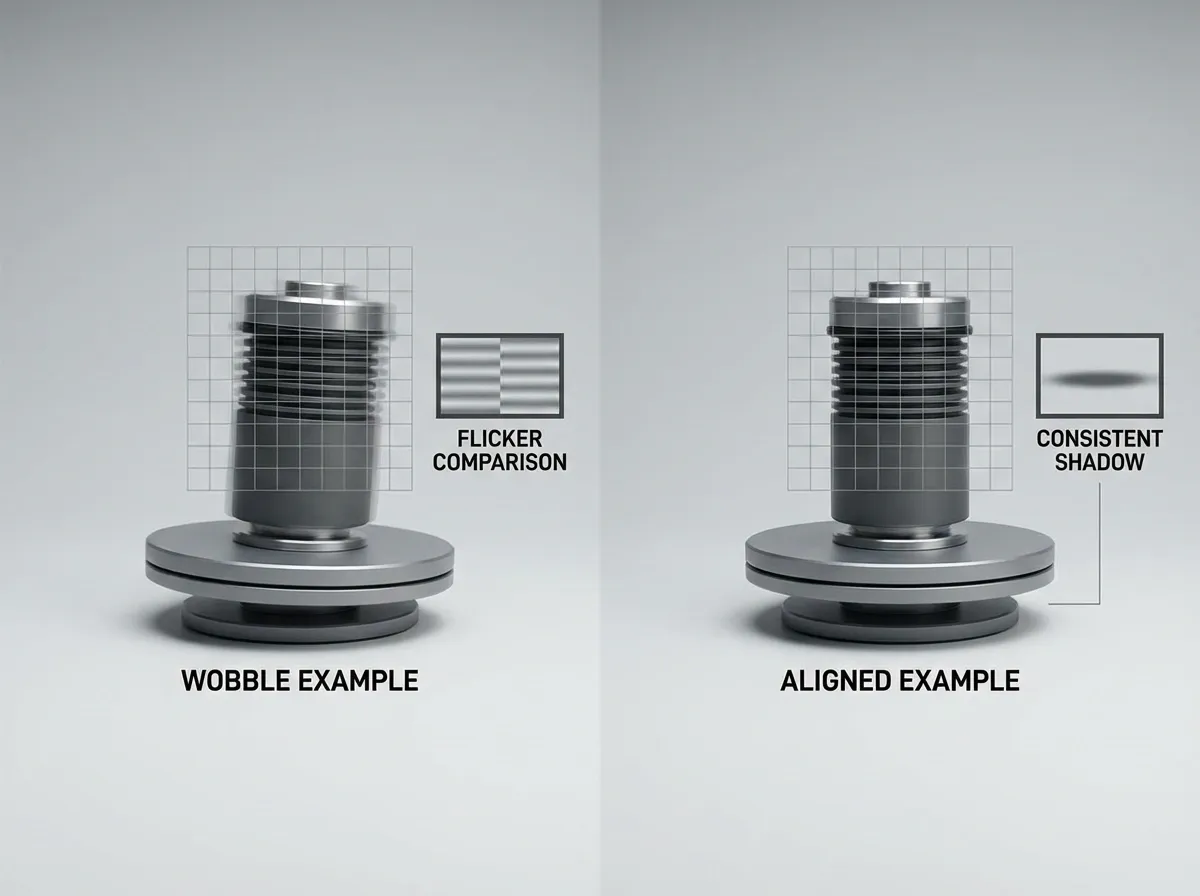
The premium feel comes from small details: no jitter, consistent color, smooth shadows, and fast load time. Build a quick QA checklist and run it before every launch.
Common issues and fixes
Wobble: product is not centered or frames are not aligned. Fix in capture first, then use alignment in software.
Flicker: auto exposure or changing ambient light. Lock exposure and reduce ambient light.
Color shift: auto white balance. Set a fixed Kelvin value or use a gray card.
Shadow jump: light moves or product height changes. Lock lights and stabilize the product.
Slow load: too many frames or heavy files. Reduce frame count, use WebP, and lazy load.
How to test impact on conversion
Do not assume 360 increases conversion for every SKU. A/B test it on a handful of products where it should matter, then measure: add to cart, conversion rate, and returns. If you are also using AI generated supporting images, keep the photography style consistent. The article Tips for Professional AI-Generated Product Photos has good reminders on keeping outputs believable.
Frequently Asked Questions
How many photos do I need to create a 360 image that spins?
Most e-commerce teams start with 24 or 36 photos for a full rotation. 24 frames is a strong default because it loads quickly and still feels smooth on mobile. 36 frames looks more premium, especially for products with small details like buttons, ports, or texture. 72 frames can be beautiful, but file weight becomes the enemy unless you compress aggressively and load frames progressively. Pick the smallest frame count that looks smooth for your product category.
Do I need a motorized 360 product photography turntable?
No, but it helps. A manual turntable works if you are careful and your volume is low. The downside is inconsistency: tiny shifts in rotation steps and centering create wobble that is hard to fix later. Motorized 360 product photography turntables shine when you want repeatability across many SKUs, faster capture, and fewer editing hours. If you are planning weekly launches or large catalogs, motorized usually pays for itself in time saved.
What is the difference between 360 product photography software and a 360 viewer?
Production software is for preparing your frames: naming, sequencing, cropping, aligning, and exporting web friendly images. The viewer is what customers interact with on your site, typically a JavaScript component that loads frames and lets shoppers drag to rotate. You need both. Even a perfect viewer cannot fix inconsistent frames, and even perfect frames can feel bad in a viewer that loads slowly or is clunky on mobile. Evaluate them together as one experience.
Can I create a 360 spin image for free?
You can get started cheaply, yes. Use a phone camera, a tripod, a basic manual turntable (or a DIY rotating platform), and free or low cost editing tools to crop and export frames. The hidden cost is time: centering, background cleanup, and fixing flicker can add hours. If you are validating demand, “good enough” is fine. If you are scaling, invest in consistency first: locked lighting, locked camera settings, and a repeatable workflow.
What file format is best for 360 images for ecommerce?
Most 360 spins are delivered as JPEG or WebP frames. WebP is often smaller at the same perceived quality, which helps load speed, but you need to confirm your platform and viewer support. PNG is usually too heavy unless you need transparency and the frames are small. Aim for consistent compression across frames so the rotation looks stable. Also consider responsive delivery: serve smaller frames to mobile and only load high resolution frames on zoom.
Will a 360 image slow down my product pages?
It can if you load all frames upfront. A 36 frame set at high resolution adds up quickly. The fix is technical and straightforward: lazy load frames, serve an initial low resolution set, compress aggressively, and avoid autoplay on mobile. From a business standpoint, speed matters as much as visual polish because slow pages hurt ad efficiency and conversion rate. Treat performance as a requirement, not a nice to have, and test on real devices.
Is an AI 360 image generator accurate enough for real products?
Sometimes for concepts, often not for exact products. If the AI is inferring unseen angles from a single photo, it is guessing. That can introduce incorrect logos, seams, ports, or geometry. For e-commerce, accuracy is trust. A good compromise is to capture real rotation frames for the spin and use AI for supporting imagery, like backgrounds or campaign variations. That approach keeps the product truthful while still saving time on creative production.
How do I stop my 360 rotation from looking jittery?
Jitter usually comes from three sources: inconsistent rotation increments, off center placement, or slight camera movement. Start by fixing capture: stable tripod, fixed focal length, and a turntable that does not wobble. Use markers to center the product, and do not touch the setup mid shoot. Then use software alignment to correct small shifts across frames. If you still see jitter, reduce shadows that move dramatically, since shadow movement can read like wobble.
Should I use white background or lifestyle background for my 360 spin?
For the spin itself, white or neutral backgrounds usually perform best because they keep attention on the product and make frame to frame consistency easier. Lifestyle backgrounds can be great for hero images and ads, but they add complexity to 360 because parallax and shadows need to remain believable across angles. Many brands run a clean spin for clarity, then surround it with lifestyle images for emotion. That mix tends to convert well without creating a heavy editing workload.
Key Takeaways
A 360 image is a sequence of real photos, not a 3D model. Consistency beats fancy gear.
Start with 24 to 36 frames, then optimize for speed before chasing higher frame counts.
Lock exposure, focus, and white balance to avoid flicker and color shifts across frames.
Use a viewer that is mobile friendly and performance focused, with lazy loading and no forced autoplay.
AI helps most with cleanup and supporting variations, but be cautious about AI guessed angles for accuracy.
Conclusion
A great 360 spin is one of those assets that keeps paying you back. It answers questions your FAQ never will, reduces uncertainty, and makes your product feel more “real” on a screen. The teams that win with 360 product photography treat it like a repeatable system: stable turntable, locked lighting, consistent frame count, and a viewer that loads fast on mobile.
If you are choosing what to improve next, prioritize truth and performance. Capture real frames first, then use software to align and compress, and only then layer in creative. One practical way to speed up the creative side is using AI for supporting backgrounds and quick iterations. ProductAI is one example of a platform teams use to generate extra product photo variations without organizing another shoot, while keeping the core spin set grounded in real photography.
If you want to explore what AI assisted product visuals look like, try a couple of free tools and compare results against your current workflow.
Last updated: February 2026
About the Author
Giles Thomas, Ecommerce & AI Product Photography Expert – Founder, AcquireConvert.
Giles helps e-commerce teams improve conversion rates with performance-focused visual merchandising, including 360 product photography workflows that balance quality, consistency, and page speed. He focuses on practical systems for capture, editing, and testing so interactive product spins support revenue and reduce returns.

Hi, I'm Giles Thomas.
Founder of AcquireConvert, the place where ecommerce entrepreneurs & marketers go to learn growth. I'm also the founder of Shopify agency Whole Design Studios.