Best 360 Image Viewers for Ecommerce Sites (2026 Guide)

.webp)
Last updated: February 2026
What You Will Learn
What a 360 image viewer actually does (and why it matters)
Viewer types and when to use each
The ecommerce checklist: what to evaluate before you pick a viewer
Performance and SEO realities for 360 spins
A practical setup workflow for launches and catalog scale
Where AI fits in 360 workflows (without the hype)
You finally invested in a 360 product spin, uploaded it to your site, and then the complaints start. “It’s slow on mobile.” “It doesn’t swipe properly.” “The zoom is blurry.” Worst of all, your analytics show people dropping off right where you hoped they would engage most.
That is the make or break moment for a 360 image viewer. The viewer is not just a nice interactive widget. It is the experience layer that decides whether shoppers actually use your 360 product image or abandon it.
This guide walks you through what to look for in 360 image software, the most common deployment options, and how to choose a viewer that fits your product pages, your team, and your site speed goals. Think of it as a buyer’s checklist plus implementation advice, written for ecommerce teams who care about conversions, not novelty.
What a 360 image viewer actually does (and why it matters)
.webp)
A 360 image viewer is the front end that lets shoppers drag, swipe, or click through a sequence of images to simulate rotating the product. In practice, you are usually serving 24 to 72 frames that are stitched into a “spin.” The viewer decides how those frames load, how interactions feel, and whether the experience is accessible on touch devices.
Here’s the thing: most conversion value comes from reducing uncertainty. If your shopper cannot see the side profile, the thickness, the texture, or key functional details, they hesitate. A solid 360 viewer makes that exploration effortless.
When a 360 product image helps conversion
360 spins tend to pay off when shoppers worry about shape, fit, or build quality. Think footwear, bags, furniture, consumer electronics, cookware, and premium packaging. For simple commodity items, the extra weight can be pure overhead.
If you are building out a broader product photography system, start with your core product photos standards first. A 360 experience is an enhancement, not a substitute for clear hero images.
Viewer types and when to use each
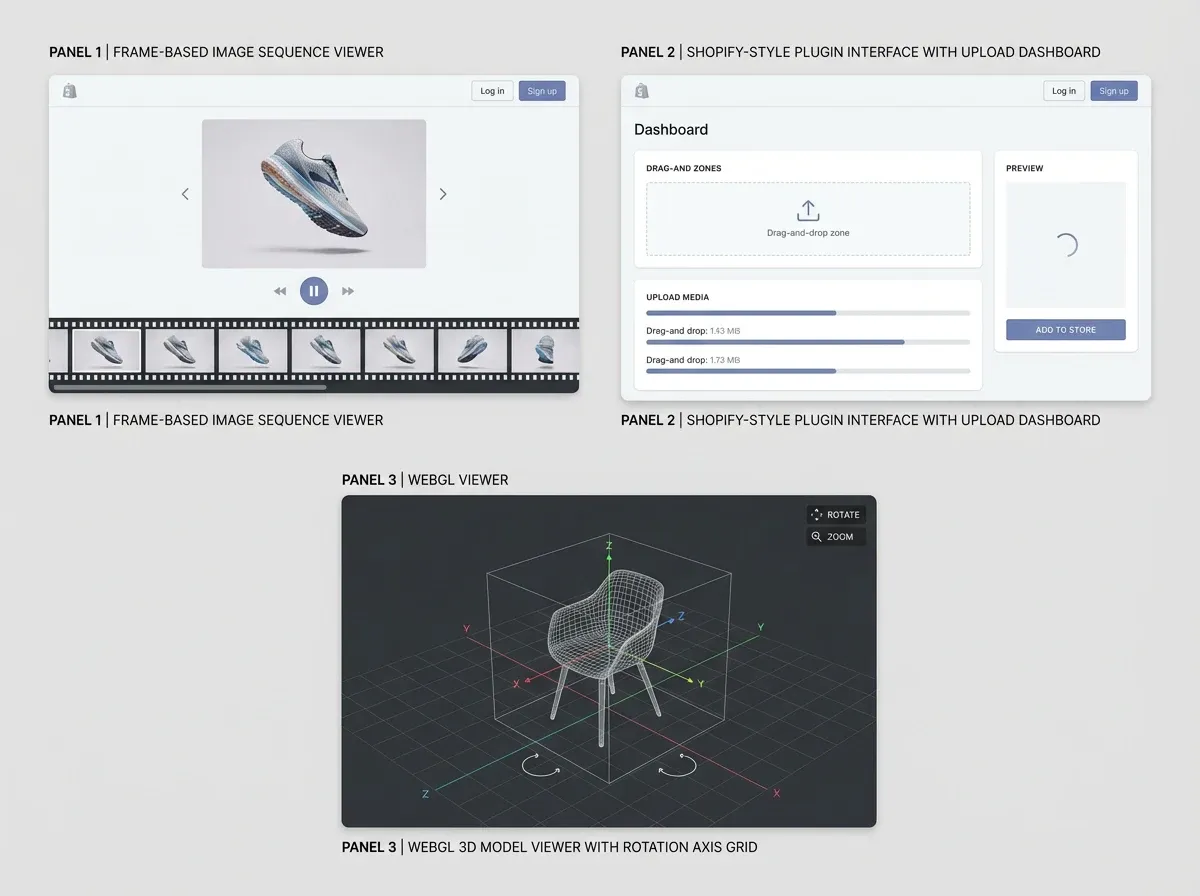
There is no single “best” 360 degree product viewer for every store. What works for a high-traffic Shopify site with a lean team may be wrong for a custom headless build or an enterprise PIM workflow.
1) JavaScript sequence viewers (image frame based)
This is the most common approach: the viewer loads a sequence of JPEG or WebP frames and swaps them as the user drags. It is straightforward, compatible, and usually easiest to embed into ecommerce themes.
It also gives you a lot of control over performance, because you can lazy load frames, prefetch a subset, and tune compression. Most “classic” 360 spin implementations fall into this bucket.
2) Platform apps and plugins (Shopify, WooCommerce, etc.)
Apps can be the fastest path to “working 360.” They often include hosting, a backend uploader, and a UI for mapping spins to SKUs. The tradeoff is vendor lock-in, ongoing fees, and sometimes limited control over performance tuning.
If you are already in the Shopify ecosystem, it is worth looking at your broader tooling stack too. This is where a roundup like Best Shopify AI Apps in 2026 can help you see how other merchants structure their workflows across imagery, merchandising, and speed.
3) WebGL and 3D model viewers (glTF, USDZ, etc.)
Some “360 viewers” are actually 3D viewers. Instead of swapping frames, they render a 3D model you can rotate. That can be incredible for detail and lighting, but it is a different production pipeline, different file types, and higher performance risk.
If your goal is specifically a 360 spin image, do not accidentally commit to a 3D pipeline unless you have the time, budget, and skills to support it.
The ecommerce checklist: what to evaluate before you pick a viewer
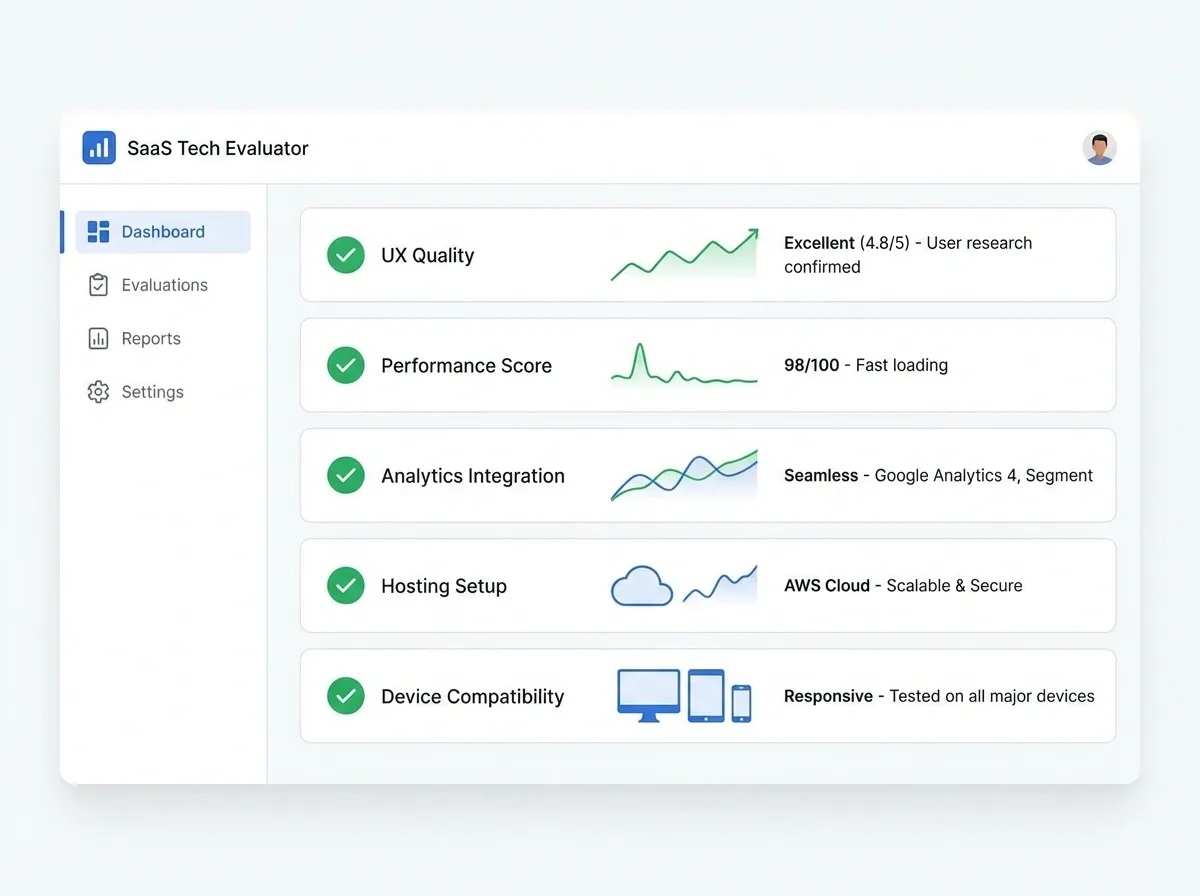
When you compare 360 image viewer options, you are really comparing risk. Risk to page speed, risk to consistency across devices, risk to maintenance, and risk to your team’s time.
Interaction and UX requirements
Start with the customer experience. Does the viewer support touch swipes properly? Does it allow click-and-drag on desktop? Is there inertia or smoothing, and does it feel “premium” or “janky”?
Consider this: if you sell higher-ticket items, the interaction itself signals quality. A glitchy spin can make your product feel cheaper than it is.
Image format support and pipeline fit
Most viewers accept JPG/PNG sequences, but modern ones support WebP or AVIF for better compression. Ask how the viewer handles varying frame sizes, color profiles, and transparent backgrounds.
If your frames need a clean marketplace look, you may prefer to generate consistent white backgrounds first, then build the spin. One example is using a tool like ProductAI’s Free White Background Generator to standardize frames before you assemble the rotation: Free White Background Generator.
Hosting and CDN behavior
Where do the frames live? If they load from a third-party domain, make sure caching headers, compression, and HTTP/2 are solid. If you self-host, confirm your CDN can handle the request volume and that your build process can publish frames reliably.
What many businesses overlook is how 360 spins increase “asset count” per SKU. You are not adding one image, you are adding dozens. That changes your bandwidth story fast.
Analytics and measurement
If you cannot measure usage, you cannot justify the work. Look for basic events like “spin started,” “frames viewed,” “zoom used,” and time interacting. If the viewer does not offer events, make sure you can add your own hooks for GA4 or your data layer.
A practical benchmark: if less than a small single digit percentage of shoppers interact with the spin, you might be better off investing in sharper hero images, more lifestyle shots, or better zoom.
Performance and SEO realities for 360 spins
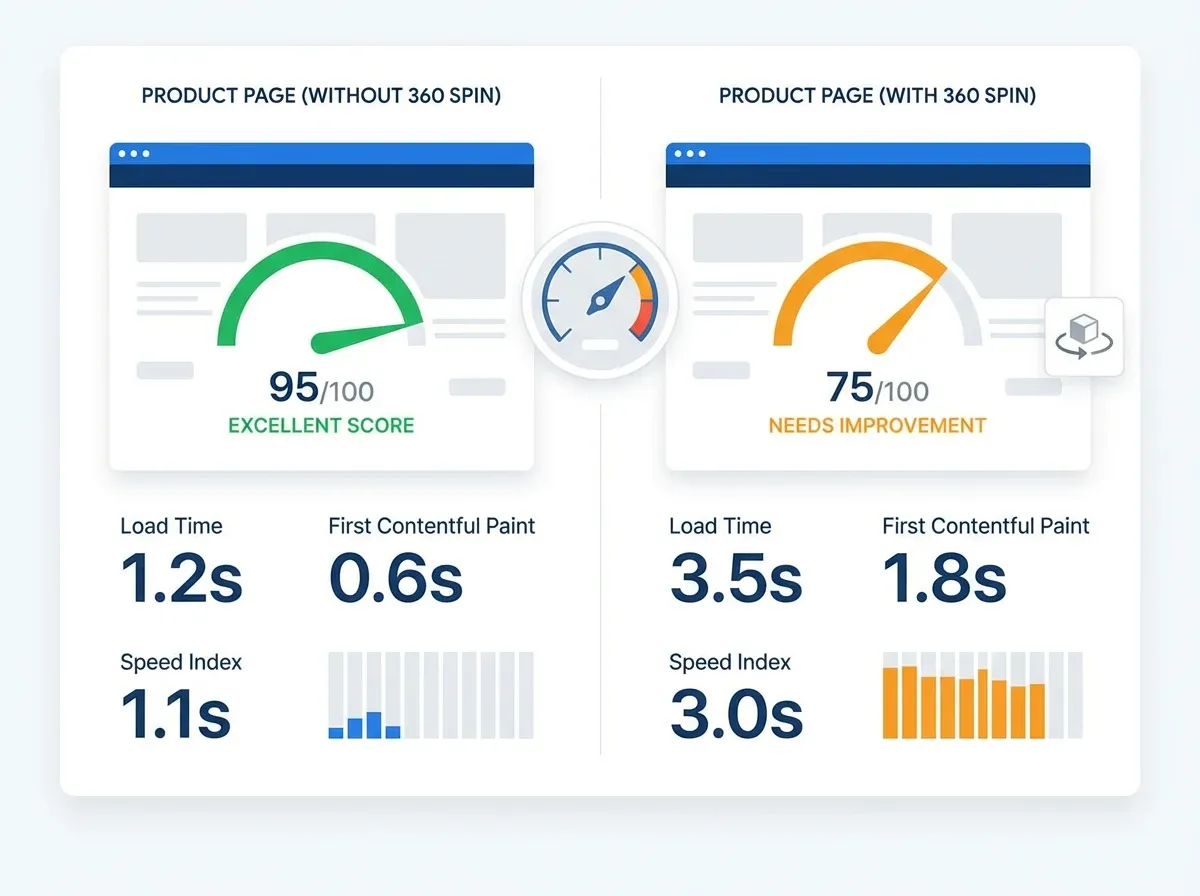
Speed is the biggest reason 360 product image projects stall. You are trading “wow” for bytes, and ecommerce already has a speed problem.
How to keep a 360 viewer fast
Lazy load the spin until it is in view, and load a small preview set first.
Use responsive frames, not one massive frame size for every device.
Compress aggressively, ideally with WebP when supported by your viewer.
Preload the first frame only, then stream the rest after first interaction.
Limit frame count to what your product needs (often 24 to 36 is enough).
Now, when it comes to perceived quality, resolution matters. If your frames look soft on retina displays, you will see it in returns and support tickets. A simple fix is upscaling the source frames before compression. ProductAI’s Increase Image Resolution is one option for that step: Increase Image Resolution.
SEO and accessibility considerations
A 360 spin is primarily a UX element, not an SEO hack. Search engines typically index the page content and your primary images, not every spin frame. Make sure you still have strong alt text on key images, clear product copy, and a fast core experience.
Also check accessibility. Keyboard controls, focus states, and a clear fallback image matter. If the viewer is not accessible, you are excluding shoppers and creating compliance risk.
A practical setup workflow for launches and catalog scale
Teams usually fail with 360 because they treat it like a “creative project” instead of an operational pipeline. The reality is you need repeatability.
Step-by-step: from capture to a working 360 viewer
Decide where 360 fits on the page and which SKUs earn it (start with top sellers).
Capture frames consistently (turntable or rig). Lock camera position, lens, and lighting.
Batch edit frames for consistency: exposure, color, crop, and background.
Export in the formats and dimensions your viewer performs best with.
Upload frames to your host or plugin, then map to SKU or variant.
Test on iOS Safari, Android Chrome, and desktop. Watch memory usage and load time.
Instrument analytics events so you can track interaction rate and impact.
If you are still deciding between different viewer implementations, it helps to read focused breakdowns on the surrounding components. For example, this guide on 360 photo viewer considerations can help you separate “viewer UI” from “spin production” decisions.
And if your team is comparing embedded experiences vs dedicated modules, reviewing options for a 360 product viewer can clarify what to standardize across your catalog.
Where AI fits in 360 workflows (without the hype)
.webp)
AI can help with 360, but it does not magically eliminate the need for good inputs. If your lighting changes frame-to-frame or your product is glossy and reflecting the room, AI will struggle to make that consistent.
Good AI use cases around 360
From a practical standpoint, AI is best used for cleanup and consistency. That includes background normalization, shadow cleanup, removing dust or small blemishes, and ensuring your frames feel like one coherent set.
Tools like ProductAI can be useful here because you can process product frames quickly without scheduling a reshoot. You still need to review the sequence, but it helps when you are scaling content for seasonal launches or running lots of SKU updates.
Where “AI 360 image generator” claims fall apart
You will see tools marketed as an “ai 360 image generator free” or “image to 360 ai.” Some can generate rotation-like sequences, but the failure mode is consistency. Small geometry errors between frames create a wobble effect that looks fake, and shoppers notice.
Think of it this way: a 360 spin is a trust asset. If it looks synthetic or unstable, it can reduce confidence instead of increasing it. Use AI to polish real captures first, then experiment with generated spins once your baseline is strong.
If you want to go deeper into how 360 assets are structured and deployed, this explainer on 360 image setups is a good next read.
Frequently Asked Questions
What is a 360 image viewer for ecommerce?
A 360 image viewer is a widget that displays a sequence of product photos as an interactive rotation. Shoppers can drag or swipe to “spin” the product and inspect it from multiple angles. For ecommerce, the goal is reducing uncertainty, especially for products where shape, thickness, and materials matter. The viewer is just as important as the images because it controls loading, responsiveness on mobile, zoom behavior, and whether the experience feels smooth or frustrating.
How many frames do I need for a good 360 product image?
Most ecommerce spins work well with 24 to 36 frames. That usually gives smooth rotation without creating a heavy download. Higher frame counts can look nicer, but they increase asset count, hosting costs, and page weight. The right number depends on the product’s geometry and how close shoppers need to inspect details. For simple shapes, 24 frames is often enough. For complex items with important side details, 48 can be justified if you optimize loading properly.
What file format is best for 360 spin images?
JPG is still common because it is universally supported and compresses well for photographs. WebP is often a better choice if your viewer supports it, because you can achieve similar quality at smaller file sizes. PNG is usually only worth it if you need transparency, but it tends to be heavier. AVIF can be excellent but is not always supported in older viewers. The best approach is to test: export a small set, measure load time, and compare visual quality on mobile.
Will a 360 viewer hurt my site speed and Core Web Vitals?
It can, yes. You are adding dozens of images to a single product page, which can increase LCP and total transfer size if you are not careful. The fix is usually implementation, not abandoning 360. Lazy load the spin, preload only the first frame, and fetch the rest after interaction. Also compress frames and serve responsive sizes. If your 360 viewer loads everything upfront, it is a red flag. A good viewer should let you control loading behavior.
How do I measure whether my 360 image viewer is worth it?
Track interaction rate and downstream impact. At minimum, measure how many users start the spin, how long they interact, and whether they convert at a higher rate than non-interactors. Also look at returns and support tickets for “not as expected” complaints on SKUs with 360. Run an A/B test on a subset of products if you can. If interaction is low, it may be a placement issue, a performance issue, or simply that shoppers do not need 360 for that category.
Is a 360 product viewer the same as a 3D viewer?
No. A 360 product viewer usually plays a sequence of photos, which is a 2D frame-based approach. A 3D viewer renders a 3D model in the browser, often using WebGL and formats like glTF. 3D can allow more freedom like dynamic lighting or arbitrary camera angles, but it demands a different production pipeline and often higher compute on the device. If your aim is a reliable “spin” that loads fast, a frame-based 360 viewer is typically simpler to ship.
Can AI generate a 360 spin image from one photo?
Sometimes, but results vary. When AI tries to infer unseen angles from a single image, it can introduce geometry errors or inconsistent textures across frames. That inconsistency is what creates the “wobble” effect that looks fake. AI is more reliable when used to clean and standardize real frame captures, like removing backgrounds, fixing color shifts, or upscaling. If you do experiment with AI-generated spins, test them with real shoppers and compare trust signals like conversion rate and return rate.
Do I need a special “AI image metadata viewer” to manage 360 assets?
Not necessarily. Metadata can help you manage naming conventions, frame order, and SKU mapping, but most teams solve this with a disciplined file structure plus a DAM or PIM. Where metadata becomes useful is scale: thousands of products, multiple regions, and repeated seasonal updates. If you have a lot of 360 sets, make sure your pipeline preserves frame order, stores capture settings, and tracks which version is live. That reduces errors when you re-export or migrate viewers later.
What is the biggest mistake ecommerce teams make with 360 viewers?
Shipping a heavy experience before proving it improves buying confidence. Teams often build a gorgeous 360 spin, then load all frames immediately and wonder why performance tanks. The better approach is to pilot on a small set of SKUs, tune compression and lazy loading, and instrument analytics. Treat it like a conversion feature, not a design flourish. If you cannot measure impact, it will be hard to justify ongoing production and maintenance across your catalog.
How should I prepare images before building a 360 sequence?
Consistency is everything. Lock exposure, color temperature, and cropping so the product does not “jump” between frames. Remove dust and small blemishes that become distracting during rotation. Standardize the background so the product remains the focus, especially if you want marketplace-ready visuals. If you need background cleanup, a workflow like the one described in How to Remove Background from Image: Complete Guide can help you keep frames consistent before you assemble the spin.
Key Takeaways
A 360 image viewer is a UX and performance decision, not just a creative add-on.
Frame-based viewers are usually the simplest path for ecommerce 360 spins.
Prioritize lazy loading, compression, and responsive frames to protect Core Web Vitals.
Measure interaction rate and conversion impact before scaling 360 across your catalog.
AI helps most with cleanup and consistency, not with inventing perfect rotations from thin air.
Conclusion
The best 360 image viewer for your store is the one that shoppers actually use, on mobile, without slowing your product pages down. That means focusing on interaction quality, performance controls, and a workflow your team can repeat for every SKU that earns a spin.
If you are early in 360, start small. Pick a handful of products where angles really matter, implement a viewer that supports lazy loading, and instrument analytics. Once you see the engagement and conversion lift, you can justify scaling production, tightening your frame standards, and expanding into richer 3D experiences where it makes business sense.
If you want to experiment with faster frame cleanup, you can explore ProductAI’s free tools to standardize and optimize your spin images.
Last updated: February 2026
About the Author
Giles Thomas, Ecommerce & AI Product Photography Expert – Founder, AcquireConvert.
Giles helps ecommerce teams improve conversion rates by optimizing product page experiences, including interactive visual assets like 360 spins. He focuses on practical, performance-aware workflows that keep 360 viewers fast, measurable, and scalable across growing catalogs.

Hi, I'm Giles Thomas.
Founder of AcquireConvert, the place where ecommerce entrepreneurs & marketers go to learn growth. I'm also the founder of Shopify agency Whole Design Studios.