360 Photography: Equipment + Workflow (2026 Guide)

.webp)
Last updated: February 2026
What You Will Learn
What 360 photography is (and what it is not)
Where 360 spin photography helps most in e-commerce
360 photography equipment: what you actually need
How to set up a simple 360 photography studio
A reliable 360 degrees product photography workflow
360 photography software options and how to choose
Publishing your spin: viewer, hosting, and site performance
Quality control: the issues that ruin a spin
You know the feeling: you put a product on your site, shoot five “good enough” angles, and customers still ask questions you thought the photos answered. “What does it look like from the side?” “How thick is it?” “Where are the ports?” “How does the clasp sit?” That is where 360 photography earns its keep. A clean spin can replace a dozen extra stills, reduce uncertainty, and help shoppers self qualify without jumping into support chat.
But the first time you try it, 360 degrees product photography can feel fiddly. The turntable jitters, lighting flickers across frames, and the final spin looks like your product is wobbling in an earthquake.
This guide breaks down the equipment, the workflow, and the practical choices that matter for e-commerce. You will also learn where 360 object photography fits alongside your wider product photos strategy so you get the conversion lift without building a full production studio.
What 360 photography is (and what it is not)
.webp)
360 photography is a sequence of still images captured at evenly spaced angles around a product, then stitched into an interactive “spin.” Most e-commerce spins are 24, 36, or 72 frames. Shoppers drag to rotate the product, which makes details easier to understand than flipping between static images.
Here is the thing: 360 spin photography is not the same as a 3D model. A spin is a photo sequence. It gives you true surface detail, color, and texture, but it cannot show “new” angles that were not photographed. A 3D model can generate any viewpoint, but it may look less photoreal if the model and materials are not perfect.
In practice, this means 360 is often the best midpoint: more informative than stills, cheaper and faster than full 3D, and easier to keep consistent across a catalog.
If you want a deeper look at the format choices, this pairs well with 360 product photography as a broader overview.
Where 360 degrees product photography usually pays off
Not every SKU deserves a spin. The ROI tends to show up when shoppers have lots of “is it really like that?” questions, or when the product has functional details that are hard to communicate in one hero image.
Best fit products (real examples)
Electronics 360 photography is a classic use case: ports, button placement, thickness, vents, and screen bezels matter. A spin reduces ambiguity and can cut returns from “I thought it was smaller” style expectations.
Consider this for retail packaging too. If you sell premium boxes, kits, or gift sets, a spin shows finishes and edges that static photos often hide.
When you should skip 360
If your product is extremely reflective, translucent, or has fine sparkle, you can still do 360, but the lighting and polarizing become more work than most teams expect. Also, if your product is basically flat and symmetric (think a simple phone case), you may get 80% of the benefit with 3 to 5 still images.
What many businesses overlook is merchandising time. A spin has more moving parts than a still. If you do not have someone who can run a repeatable workflow, your “quick test” turns into a messy ongoing task.
360 photography equipment: what you actually need
When it comes to product photography 360 equipment, you can spend anywhere from a few hundred dollars to a full studio budget. The trick is buying the pieces that reduce reshoots and increase consistency.
Core gear checklist
Turntable: manual is fine for testing, motorized is better for production. Look for consistent step increments and minimal wobble.
Camera: DSLR or mirrorless gives you the cleanest control, but a modern phone can work for lightweight products if you lock exposure and focus.
Tripod or fixed rig: the camera must not move between frames. Stability matters more than fancy features.
Lighting: continuous lights are easiest. Two soft sources plus a fill card solves most problems.
Background: sweep paper, acrylic, or a small light tent depending on product type.
Helpful upgrades once you are serious
Remote trigger or tethered shooting so you do not bump the camera
Polarizing filter for reflections (especially glossy packaging)
Turntable with programmable steps so every product uses the same frame count
From a practical standpoint, your biggest enemy is variation. A slightly different camera height or a small exposure shift turns into visible flicker once it animates.
How to set up a simple 360 photography studio
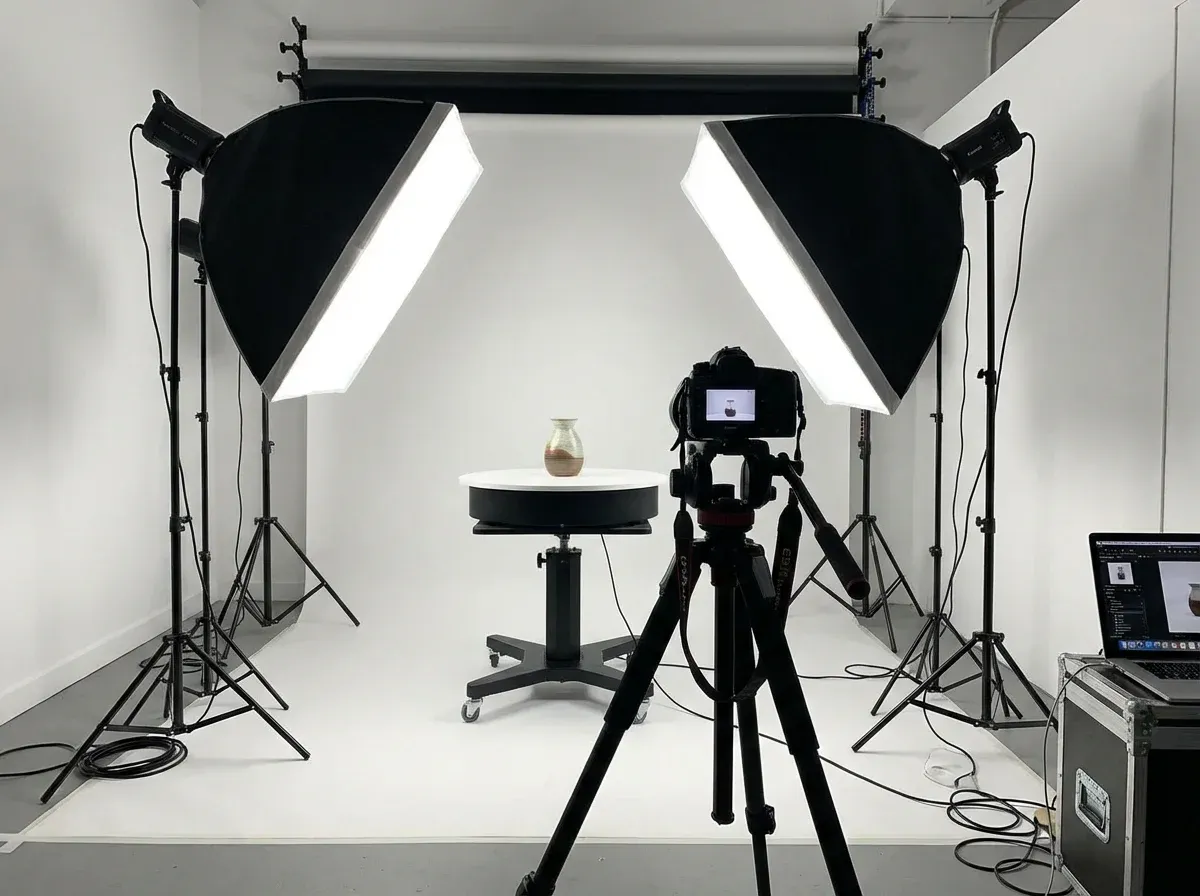
You do not need a big space, but you do need repeatability. Think of the setup like a mini assembly line: position, light, shoot, export.
Lighting layout that stays consistent
Start with two soft lights at roughly 45 degrees to the product, slightly above it, aimed toward the center. Add a white foam board opposite your key light to lift shadows. If your product has deep cavities (mugs, bags, devices with ports), move the fill board closer rather than cranking exposure.
Mark your positions
Tape marks on the table for turntable placement, and mark the tripod feet positions. It sounds basic, but it is the difference between “we can shoot 20 SKUs today” and “why does every product look different?”
Background choices for e-commerce
Many teams shoot spins on white because it is safer across marketplaces. Others prefer a light gray sweep because it avoids harsh edges and helps reflective products look more premium. If you are mixing spins and lifestyle stills, keep your background strategy consistent so your product page does not look like a collage.
If you need inspiration for styles that still feel natural, see Location Backgrounds for Product Photography.
A reliable 360 photography workflow (capture to publish)
A good workflow is boring. That is the goal. You want the process to produce clean spins even when you are shooting your 50th product.
Step 1: Decide your frame count and stick to it
24 frames is a common baseline for smaller products. 36 frames often feels smoother. 72 frames looks great but increases capture time, editing time, and file weight. Pick one standard for your catalog, then only break it for hero SKUs.
Step 2: Lock your camera settings
Use manual exposure, manual white balance, and manual focus. If you let the camera auto adjust, you get flicker across the spin. If you are using a phone, use a pro mode app and lock AE/AF before you start rotating.
Step 3: Shoot with a repeatable rotation
For manual turntables, rotate using marked increments. For motorized tables, program the steps. Keep the product centered and level. A tiny tilt becomes a noticeable wobble when animated.
Step 4: Batch edit (do not “perfect” frame by frame)
Apply the same crop, exposure tweaks, and color correction across the full set. If one frame needs unique correction, fix the root problem in your lighting or capture process instead.
Step 5: Export for the viewer you will use
Some viewers want a numbered JPEG sequence. Others accept a sprite sheet. Decide early, because it affects naming conventions and compression choices.
One practical way teams speed up the supporting assets around a spin is using AI to generate extra stills (for ads, category pages, and marketplaces) without re-shooting. For example, ProductAI tools like the AI Background Generator can help you quickly test different background looks for your hero image while keeping the spin consistent on the product page.
360 photography software: how to choose (and what “free” really means)
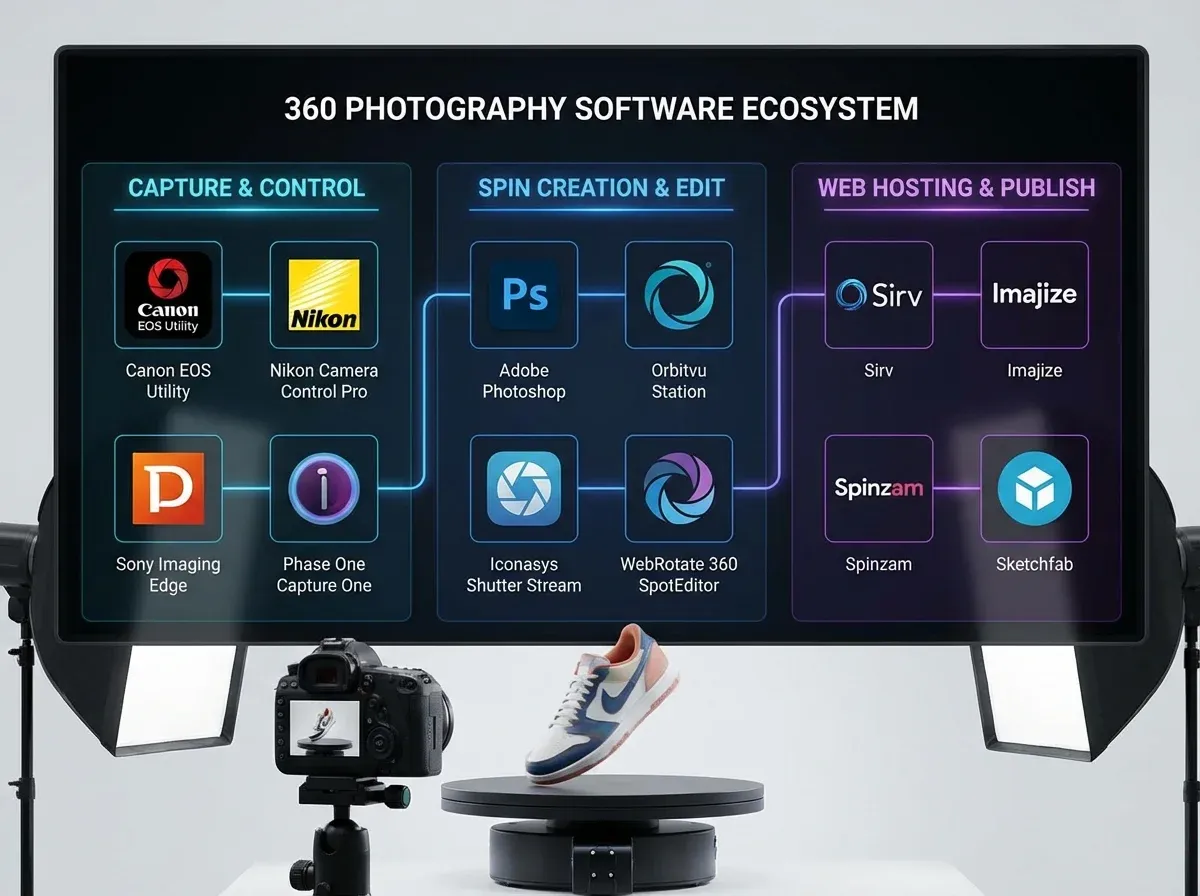
360 photography software sits in the middle of your workflow. It can automate naming, alignment, color consistency, and output formatting. It can also add cost and complexity if you choose the wrong type.
Three software categories you will run into
Capture and tether tools: help you control the camera, trigger shots, and keep settings stable.
Spin builders: take your frames and create a web-ready output for a viewer.
Viewers and hosting: render the spin on your product page and manage performance.
How to evaluate 360 spin photography software
Focus on: output format flexibility, ease of deployment on your platform, compression controls, and how it handles mobile. A “perfect” spin that takes 8 seconds to load is not perfect. It is a bounce rate generator.
If you are exploring a 360 product photography app approach, test it with your trickiest SKU, not your easiest. That is the fastest way to find the real limitations.
About 360 photography software free options
Free tools can be fine for prototyping or very small catalogs. The reality is you often pay in time: manual file prep, limited export formats, or fewer controls over compression. If the goal is an ongoing content pipeline, calculate the labor cost, not just the subscription cost.
If you are budgeting the bigger picture, this breakdown of Product Photography Pricing: How Much Should It Cost helps you compare in-house time vs outsourced production.
Publishing a 360 spin: viewer, hosting, and site performance
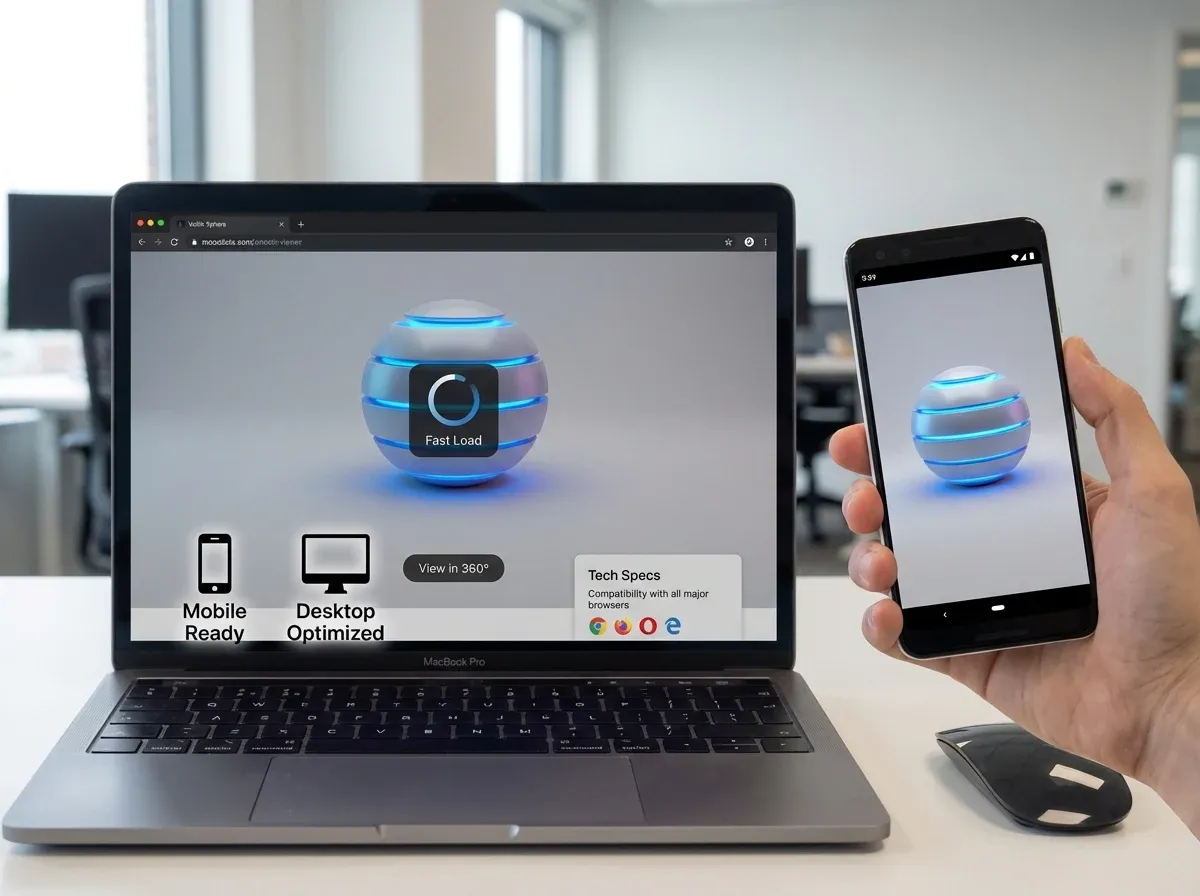
Publishing is where many 360 projects fall apart. The spin looks great locally, then feels laggy on a real product page. Or it conflicts with your theme, zoom tool, or image gallery.
Choosing a 360 product viewer
Your viewer should support touch gestures, responsive sizing, and lazy loading. It also needs to play nicely with your existing image gallery so shoppers can still see your hero and detail shots.
If you are assessing options, start here: 360 product viewer. Make “time to first interaction” a key metric, not just visuals.
File size and compression targets
Think of each spin as a mini image set. If you ship 36 frames at high quality JPEG, you can easily push multiple megabytes. That might be fine on desktop Wi-Fi and painful on mobile.
In practice, this means you should compress consistently, keep dimensions appropriate to your site, and avoid exporting frames much larger than your product gallery displays.
SEO and accessibility considerations
A 360 spin is interactive, but it should not replace key still images. Keep a strong hero image, maintain alt text on core images, and make sure your spin does not block indexing or slow down your page speed metrics.
Quality control: what ruins 360 rotating product photography
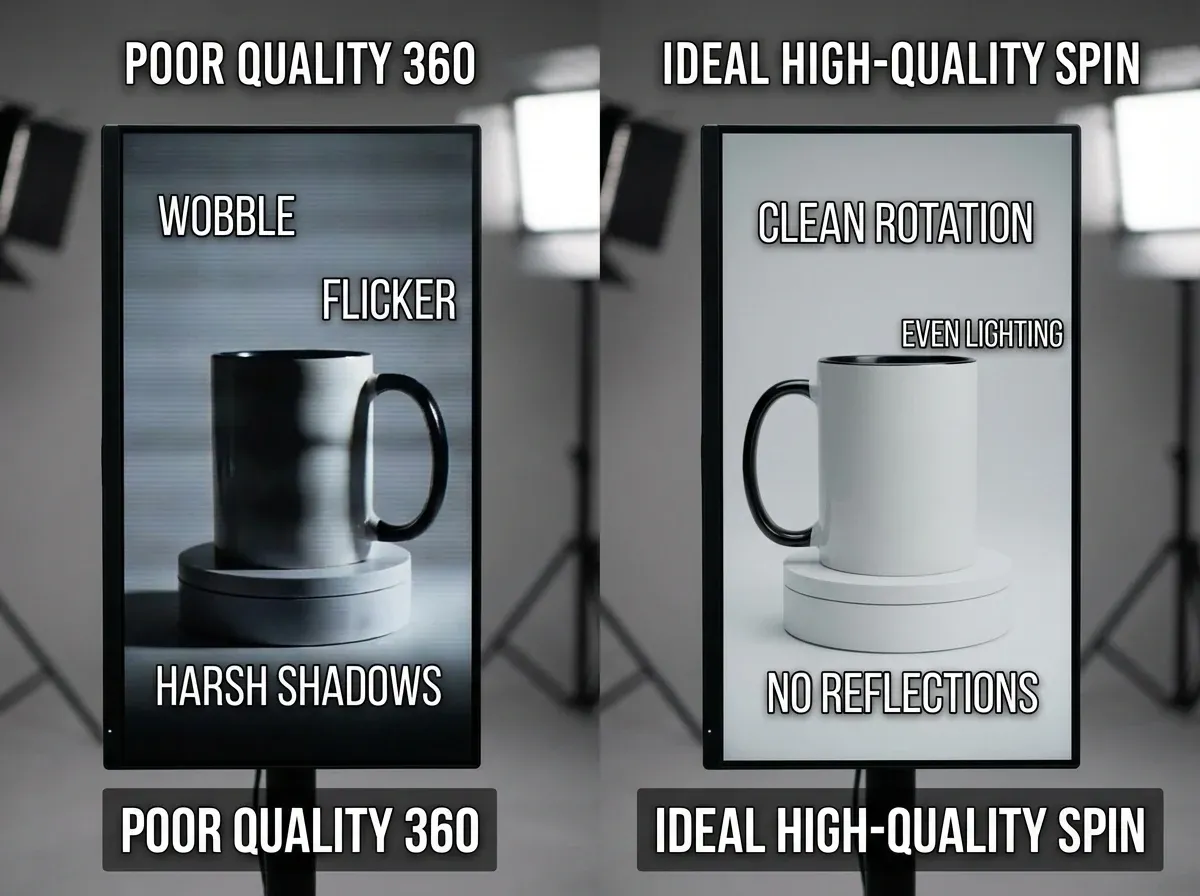
A spin can be technically correct and still feel “cheap.” These are the quality checks I would build into your process before you publish.
Wobble and drift
If the product shifts left to right as it rotates, you will see drift. Fix it by centering the product on the turntable and keeping the camera locked. Some software can auto-align frames, but it is better to remove the cause.
Flicker (exposure or color shifts)
Flicker almost always comes from auto exposure or changing light. Use manual settings and stable continuous lighting. If your lights are cheap and flicker at certain shutter speeds, adjust your shutter or upgrade the lights.
Harsh edges and inconsistent shadows
A hard shadow that changes shape across frames makes a spin look amateur. Soften the light source, move it farther back, or use diffusion. If you need a clean catalog look for marketplaces, shoot with a consistent base and then standardize the supporting stills. ProductAI’s Increase Image Resolution can help when you have older stills that need to match newer, higher-resolution assets, without reshooting everything.
Reflections that reveal your setup
Glossy products often show the room, the photographer, or the light shapes. Control it with diffusion, flags, and (when needed) polarization. Do not assume you can “fix it in post” across 36 frames.
Frequently Asked Questions
What is 360 photography for products?
360 photography is a set of images captured around a product at even angle increments, then displayed as an interactive spin. Shoppers can drag to rotate the product, which helps them understand shape, depth, and details faster than clicking through stills. It is especially useful when buyers need to inspect multiple sides, like electronics, premium packaging, or items with closures and ports. It is not a 3D model, so you only see the angles you actually photographed.
How many photos do I need for 360 degrees product photography?
Most stores use 24, 36, or 72 frames. 24 is often enough for small products and keeps file size down. 36 usually feels smoother and is a solid “default” for many catalogs. 72 can look premium, but it increases shooting time and page weight, so it needs more careful compression and loading behavior. Pick one standard frame count for consistency, then reserve higher frame counts for hero SKUs that carry the most revenue.
What 360 photography equipment is essential?
You need a stable camera setup, consistent lighting, and a turntable that rotates smoothly without wobble. A tripod (or fixed rig) is mandatory because the camera cannot move between frames. Continuous lights with diffusion make consistency easier than flash for most teams. A sweep background or light tent helps control shadows and edges. Once you scale up, a motorized turntable with set step increments and a remote trigger saves time and reduces mistakes.
Can I do 360 object photography with a phone?
Yes, for small-scale tests or lightweight products, a phone can work. The key is control. You must lock exposure, white balance, and focus so the phone does not “correct” the scene as the product rotates. Use a tripod mount for the phone and a stable turntable, and keep lighting consistent. You will still need to batch edit and compress files for web use. For reflective or high-detail products, a dedicated camera usually produces cleaner results.
What causes wobble in 360 spin photography?
Wobble usually comes from one of three issues: the product is not centered on the turntable, the product is not level, or the camera position shifts during capture. Even tiny movement becomes obvious when images animate. Fix it by marking the center of the turntable, using putty or a stand to stabilize awkward products, and taping tripod feet positions. Some 360 photography software can auto-align frames, but prevention is faster than correction.
Is 360 photography software required?
It is not strictly required, but it is hard to run a repeatable process without it. Software helps you keep naming consistent, align frames, export in the right format for your viewer, and sometimes automate compression. If you are only making one spin, you can assemble it manually. If you plan to produce spins every month, the software becomes part of your production system. Evaluate it based on output formats, ease of publishing, and performance on mobile.
What is the difference between a 360 product viewer and a 360 product photography app?
A 360 product photography app often focuses on capture and build steps, like guiding you through frame count, helping stabilize exposure, and exporting a spin package. A 360 product viewer is what displays that package on your site, handling drag interaction, responsive sizing, and loading behavior. In some tools these are bundled, but in many stacks they are separate. Your best results come when capture, export, and viewer requirements are decided together.
Does 360 photography increase conversions?
It can, especially for products where shoppers need more confidence about size, details, and build quality. The bigger win is often reducing uncertainty: fewer pre-purchase questions, fewer “not as expected” returns, and faster decision-making. That said, it is not magic. If your spin loads slowly, looks jittery, or replaces key still images, it can hurt performance. Treat it like any conversion asset: test it on a subset of products and measure engagement and outcomes.
How do I keep 360 spins consistent across a catalog?
Standardize everything you can: frame count, camera height, lens choice, crop, background color, and lighting positions. Mark physical positions in your studio so the setup does not drift over time. Lock camera settings to prevent flicker, and use batch edits rather than frame-by-frame tweaking. Create a simple checklist for capture and export so different team members can produce the same output. Consistency is what makes a store feel trustworthy at scale.
How do I combine 360 photography with AI product photos?
Use 360 for what it does best: interactive inspection. Use AI imagery for what it does best: producing lots of still-image variations quickly for ads, seasonal campaigns, and A/B tests. For example, you might keep your spin on a clean background for clarity, then generate lifestyle or themed hero images for campaigns. One example is ProductAI, which offers tools like background generation and resolution upscaling to support your still-image library without reshooting.
Key Takeaways
360 photography works best when shoppers need to inspect details that still images struggle to communicate.
Consistency beats complexity: lock camera settings, stabilize the product, and standardize frame count and lighting.
Performance is part of quality. Compress frames and choose a viewer that loads fast on mobile.
Start with a pilot set of SKUs, then scale once your workflow is repeatable.
Use 360 spins alongside strong stills, not instead of them, to keep SEO, accessibility, and merchandising strong.
Conclusion
360 photography is one of those e-commerce upgrades that looks “nice to have” until you see how it changes shopper behavior. When customers can rotate a product, they stop guessing. That usually means fewer back-and-forth questions, fewer surprises at delivery, and a stronger sense of quality on the product page.
The workflow is the difference-maker. Start simple: stable turntable, consistent light, manual camera settings, and a standard frame count. Build a repeatable process before you chase fancy effects. Once you have reliable spins, publish them with a viewer that prioritizes mobile performance and does not break your existing gallery.
If you want to round out your visual system, explore how AI tools can support your still images while your spins do the heavy lifting for inspection.
If you want to see AI product imagery in action, try ProductAI free tools and test a few hero variations.
Last updated: February 2026
About the Author
Giles Thomas, Ecommerce & AI Product Photography Expert – Founder, AcquireConvert.
Giles helps e-commerce teams improve conversion rates through better product presentation and performance-first visual workflows. He focuses on practical production systems—from lighting and capture consistency to publishing spins that load fast on mobile and integrate cleanly with product galleries.

Hi, I'm Giles Thomas.
Founder of AcquireConvert, the place where ecommerce entrepreneurs & marketers go to learn growth. I'm also the founder of Shopify agency Whole Design Studios.