360 product photography: setup, pricing, results (2026)

.webp)
Last updated: February 2026
What You Will Learn
What 360 product photography is (and what it is not)
Setup options: DIY, studio, and service providers
360 product photography pricing: what drives cost
What “good results” look like (with a quality checklist)
Amazon 360 product photography: realities and alternatives
Workflow tips to ship more spins per day
Where ProductAI fits (and where it does not)
360 product photography can lift conversion rates for the right products because shoppers get confidence fast: they can inspect shape, finish, and details without guessing. The catch is it is a workflow, not just a shoot. You need a repeatable capture setup (usually a turntable), consistent lighting, and a way to publish the spin on-site or in a marketplace that supports it. This guide breaks down what a practical setup looks like, how to think about 360 product images requirements, and what pricing tends to include, from DIY kits to studio services.
What 360 product photography is (and what it is not)
At its simplest, 360 product photography is a series of still photos captured at consistent rotation intervals (for example, 24, 36, or 72 frames around the product). Those frames are then stitched into an interactive spin that a shopper can rotate inside a 360 product viewer.
It is not the same as 3D. A 360 spin is a photo sequence, so you cannot change lighting direction or perspective beyond the captured angles. True 3D models (photogrammetry or CAD) can do more, but cost and production time are usually higher.
If you are deciding whether 360 is “worth it,” anchor your decision in buyer behavior. 360 shines on products where surface detail and geometry matter: footwear, bags, electronics, cosmetics packaging, furniture accents, and premium items where returns are expensive.
360 product photography setup options (DIY vs studio vs service)
.webp)
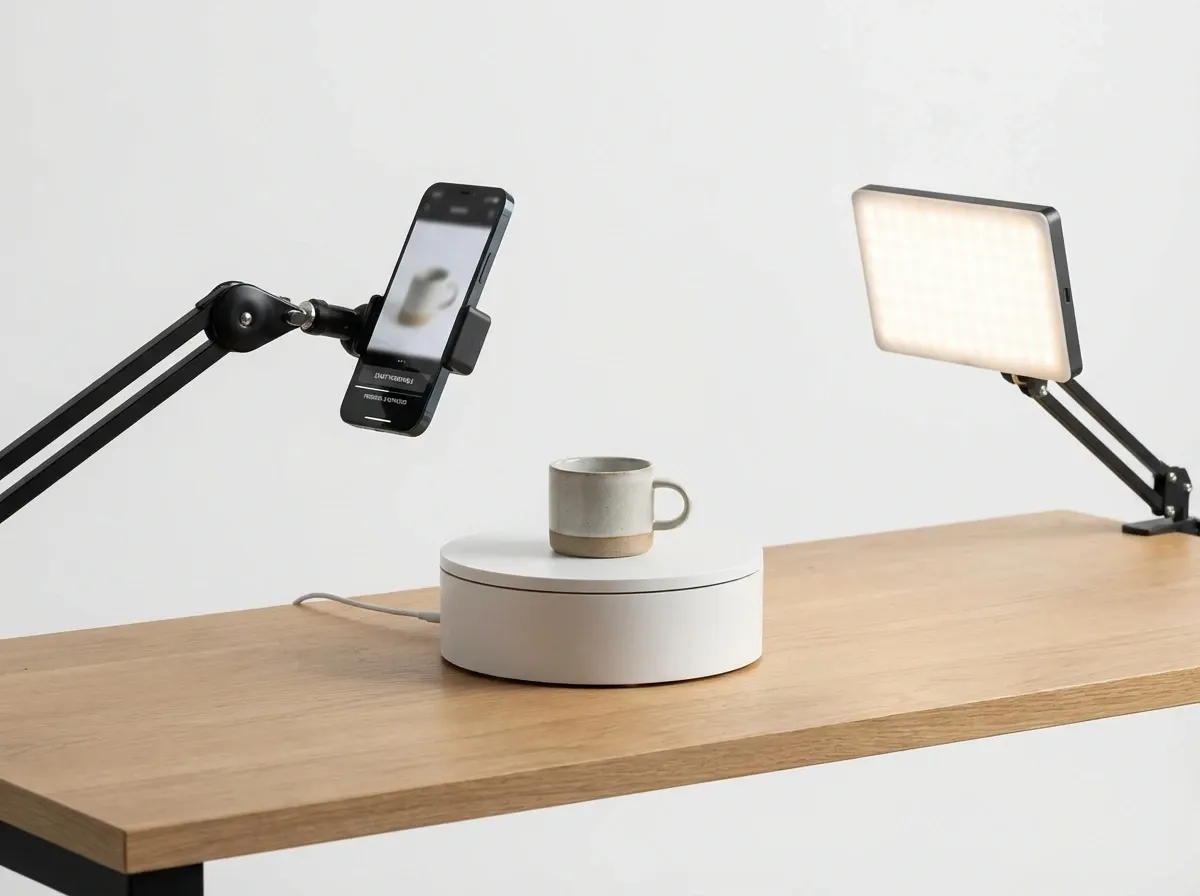
Option 1: DIY 360 product photography studio (in-house)
A DIY setup can work well if you shoot frequently and have consistent products. The essential pieces are:
Turntable 360 product photography rig: motorized turntable with repeatable step rotation and remote triggering.
Lighting: continuous lights or strobes, but consistency is the goal. Softboxes plus flags help control reflections.
Camera and lens: a solid mid-range mirrorless or DSLR works. Choose a focal length that minimizes distortion.
Tripod, overhead arm (optional), and a fixed mark for product center.
Background: sweep, acrylic, or a set that matches your brand guidelines.
Software: capture automation (optional) plus a viewer or a hosted solution to publish the spin.
In-house is best when you need speed, frequent refreshes, and you can standardize product dimensions. If every product is different (high variety sizes, reflective materials, transparent items), you will spend more time troubleshooting.
Option 2: Hire 360 product photography services
Outsourcing makes sense when you want predictable output without building a studio, or when you have a one-time catalog project. A good service provider should be able to show:
Clear 360 product photography examples in your category (not just generic demos).
A defined frame count, resolution, and file delivery format.
Consistent retouching rules (dust removal, color consistency, label legibility).
Publishing support (viewer embed, CDN hosting, or file delivery that matches your platform).
If you are searching for location-based providers (for example, 360 product photography Dubai, UK, or London), treat geography as secondary. The real differentiator is quality control, communication, and whether they can scale throughput while keeping the look consistent.
Option 3: Use a 360 product photography app
Apps can help you automate capture and keep settings consistent. They can be a good middle ground if you want DIY control with less manual work. For a deeper breakdown of app-led workflows, see this guide to a 360 product photography app.
360 product photography pricing: what drives the cost

When people ask about 360 product photography prices, they often compare it to standard product photos. The difference is volume and consistency: you are producing many frames per SKU, not one hero image.
Typical pricing components (what you are really paying for)
Capture time per SKU: setup, centering, leveling, and rotation frames.
Retouching across frames: dust, glare control, label cleanup, color consistency.
Frame count and resolution: more frames and higher resolution increase processing and delivery size.
Viewer delivery: self-hosted files vs hosted viewer, plus ongoing hosting/CDN costs.
Product complexity: reflective, transparent, glossy, or irregular shapes take longer.
If you want a broader benchmark for photography costs beyond 360, this breakdown on product photography pricing is a helpful reference point.
DIY vs service: how to estimate ROI
DIY cost is usually front-loaded: you pay for gear and time, then reduce marginal cost per SKU over time. Services are the opposite: low setup cost, higher per-SKU fees, but fewer internal hours.
A practical way to decide is to estimate your monthly throughput. If you expect steady volume, in-house can be cheaper and faster. If you have a one-off project or seasonal peaks, services often win on predictability.
What good 360 results look like (and how to spot problems)
.webp)
Great 360 spins feel “smooth” because each frame matches the previous one in exposure, color, and alignment. Bad spins are usually caused by tiny setup changes that compound across frames.
Quality checklist for 360 product photography
Consistent centering: the product stays in the same position across rotation (no wobble).
Stable exposure and white balance: avoid flicker between frames.
Controlled reflections: especially on glossy packaging and electronics.
Clean base and surface: dust and fibers multiply across 36+ frames.
Correct perspective: avoid wide-angle distortion that makes products look warped.
Fast load: compressed frames and a viewer that streams efficiently.
What to measure after launch
Conversion rate change on SKUs with 360 vs without.
Engagement: spin interactions, time on page, gallery clicks.
Returns rate: 360 often helps when returns are driven by “not as expected.”
Amazon 360 product photography: what is possible in 2026
Amazon support for interactive media varies by category, program eligibility, and listing type. If your goal is Amazon-specific, start with the platform requirements and then decide whether 360 is the right asset or if your time is better spent on compliant image sets and video.
For a focused walkthrough of the concept and common requirements, see this guide on amazon 360 product view. If 360 is not available for your listings, you can still reuse the same frame set for on-site 360, PDP animations, and social content.
A practical workflow to produce more 360 spins per day
1) Standardize capture settings
Lock in camera height, focal length, and distance for each product size category. Document it. Small changes between sessions show up as wobble and inconsistent scale.
2) Build a repeatable product prep checklist
Prep is usually the hidden time sink. Cleaning, label alignment, removing protective films, and controlling fingerprints matter more in 360 because issues repeat across dozens of frames.
3) Retouch smarter, not harder
Retouching every frame manually can kill margins. Your goal should be to improve capture quality so your post work is light. When you do need edits, use tools that speed up the repetitive tasks (background cleanup, text removal, resolution).
Where ProductAI fits into a 360 workflow (and where it does not)
.webp)
ProductAI is not a 360 capture system and it will not replace a turntable or a 360 viewer. Where it can help is in the supporting production work around your 360 set: preparing clean frames, creating consistent backgrounds for your non-360 images, and producing additional lifestyle angles that complement the spin.
For example, if your 360 frames are captured on a neutral set, you can use the AI Background Generator to quickly create branded lifestyle imagery for ads and PDP galleries without rebuilding a physical set each time. If your 360 viewer needs higher-resolution frames for zoom, Increase Image Resolution can help you test whether an upscale meets your quality bar before you reshoot. For cleanup tasks across supporting images, the Magic Photo Editor is useful when you need fast, iterative edits.
If you want tips for getting cleaner AI outputs (especially when matching a brand look), this guide on professional AI-generated product photos is a solid starting point.
Limitations to recognize: ProductAI is credit-based and some features are in beta, so it is best used to accelerate production around your core capture workflow, not as your entire 360 pipeline.
Pros and Cons
Strengths
Builds buyer confidence for shape, finish, and detail heavy products, especially premium SKUs.
Creates reusable assets: 360 frames can also power animations, social snippets, and PDP galleries.
DIY setups can become cost-effective at steady volume once your studio process is standardized.
Service providers can deliver consistent output quickly without you building a full studio.
Works well alongside supporting tools for background cleanup, resolution, and extra lifestyle content.
Considerations
Production effort is real: dozens of frames per SKU means prep and QC take time.
Glossy and reflective products are harder to shoot in 360 because reflections change with rotation.
Publishing is not “automatic”: you still need a viewer/hosting plan and performance optimization.
Marketplace support (including Amazon) can be limited or program-dependent, so plan a fallback.
Frequently Asked Questions
How many images do I need for 360 product photography?
Most 360 spins use 24 to 72 frames depending on product complexity and how smooth you want rotation to feel. 24 frames can work for simple shapes, while 36 or 72 is better for detailed products where small changes matter. A good rule is to start at 36, test load speed and user engagement, then adjust based on results.
What is a good frame size for 360 product images?
Choose a size that looks sharp at your viewer’s maximum zoom while staying fast to load. Many brands publish a compressed “display” size and keep high-resolution originals for future reuse. The right answer depends on your site speed targets and product detail level. Always test on mobile networks since that is where slow spins fail first.
Is 360 product photography the same as a 3D model?
No. A 360 spin is a sequence of photos taken at fixed angles, then displayed interactively. A 3D model is geometry that can be rendered from new angles and lighting. 360 is often cheaper and faster to produce, but it cannot change perspective beyond what you captured. If you need true configurators, consider 3D.
How much does 360 product photography cost?
Pricing depends on frame count, retouching expectations, product complexity, and whether hosting/viewer support is included. DIY has higher upfront cost (gear and setup time) but can lower per-SKU cost with volume. Services shift cost to a per-SKU model and are often easier to manage for one-off projects or seasonal bursts.
What should I look for in 360 product photography services?
Ask for examples in your category, clarity on frame count and resolution, and a written QC process (alignment, color consistency, dust cleanup). Confirm how you will publish: do you get image files only, or also a viewer embed and hosting. A great provider will also advise on how to optimize load speed and mobile performance.
Does Amazon support 360 product photography?
Amazon support depends on program eligibility and category rules. Some sellers can add interactive views, while others may need to rely on compliant image sets and video instead. Plan to reuse the 360 asset on your own site even if Amazon options are limited. That way the shoot still pays off across channels.
Can I do DIY 360 product photography with a phone?
You can, especially for testing. The challenge is consistency: stable exposure, fixed perspective, and reliable rotation steps. If you go phone-first, use a tripod, lock exposure and white balance, and invest in controlled lighting. For ongoing production, a dedicated camera plus a motorized turntable typically improves repeatability and reduces retouching time.
What is the best turntable for 360 product photography?
The “best” turntable is the one that matches your product size and can rotate in consistent steps without wobble. Look for repeatable indexing, a strong weight rating, and easy triggering so you can shoot fast. If you plan to scale, capture automation matters because it reduces operator time and helps keep every SKU consistent.
Where does ProductAI help if I am already shooting 360?
ProductAI helps most with the surrounding image workload: producing extra lifestyle content, testing background concepts, cleaning up supporting images, and upscaling assets where appropriate. It does not capture or host 360 spins. Think of it as a way to get more value from each SKU shoot by creating additional PDP and ad creatives quickly.
How do I know if 360 is improving results?
Run an A/B or time-based test on comparable products: track conversion rate, engagement (spins, time on page), and returns. 360 tends to perform best when it reduces uncertainty, like fit, size perception, and finish quality. If your products are simple and low-risk, you may get better ROI by improving standard images and video first.
Key Takeaways
360 product photography is a repeatable system: capture, QC, and publishing matter as much as the camera.
Costs are driven by frame count, retouching, complexity, and whether viewer hosting is included.
Measure success with conversion, engagement, and returns, not “cool factor.”
Amazon support can vary, so plan to reuse the asset on your own site regardless.
ProductAI does not replace a 360 rig, but it can speed up supporting creative and post-production tasks around your catalog.
Conclusion
360 product photography can be a strong investment when your shoppers need extra confidence and your returns are expensive. The best results come from a boring (in a good way) process: consistent lighting, consistent rotation, and a viewer that loads fast on mobile. If you are not ready to build a full 360 studio, start by outsourcing a small SKU batch and measuring lift, then decide whether DIY makes sense.
If you want to increase the output from every product shoot, explore ProductAI’s AI Background Generator and supporting tools to produce more PDP and ad creatives without adding studio days.
Last updated: February 2026
About the Author
Giles Thomas, Ecommerce & AI Product Photography Expert – Founder, AcquireConvert.
Giles helps e-commerce brands improve conversion performance through better product visuals and scalable content workflows. His work focuses on practical capture setups, marketplace-ready imagery, and using AI tools to speed up post-production without sacrificing quality.

Hi, I'm Giles Thomas.
Founder of AcquireConvert, the place where ecommerce entrepreneurs & marketers go to learn growth. I'm also the founder of Shopify agency Whole Design Studios.