360 Spin Photography: Capture Products in Motion (2026 Guide)

.webp)
Last updated: February 2026
What You Will Learn
What a 360 spin is (and what it is not)
When 360 spin photography actually moves the needle
How to capture a 360 spin: studio setup and workflow
Editing, file output, and hosting options
E-commerce UX and platform requirements (Shopify, Amazon, ads)
Where AI helps with 360 spins (and where it does not)
How to measure ROI without guessing
You finally get your product photos uploaded, your PDP looks clean, and then the returns start coming in with the same message: “Not what I expected.” Sound familiar? Usually it is not your product. It is the buyer’s confidence. Flat images struggle to communicate depth, scale, and details like texture, edges, and how parts connect. That is exactly where a 360 spin earns its keep.
A good 360 spin gives shoppers the feeling of picking something up and inspecting it. Done well, it can lift conversion rates, reduce pre-purchase questions, and cut down on “it looked different online” returns. Done badly, it adds load time, looks jittery, and makes your brand feel cheaper than it is.
This guide breaks down how 360 spin photography works, what you need to create it, what to watch out for, and how to decide if it is worth the effort for your catalog. If you are already building out your product photos strategy, consider this the practical add-on that helps shoppers understand the product faster.
What a 360 spin is (and what it is not)
A 360 spin is a sequence of still images captured around a product, then displayed as an interactive viewer that lets shoppers rotate it. Think of it as a flipbook controlled by the user. You are not filming video, and you are not generating a true 3D model (though you can build 3D from image sets in some workflows).
Now, when it comes to terminology, the internet mixes a few things together. A “360 product spin” might mean a simple rotation on a turntable, or it might mean a multi-row spin that also tilts up and down. The difference matters because it changes cost, capture time, and what the shopper can actually learn.
Single-row vs multi-row spins
Single-row spins capture one ring around the product at a fixed camera height. This is the most common approach for e-commerce because it is fast and predictable.
Multi-row spins capture several rings at different heights, which creates a more “3D-like” experience. Here’s the thing: multi-row is impressive, but it is far less forgiving. Any exposure shift, wobble, or inconsistent shadow becomes obvious.
360 image vs 360 spin
A “360 image” is sometimes used as shorthand for a spin set, but it can also refer to panoramic images. In e-commerce, you almost always mean a spin set plus a viewer. If you are briefing a studio or choosing 360 spin photography software, be explicit: you want interactive product rotation, not a panorama.
When 360 spin photography actually moves the needle

Not every product deserves a 360 spin. If you add it everywhere, you can burn time and budget for minimal gain. The reality is that 360 spins shine when a shopper’s main concern is “what does this look like from the other side?”
Products that benefit most
Complex shapes: shoes, bags, electronics, tools, home goods, anything with ports, seams, or details on the back.
Premium items: luxury and giftable products where craftsmanship and materials matter.
High-return categories: products where “expectation gap” drives returns.
Color and finish sensitive items: matte vs gloss, brushed metal, transparent plastics.
When it is not worth it
Consider this: if the product is basically symmetrical, or your main selling point is a front-facing label, a spin may add little. The same goes for products that must be explained through use. In those cases, lifestyle photography, short video, or a clear diagram can do more.
If you are deciding between interactive spins and other 3D formats, read the broader overview on 360 product photography to make sure your choice matches shopper intent.
How to capture a 360 spin: studio setup and workflow
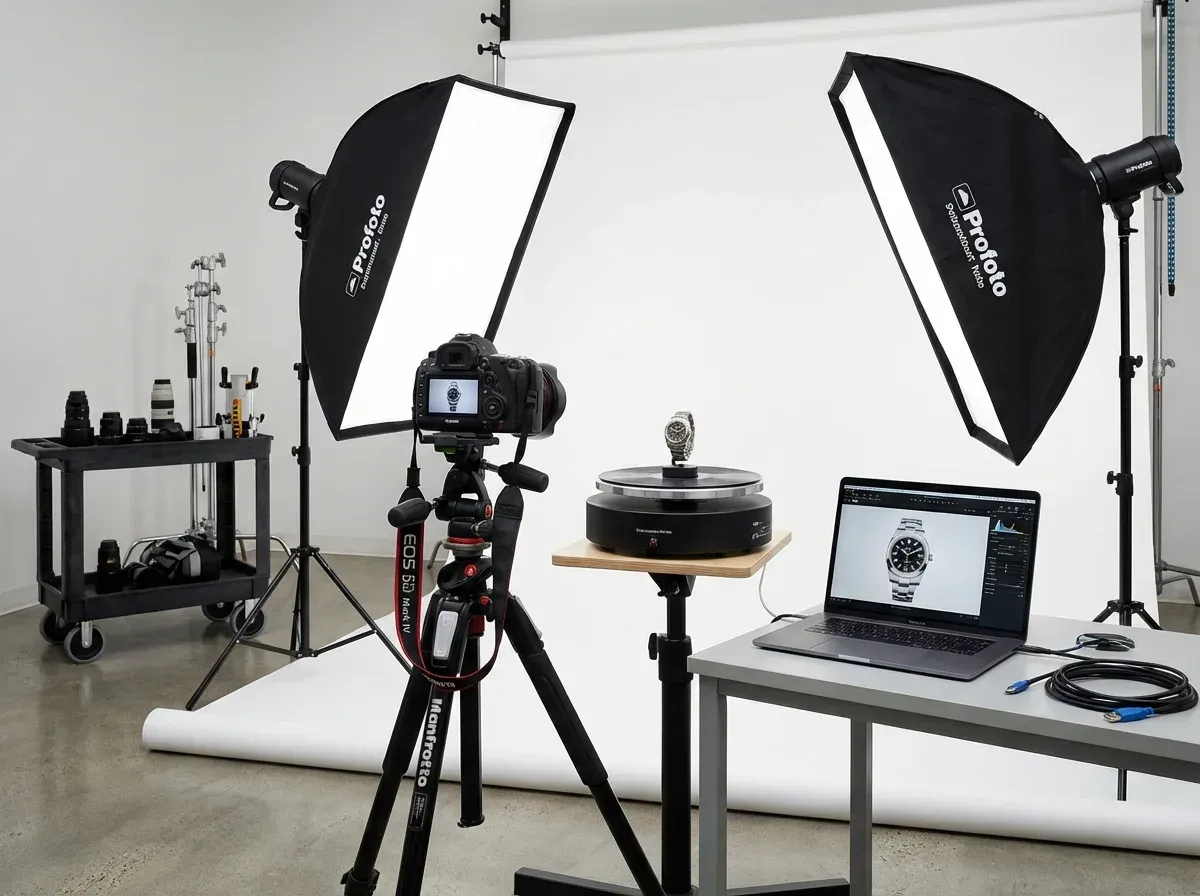
The capture process is simple on paper: place product, rotate, shoot, repeat. In practice, the difference between “good enough” and “premium” is stability and consistency. Your goal is to produce a sequence of frames that feel like one continuous motion.
What you need for a clean 360 spin
Camera with manual control (DSLR or mirrorless is common, but high-end phones can work for small items)
Tripod or fixed rig (do not handhold)
Turntable (manual or motorized) with degree markings or programmable steps
Consistent lighting setup (softboxes or continuous lights, plus diffusion)
Background (white sweep is common, but brand looks can work if consistent)
Recommended capture settings (the “keep it consistent” checklist)
Lock everything you can. Use manual exposure, manual white balance, and manual focus. If auto settings drift frame to frame, your spin will flicker. That flicker is the number one “cheap” signal in a 360 viewer.
From a practical standpoint, start with ISO as low as possible, set an aperture that keeps the whole product sharp, then adjust shutter speed to match your lighting. Shoot RAW if you can. You can always export to JPG or WebP later.
How many frames should you shoot?
Most stores land in the 24 to 72 frame range. More frames look smoother, but they cost more time to shoot, edit, upload, and load. Think of it this way: each extra frame is a tax you pay forever in storage and page speed.
A common sweet spot is 36 frames, which is a 10-degree step. For small items with fine detail, 72 frames can feel better. For bulky items, 24 frames is often enough.
Keep the product centered (or the spin will wobble)
If the product is not centered perfectly on the turntable, it will “orbit” as it rotates. Viewers notice this immediately. Mark the turntable center, use a positioning guide, and re-check after any product change. If the product has an uneven base, use museum wax or clear supports, then plan retouching.
If you want to understand the mechanics behind smooth movement and viewer behavior, it is worth reading up on 360 rotation principles. It helps you brief studios and spot issues before you publish.
Editing, file output, and hosting options
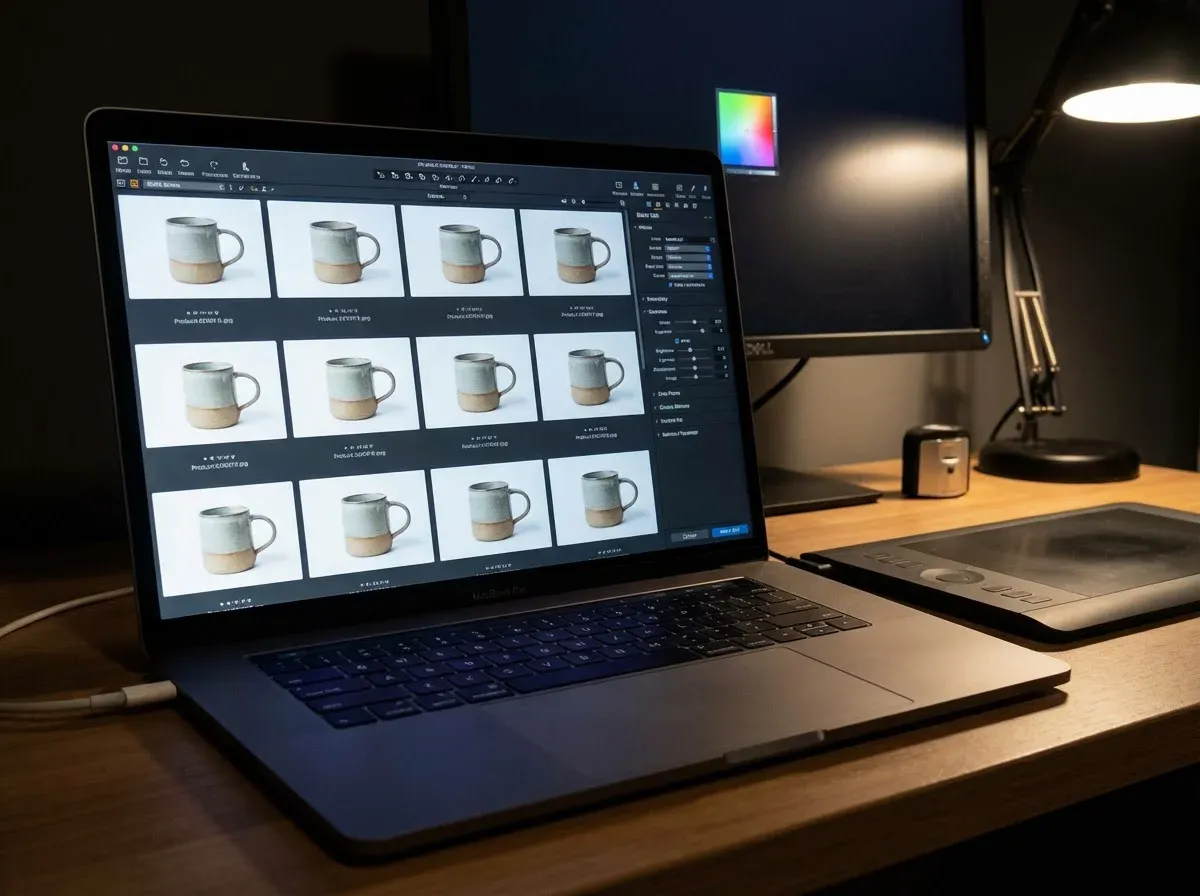
Once you have your frames, you have two jobs: make them visually consistent, and package them in a way your site can deliver quickly. A 360 spin is only as good as the slowest frame and the heaviest file.
Batch editing: speed comes from discipline
Edit one “hero” frame first, then sync those settings across the set. Fix exposure, white balance, and contrast in a way that holds up across all angles. Then handle angle-specific touchups only when necessary.
Pay special attention to shadows. Inconsistent shadow density reads as flicker, even if exposure is locked. If you cannot make shadows consistent, consider a cleaner lighting setup, or a more neutral background that hides small changes.
Export settings that work for e-commerce
Use consistent dimensions across all frames (for example, 1200 x 1200)
Compress aggressively, but avoid “crunchy” edges and banding
Prefer modern formats when supported (WebP), with JPG fallback when needed
Name files sequentially so viewers load in order (001, 002, 003...)
Viewer and hosting choices
There are two common approaches. You can host the images yourself and use a 360 viewer script or app, or use a hosted 360 platform that serves the viewer and assets. Self-hosting gives you control. Hosted platforms can be faster to implement and may include CDN delivery.
Whatever you pick, test on mobile. Most shoppers will swipe with a thumb, on a mediocre connection, while doing something else. Your spin needs to feel responsive without delaying the rest of the page.
E-commerce UX and platform requirements (Shopify, Amazon, ads)
What many businesses overlook is that a 360 spin is not just “another image.” It is an interactive element. That means it competes with your add-to-cart button, your reviews, and your page speed budget.
Where to place a 360 spin on your PDP
The safest placement is inside the main media gallery, alongside your standard images. Add a clear cue like “360 view” so shoppers understand it is interactive. If you bury it below the fold, it gets ignored. If you force it as the first frame for every product, you can annoy shoppers who just want a quick look.
Amazon and marketplace considerations
Marketplaces can be stricter. Amazon, for example, has specific programs and requirements for 360 content and can limit how interactive assets display depending on category and listing type. If your main channel is marketplaces, validate what is supported before investing in a full 360 workflow for your whole catalog.
Ads: 360 spins are usually not the asset
Paid social and display rarely support true interactive spins in the ad unit. In practice, this means you typically repurpose spins into short videos or animated sequences. That can still work well, but it is a different creative format with different performance dynamics.
Where AI helps with 360 spins (and where it does not)
.webp)
AI can speed up parts of the workflow around a 360 spin, but it does not magically replace physics. If the product is wobbling, reflections are chaotic, or lighting changes between frames, AI might help you patch issues, but it will not consistently rescue a broken capture setup.
What AI can help with today
AI is great at repetitive image production tasks that sit around your spin workflow. For example, you might capture a spin on a neutral background for consistency, then create extra lifestyle variations for marketing. One example is AI Background Generator from ProductAI, which can help you create campaign-ready backgrounds for hero images without scheduling another shoot.
Resolution and zoom-friendly spins
Spins often get viewed with pinch-to-zoom. If your frames are too small or too compressed, shoppers cannot inspect details, which defeats the point. If you need to upscale older frames (or you shot smaller to keep load times down), tools like Increase Image Resolution can help improve perceived sharpness before you export your final web set. You can find it here: Increase Image Resolution.
What to be cautious about
If you use AI retouching inconsistently across frames, you can introduce a new kind of flicker where details subtly change as the product rotates. Watch for logos that warp, textures that “crawl,” or reflections that appear and disappear. For spins, consistency beats perfection.
If you want to experiment with quick background concepts for supporting images around your spin (like banners or category thumbnails), you can try the AI Background Generator as a lightweight way to explore options before committing to a full creative direction.
How to measure ROI without guessing

A 360 spin is a cost center unless you can tie it to outcomes. The good news is you can measure it with pretty standard e-commerce instrumentation.
Start with a simple test design
Pick a product set where you expect a lift: top sellers, high-return items, or products with lots of “does it have X on the back?” questions. Add spins to half the set and leave the other half with high-quality static images. Keep everything else the same.
Metrics that actually tell the story
Conversion rate on PDP sessions
Add-to-cart rate
Return rate and return reasons
Support tickets or pre-purchase questions
Time on page and engagement with the viewer (if tracked)
Cost realism
Costs vary widely depending on whether you shoot in-house, use a 360 spin product photography studio, or outsource editing. Before you greenlight a large rollout, benchmark the economics. This breakdown on Product Photography Pricing: How Much Should It Cost is helpful for setting expectations and avoiding surprise line items.
Do not forget page speed
The reality is that a slow page can erase the benefit of better visuals. Measure Core Web Vitals before and after. If your spin viewer adds seconds to load time, you may need fewer frames, better compression, lazy loading, or a different hosting approach.
Frequently Asked Questions
What is a 360 spin in product photography?
A 360 spin is a series of still images taken as a product rotates, usually on a turntable. A viewer then displays those images interactively so shoppers can drag or swipe to rotate the product. It is not the same as a video, and it is not the same as a true 3D model. For e-commerce, the main benefit is clarity: buyers can inspect details that a single hero shot cannot show, which can reduce uncertainty and improve purchase confidence.
How many images do I need to create a 360 spin image?
Most e-commerce teams use 24, 36, or 72 frames. Fewer frames load faster and cost less to edit, but motion can feel choppy. More frames look smoother, but they increase file weight and production time. If you are starting out, 36 frames is a strong baseline because the rotation feels natural while keeping assets manageable. Once you test on mobile and measure engagement, you can increase or decrease based on performance and page speed.
What is the difference between 360 spin photography and 360 product photography?
People often use the terms interchangeably, but “360 product photography” can mean any 360 content, including spins and sometimes even panoramic views depending on context. “360 spin photography” is more specific: a product rotates through frames and the customer controls the rotation. If you are planning your content strategy, it helps to map it back to the shopper task. If the task is inspecting an object from all sides, a spin fits. For broader context, see 360 product photography.
Do I need a motorized turntable for 360 spin product photography?
You do not strictly need one, especially for early tests or low-volume catalogs. A manual turntable with degree markings can work if you are careful and consistent. That said, motorized turntables reduce human error and speed up capture. They also help keep spacing consistent between frames, which makes the spin look smoother. If you are producing spins at scale, motorized equipment usually pays back quickly through time saved and fewer reshoots.
What is the best background for 360 spin images for ecommerce?
For most brands, a clean, neutral background is the safest choice because it reduces distractions and makes inconsistencies less visible across frames. White or light gray is common, especially if you need marketplace-ready assets. Branded or lifestyle backgrounds can work, but they are harder to light consistently, and repeating patterns can “jump” during rotation. If you want ideas on what works in real shoots, this guide on Location Backgrounds for Product Photography is useful even if you only apply the principles to your hero images.
What should I look for in 360 spin photography software?
Prioritize three things: smooth interaction on mobile, good loading behavior, and easy asset management. You want a viewer that supports lazy loading, touch gestures, and responsive sizing without breaking your PDP layout. You also want a workflow that makes it simple to upload and replace image sets, because you will reshoot or refresh products over time. Finally, check analytics options. Knowing how many shoppers interact with the spin helps you judge whether it is driving value.
Can I create 360 spin images for Amazon?
Sometimes, but it depends on Amazon’s current capabilities in your category and the listing setup you have access to. Amazon has historically supported 360 content through specific programs, and not every seller can deploy it the same way. Before you invest in a full spin pipeline for Amazon, confirm what is allowed and what will actually display on mobile. A practical approach is to use spins primarily on your own site, then repurpose the capture set into video or stills for marketplaces.
Is there a “create 360 spin image free” option that works for real stores?
You can create a basic spin with a phone, a cheap manual turntable, and a free viewer script. It is a good way to validate whether customers engage with the feature. The tradeoff is time and consistency. Free setups usually require more manual work to center the product, keep lighting stable, and export optimized files. If your test shows that spins improve conversion or reduce returns, you can then justify better gear, a paid viewer, or outsourcing to scale the process.
Will 360 spin images slow down my product pages?
They can, especially if you upload too many large frames and load them all at once. The fix is usually straightforward: reduce frame count, compress more efficiently, set the viewer to lazy load, and avoid making the spin the first asset that loads. Treat your spin like a performance budget item, not just a creative asset. Measure load time and Core Web Vitals before and after. If performance drops, you may be paying for the spin with lost conversions elsewhere.
Can AI generate a 360 spin from a single product photo?
AI can sometimes hallucinate missing angles, but that is risky for e-commerce because it can introduce inaccuracies. For products where details must be correct (ports, seams, closures, labels), you want real capture from real angles. Where AI helps more reliably is in supporting tasks: improving image quality, creating marketing variations, and speeding up post-production around your core asset set. Use AI to scale output, but keep your 360 spin grounded in truthful visuals.
How do I choose between 360 rotation and a short product video?
Ask what the shopper needs. If they want to inspect the object from any angle, interactive 360 rotation usually wins because the customer controls it. If you need to demonstrate use, motion, or assembly, video is often better. Many brands use both: a 360 spin in the gallery for inspection, and a short video lower on the page for context. The best choice depends on your category, page speed constraints, and production capacity.
Key Takeaways
A 360 spin is a sequence of stills plus a viewer, not a video and not a true 3D model.
Consistency is the whole game: lock exposure, white balance, focus, and keep the product perfectly centered.
Start with 24 to 36 frames, optimize for mobile load speed, then adjust based on engagement and conversion data.
Use spins where buyers need to inspect details, not everywhere by default.
AI can help with supporting image tasks (background variants, upscaling), but it cannot fix a shaky capture workflow.
Conclusion
A great 360 spin does one job: it reduces uncertainty. When shoppers can rotate the product, check the back, and zoom into details, you remove friction that usually shows up as abandoned carts, pre-purchase questions, or returns. The flip side is that spins demand discipline. If your frames flicker, wobble, or take forever to load, you can end up hurting trust instead of building it.
If you are considering adding spins, start small. Choose a handful of products where shape and detail matter, produce a clean single-row set, and measure impact on conversion and returns. Once the numbers look good, you can standardize capture settings, build templates, and scale across the catalog.
If you want quick supporting visuals alongside your spin workflow, explore ProductAI free tools to test backgrounds and image quality.
Last updated: February 2026
About the Author
Giles Thomas, Ecommerce & AI Product Photography Expert – Founder, AcquireConvert.
Giles helps e-commerce teams improve product page performance through higher-converting visual content and practical measurement. His work focuses on scalable photography workflows (including 360 spins) that balance shopper experience, production efficiency, and page-speed constraints.

Hi, I'm Giles Thomas.
Founder of AcquireConvert, the place where ecommerce entrepreneurs & marketers go to learn growth. I'm also the founder of Shopify agency Whole Design Studios.