Why 360 View Product Images Outsell Static Photos (2026 Guide)

.webp)
Last updated: February 2026
What You Will Learn
Why 360 views usually beat static images
What “360 view” means (and what it is not)
Where 360 degree product photography performs best
What you need: turntable, camera, lighting, and software
A practical 360 workflow you can scale
360 on Shopify, Amazon, and ads: what changes
Cost vs ROI: when 360 is worth it
You have a solid product. Your pricing is competitive. Your ads are driving clicks. Then shoppers hit the product page… and bounce because they cannot answer a simple question: “What will this look like from my angle?”
That is the real job of product imagery. Not just to look nice, but to remove doubt. A 360 view does that better than almost any other format because it replaces guesswork with proof. Shoppers rotate the item, check details, and build confidence without opening a support chat or hunting for reviews.
Here’s the thing: 360 imagery is not “nice to have” anymore in competitive categories. It is often the difference between a shopper who commits and a shopper who keeps scrolling. In this guide, I will break down why 360 product views tend to outsell static images, where they actually move the needle, what setup and software you need, and how to roll them out without blowing up your production budget.
Why 360 views usually beat static images
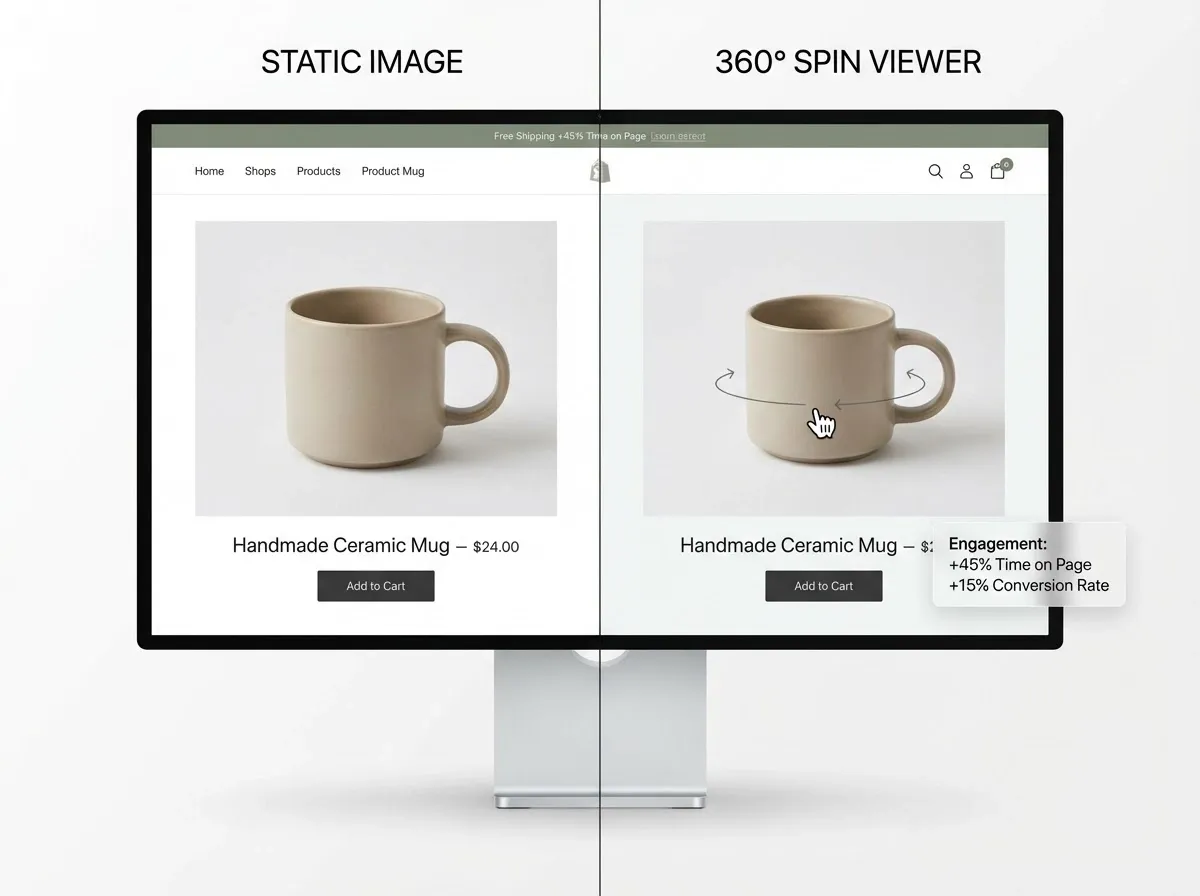
Static photos can be beautiful, but they are still selective. You choose the angles, you choose what is highlighted, and you choose what is hidden. Shoppers know that, even if they do not say it out loud.
A 360 view flips that dynamic. It gives control to the shopper, which reduces perceived risk. In practice, this means fewer “surprise” moments after delivery, and more people who feel comfortable clicking Buy.
It reduces uncertainty in the highest-friction moment
Most product pages lose sales because of uncertainty, not because the product is bad. Shoppers hesitate on size, finish, texture, connection points, closures, ports, seams, and how the item transitions from front to side to back.
When someone can rotate a product, they answer those questions themselves. That is a conversion unlock without discounting.
It acts like a self-service sales assistant
Consider this: your best store associate does not just show the front of an item. They turn it, point out details, and respond to objections. A 360 spin product photography setup is the closest you get to that experience online, especially for tactile products.
It creates “time on page” that is actually useful
Time on page is only good if the shopper is progressing toward a decision. A 360 view increases engagement because people interact with it, not because they are confused. That is a subtle but important difference.
What “360 view” means (and what it is not)
.webp)
People use “360 view” to describe a few different things, and that is where teams get stuck. You need to pick the right format for your product and your budget, then execute consistently.
360 rotation vs multi-angle vs 3D
360 rotation: a sequence of photos captured around the product, played back as a spin.
Multi-angle: a curated set of angles (front, back, side, detail shots). This is cheaper but less interactive.
3D model: a true 3D asset that can be rendered from any angle, sometimes with AR support. Highest flexibility, highest effort.
If you are aiming for “good, scalable, and fast,” 360 degree product photography (photo-based spin) is usually the sweet spot.
What quality looks like in a 360 degree product view
A strong 360 view product photography set has smooth motion (no jumps), consistent exposure across frames, sharp edges, accurate color, and a stable center point so the product does not wobble during rotation.
If you want a deeper primer on the format itself, see this guide to 360 degree view basics.
Where 360 degree product photography performs best
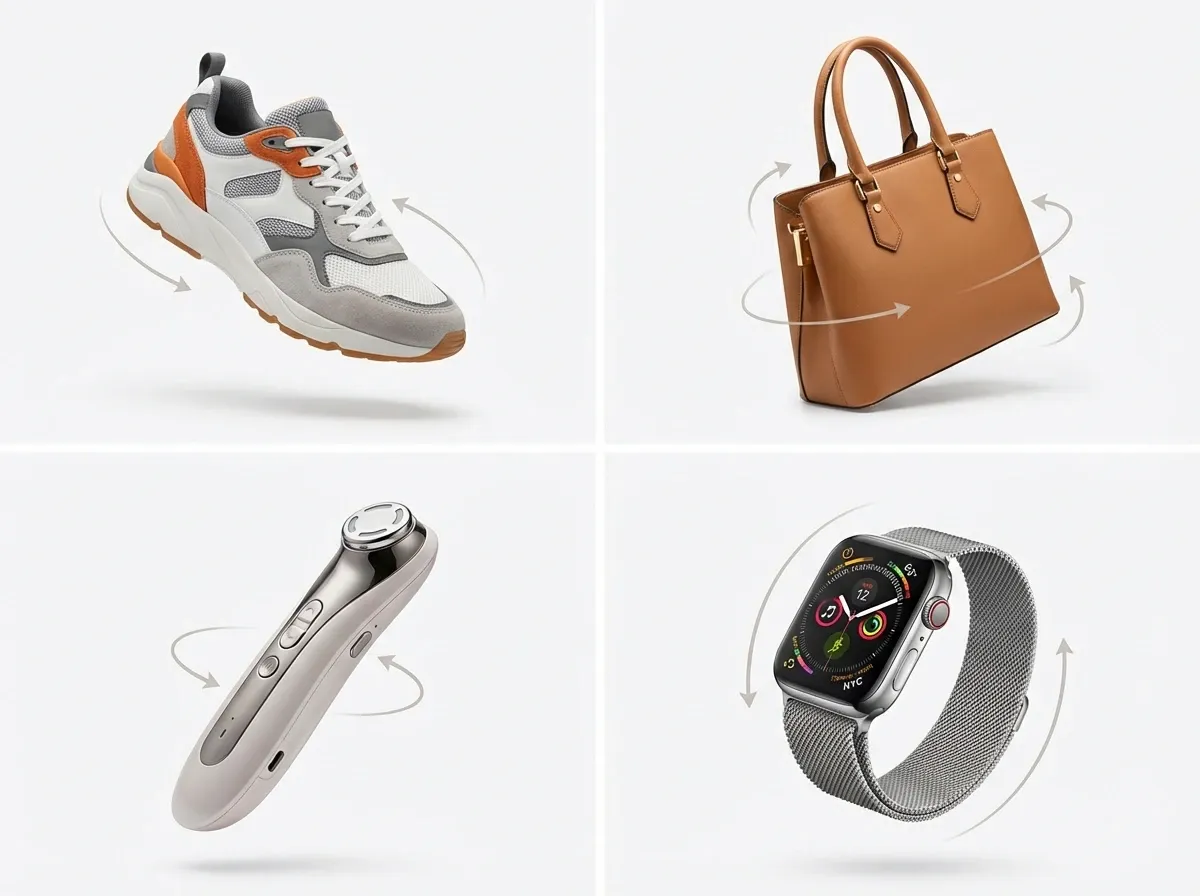
Now, when it comes to ROI, 360 is not evenly valuable across every catalog. You get the best lift where shape and detail matter, and where shoppers feel “burned” by misleading angles.
High-performing categories for 360 view
From a practical standpoint, prioritize products with complex geometry or purchase anxiety:
Footwear, bags, and accessories (shape, stitching, texture)
Beauty devices and electronics (ports, buttons, finishes)
Home goods (materials, edges, underside, assembly points)
Jewelry and watches (sparkle, setting height, clasp details)
When static images are still enough
If your product is visually simple and standardized (basic consumables, flat items, low-price add-ons), you may see more impact from better lighting, clearer detail shots, and consistent product photos than from a full 360 setup.
What you need: turntable, camera, lighting, and software
A professional-looking 360 view is mostly about consistency. You are essentially producing 24 to 72 mini photoshoots that must match.
360 product photography turntable: manual vs motorized
A 360 product photography turntable can be as simple as a lazy Susan with measured marks, or a motorized turntable synchronized with your camera.
Manual: cheapest to start, slower, and easier to introduce misalignment.
Motorized: faster capture, more consistency, better for scale.
If you are planning to shoot more than a handful of SKUs each month, motorized often pays back quickly in labor savings.
Camera and lens: what matters most
You do not need a cinema camera. You need sharpness, repeatability, and clean files. A decent mirrorless or DSLR with a standard prime or short zoom lens works well. Lock focus and exposure so every frame matches.
Lighting and background: the unglamorous conversion driver
What many businesses overlook is that 360 makes lighting mistakes more obvious because shoppers see the product in every direction. Use diffused, consistent lighting and keep reflections under control.
If you want a quick refresher on background choices that support conversion (especially for lifestyle spins or hero frames), this is worth reading: Location Backgrounds for Product Photography.
360 product photography software: what it actually does
360 product photography software typically handles capture automation (optional), frame alignment, color consistency tools, compression, and exporting into a web-friendly viewer. Some tools also host the spin, while others export assets for your site to host.
If you are evaluating options, this overview of a 360 product photography app can help you frame the decision around workflow, not buzzwords.
A practical 360 workflow you can scale
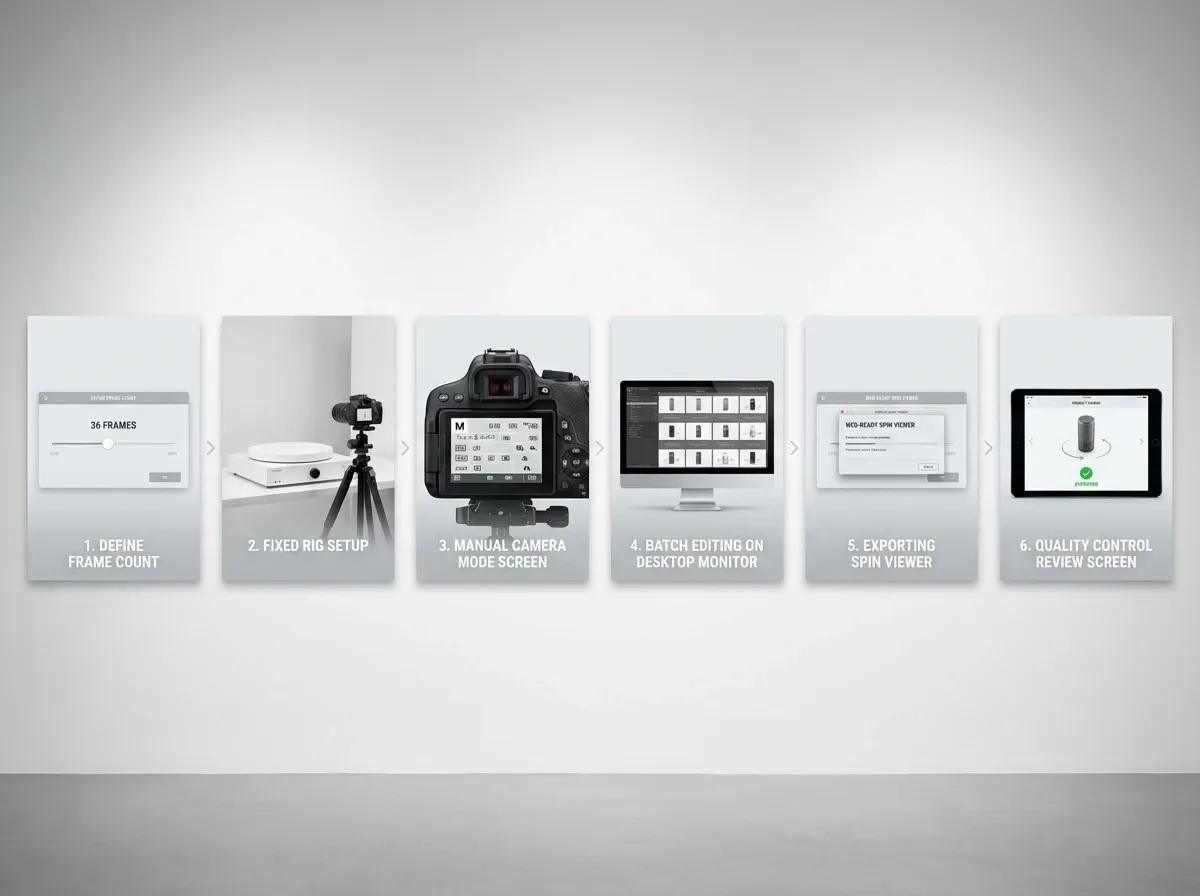
The biggest mistake I see is treating 360 as a one-off creative project. It needs to be operational. Same setup, same steps, same quality checks.
Step-by-step: a reliable 360 spin product photography workflow
Define your standard: number of frames (ex: 36), angle (eye-level vs slight top-down), and background style.
Build a fixed rig: tripod height marked, product position marked, lighting taped down.
Shoot in manual mode: lock white balance, shutter speed, aperture, and ISO.
Batch edit: apply the same baseline adjustments across the entire set.
Assemble and export: generate a consistent viewer output and compression profile.
QA like a buyer: check wobble, cropping, sharpness, and any “flash” frames.
Where AI tools help (without pretending they do everything)
AI will not magically create a true 360 spin from a single photo for every product, especially if you need perfect accuracy. The reality is that capture still matters.
Where AI does help is the boring but expensive part: making your frames consistent. For example, if you are producing a 360 set and also need matching hero images for ads, tools like ProductAI can speed up background variations. One example is the AI Background Generator for creating consistent campaign looks without reshooting: AI Background Generator.
And when your 360 viewer needs crisp frames on mobile, upscaling can be useful. The Increase Image Resolution tool is one option for improving perceived sharpness when your originals are borderline: Increase Image Resolution.
360 on Shopify, Amazon, and ads: what changes
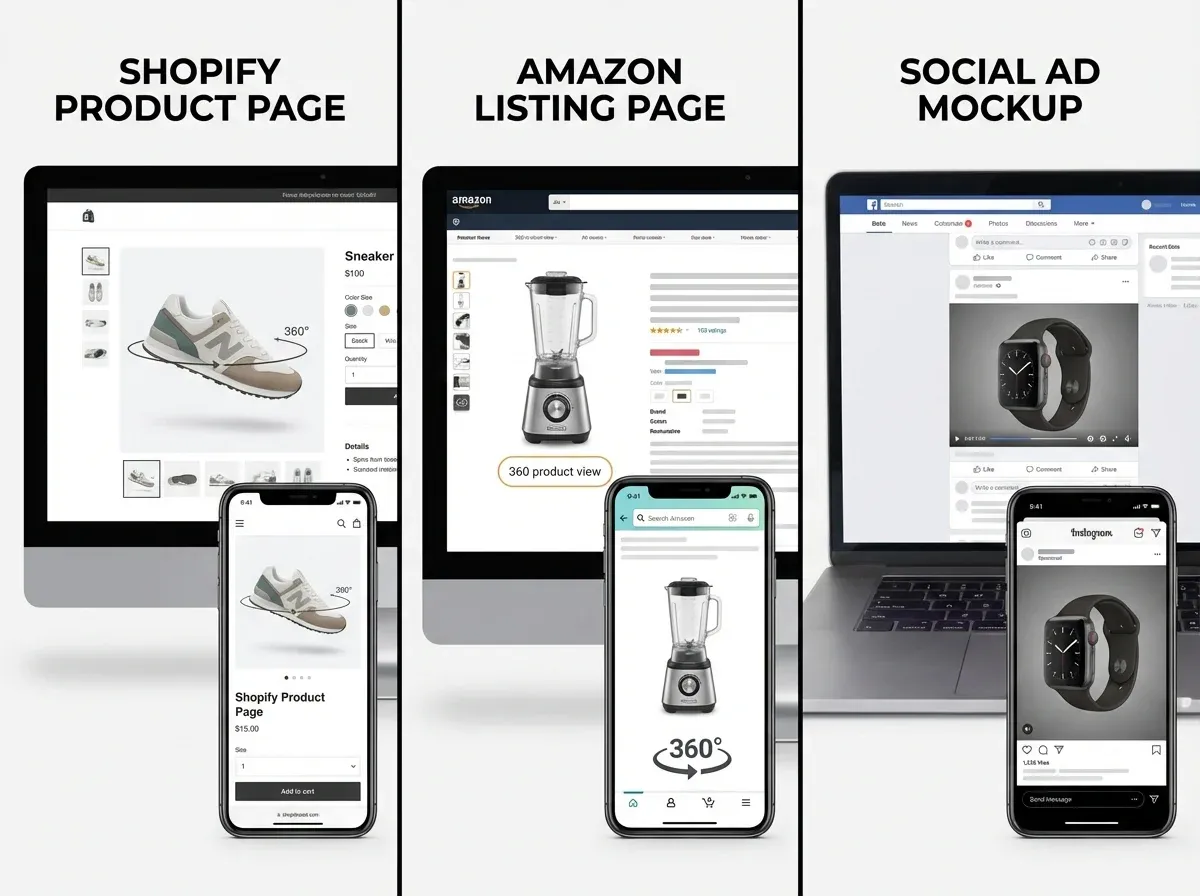
Good 360 content is only valuable if it loads fast and works where shoppers actually buy. Platform requirements and shopper expectations vary.
Shopify and DTC product pages
On your own site, you control the viewer, performance optimizations, and placement. Put the 360 view close to the primary image area, not buried below the fold. Treat it like a decision-making tool, not a gimmick.
Amazon 360 view: different rules, different payoff
Amazon is ruthless about clarity and compliance, but the payoff is real because shoppers compare listings quickly. If Amazon is a major channel for you, prioritize learning the exact requirements and rollout process for amazon 360 product view so you do not waste cycles producing assets you cannot publish.
Ads and social: use 360 thoughtfully
Most paid social placements do not support interactive spins natively. Instead, you typically use short rotations as video, GIF-like motion, or a sequence that implies depth. A 360 workflow still helps here because it gives you a library of angles for creative testing.
Cost vs ROI: when 360 is worth it
360 degree product photography equipment and software can look expensive until you compare it to the cost of returns, customer support time, and the opportunity cost of losing high-intent shoppers.
How to estimate ROI without overthinking it
Think of it this way: you are buying clarity. Measure it in three places: conversion rate lift on PDPs, reduced return rate on “not as expected,” and improved ad performance from better creative.
If you want to sanity-check what you should be paying for production, this breakdown is helpful: Product Photography Pricing: How Much Should It Cost.
A realistic rollout plan for most stores
Start with your top 20 products by revenue or by return volume. Ship wins fast, then expand. Once you have a repeatable workflow, 360 becomes a production line, not a special project.
Frequently Asked Questions
What is a 360 view in product photography?
A 360 view is an interactive product spin made from a sequence of images captured around an item, usually on a turntable. Shoppers drag, swipe, or click to rotate the product, which helps them inspect details from multiple angles. It is different from a single video because the viewer controls the angle. It is also different from a true 3D model, which is generated from 3D assets rather than photos.
Do 360 view product images actually increase conversions?
They often do, but not because they are flashy. A 360 view helps shoppers answer fit and detail questions without leaving the product page, which reduces hesitation. The biggest gains usually show up in categories where shape, finish, and construction matter. If your product is simple or very low cost, you might see a bigger return from improving your static image set first, then adding 360 to your highest-impact SKUs.
How many frames do you need for a smooth 360 rotation?
Most brands land between 24 and 72 frames. Fewer frames load faster and cost less to produce, but the spin can feel choppy. More frames look smoother but increase shooting, editing, and file size. A common middle ground is 36 frames (10-degree increments), which usually feels smooth on mobile while staying manageable to produce. The right answer depends on product complexity and your site performance constraints.
What is the best 360 product photography turntable setup for small products?
For small items, the key is stability and repeatable centering. Use a turntable with a non-slip surface, a fixed tripod, and marked product placement so the item stays in the same position across frames. Diffused lighting helps avoid hot spots that “move” as the product rotates. If you are shooting reflective items, use larger diffusion and control your environment so unwanted reflections do not appear and disappear during the spin.
What should I look for in 360 product photography software?
Prioritize workflow features over fancy effects. You want consistent exports, good compression controls, and a viewer that loads quickly on mobile. If the software supports alignment and batch processing, that saves real time when you scale. Also check hosting and embedding options so your 360 view works reliably across your storefront. If you are considering an app-based approach, compare how it handles capture, assembly, and publishing, not just the final viewer.
Can I create a 360 product view without a studio?
Yes, as long as you can control light and keep your camera fixed. Many teams start with a tabletop setup near a window plus diffusion, or with a simple continuous light kit. The challenge is consistency: every frame must match in exposure and color or the spin will flicker. If you cannot control ambient light changes, shoot at night with artificial lighting. A clean, repeatable setup beats a large room you cannot control.
Is a 360 degree product view the same as 3D product photography?
Not quite. A 360 degree product view is usually photo-based and rotates around one axis, like a turntable spin. 3D product photography can refer to true 3D assets that allow rotation in any direction and can support AR experiences. 360 is typically faster and cheaper to produce for e-commerce and is often enough to improve clarity and conversion. True 3D becomes more compelling when you need AR or complex interactions.
How does Amazon 360 view work for sellers?
Amazon supports 360 content for eligible brands and categories, but the requirements can be strict. You generally need a compliant image sequence and you must publish it using Amazon’s accepted process. The main advantage is competitive differentiation on crowded listings, where shoppers compare options quickly. If Amazon is a serious revenue channel, it is worth building a repeatable pipeline specifically for their requirements. Start here: amazon 360 product view.
Do I still need static images if I have a 360 view?
Yes. Your primary image, key lifestyle shot, scale reference, and detail close-ups still matter. Many shoppers will not interact with a 360 view at all, especially if they are speed-scanning on mobile. Treat 360 as a conversion support tool for high-intent shoppers who need extra certainty. A strong product page usually combines static images, a 360 view, and clear specs so each shopper can get confident in their own way.
Can AI replace 360 product photography equipment?
For most real products where accuracy matters, AI does not fully replace capture. You still need a camera, stable setup, and consistent lighting to produce a high-quality 360 spin. Where AI helps is speeding up the supporting work around the set, like creating consistent backgrounds for hero images or improving borderline resolution for web delivery. Used well, AI reduces production friction. It does not eliminate the need for a solid 360 workflow.
Key Takeaways
A 360 view tends to outsell static photos because it reduces uncertainty and puts control in the shopper’s hands.
360 works best for products where shape, finish, and construction details drive hesitation or returns.
Consistency is everything: fixed camera, locked settings, stable centering, and controlled lighting.
Choose 360 product photography software based on workflow and performance, not effects.
Start with your highest-revenue or highest-return SKUs, prove lift, then scale the process.
Conclusion
Static images can sell, but they make shoppers do mental work: they guess what the product looks like from the side, how deep it is, and where the key details sit. A 360 view removes that guesswork. It is one of the most practical ways to build trust quickly, especially in categories where returns happen because “it looked different online.”
The winning approach is not complicated. Build a repeatable setup, pick the right number of frames, use reliable 360 product photography software, and publish spins first on the products that matter most. As you scale, look for process shortcuts that keep quality high, like batching edits and using AI tools for supporting assets (background variants, sharper web-ready images) without pretending AI replaces the capture step.
If you want to experiment with faster supporting visuals, explore ProductAI’s free tools and see how the workflow feels.
Last updated: February 2026
About the Author
Giles Thomas, Ecommerce & AI Product Photography Expert – Founder, AcquireConvert.
Giles helps e-commerce teams improve conversion rates through stronger product-page visuals and scalable photography workflows. He focuses on practical, performance-driven approaches to 360 product imagery, tooling, and production processes that reduce uncertainty and returns.

Hi, I'm Giles Thomas.
Founder of AcquireConvert, the place where ecommerce entrepreneurs & marketers go to learn growth. I'm also the founder of Shopify agency Whole Design Studios.