3D Ecommerce: How 3D Photography Boosts Sales (2026 Guide)

.webp)
Last updated: February 2026
What You Will Learn
What 3D ecommerce actually means (and what it does not)
Why 3D photography boosts sales and reduces returns
Choosing the right 3D asset: spins, renders, AR, configurators
Where 3D belongs on your ecommerce product page
A practical workflow for producing 3D at scale
How to measure ROI and run clean A/B tests
Common mistakes that make 3D underperform
You finally get a product page live, the ads are running, and traffic is coming in. Then you watch the session recordings and see the same pattern: shoppers scroll, zoom a little, hesitate, and bounce. Your product is probably great. The problem is confidence. People cannot touch, lift, or inspect anything online, so they look for visual proof.
That is where 3d ecommerce earns its keep. When shoppers can rotate a product, explore details, and understand size and finish, you remove a chunk of purchase anxiety. In practice, this can lift conversion rate, reduce returns, and improve how your brand feels in the first five seconds.
This guide breaks down what “3D” really means, where it fits on the product page, how to choose between 3D photos, renders, and configurators, and how to measure ROI. If you are also shoring up the fundamentals, start with this pillar on product photos so your 2D and 3D assets work together.
What 3D ecommerce actually means (and what it does not)
.webp)
Most stores say “3D” when they mean one of four things: a 360-degree spin made from photos, a 3D model rendered into images, an interactive viewer that lets you rotate a model in the browser, or an AR experience that places the product in someone’s space.
Here’s the thing: 3D is not automatically better than great 2D. It is better when it answers a question 2D struggles with, like scale, geometry, or how parts relate when viewed from different angles. If your product is simple and cheap, 3D can be overkill. If your product has meaningful detail, fit, or premium materials, 3D can be the difference between “looks nice” and “I trust this.”
3D photography vs 3D product visualization
People often lump these together. A 360 photo spin is still photography, just captured from many angles. 3D product visualization usually means a digital model that you can render into stills or display interactively.
If you want a deeper breakdown of the capture side, see our guide to 3d photography. If you are leaning into digital-first assets, it helps to understand product rendering and how it changes your content pipeline.
Why 3D photography boosts sales and reduces returns
Conversion is often limited by uncertainty. 3D reduces uncertainty by letting shoppers verify details themselves. They do not have to rely on your copy, and they do not have to infer what the product “probably” looks like from one hero angle.
The biggest sales levers 3D improves
Confidence is the headline. But the knock-on effects matter too. When shoppers engage with a 3D viewer, you often see longer time on page, higher add-to-cart rate, and fewer pre-purchase questions. For higher-consideration categories, that can be the difference between someone buying now versus bookmarking and forgetting.
Consider this: returns are not just a logistics cost. They are also a margin killer, a customer support load, and an inventory forecasting problem. If 3D helps customers self-qualify before purchase, you win three times.
Where 3D tends to perform best
3D shines when the product has “explainable value” in its physicality. Think footwear (sole shape, materials), furniture (depth, height, texture), consumer electronics (ports, thickness), premium beauty packaging (finish, reflectivity), and anything modular. If your product is mainly a color or pattern choice, you might get more from improved 2D lifestyle imagery and variant coverage.
Choosing the right 3D asset: spins, renders, AR, configurators
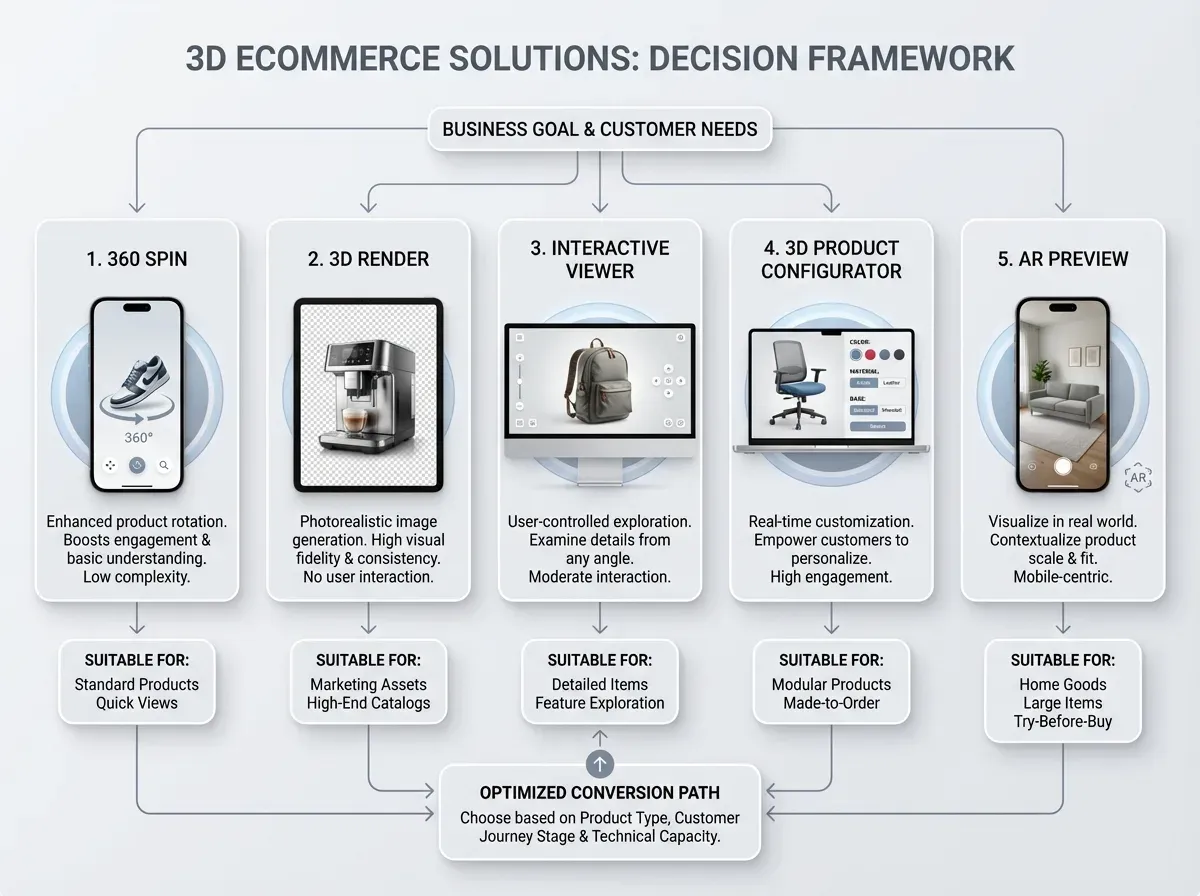
Now, when it comes to 3D ecommerce solutions, the hardest part is not the tech. It is picking the minimum effective asset for the buying decision you are trying to improve.
Option 1: 360 photo spins (multi-angle photography)
A 360 spin is typically a sequence of photos shot around the product and stitched into an interactive rotation. The upside is realism. The limitation is flexibility. If you change packaging or add a new color, you usually need another capture.
If you are still building your baseline catalog, start by tightening your product photos first. 3D works best when the rest of the gallery is already doing its job.
Option 2: 3D product design and rendering
If you already have a CAD file or a 3D model, you can render consistent images across every angle, finish, and color. This is where product visualization software can pay for itself, especially if you launch new variants often.
What many businesses overlook is that rendering is not only for “fake” images. You can blend it with real photography. Use real photos for hero and texture-critical shots, then use renders for long-tail angles, exploded views, and variant expansion.
Option 3: Interactive 3D viewers (rotate in-browser)
Interactive viewers sit on the product page and let users rotate and zoom freely. This can create a more premium 3d shopping experience than a fixed spin, but it also raises performance requirements. You need to keep load times in check or you lose the win before it starts.
Option 4: 3D product configurators
A 3d product configurator is the heavy hitter for customization. If your business sells configurable items like furniture fabrics, jewelry settings, engraved products, or modular systems, a configurator turns product selection into a guided experience.
From a practical standpoint, configurators are not just “nice UX.” They can reduce back-and-forth with support, cut misorders, and increase AOV by making upgrades obvious.
Option 5: 3D plus AR
AR is a trust accelerator for items where scale matters. But AR is not a replacement for a clean gallery. Treat it as an assist for the last-mile question: “Will this fit here?” or “Will this look right in my space?”
Where 3D belongs on your ecommerce product page
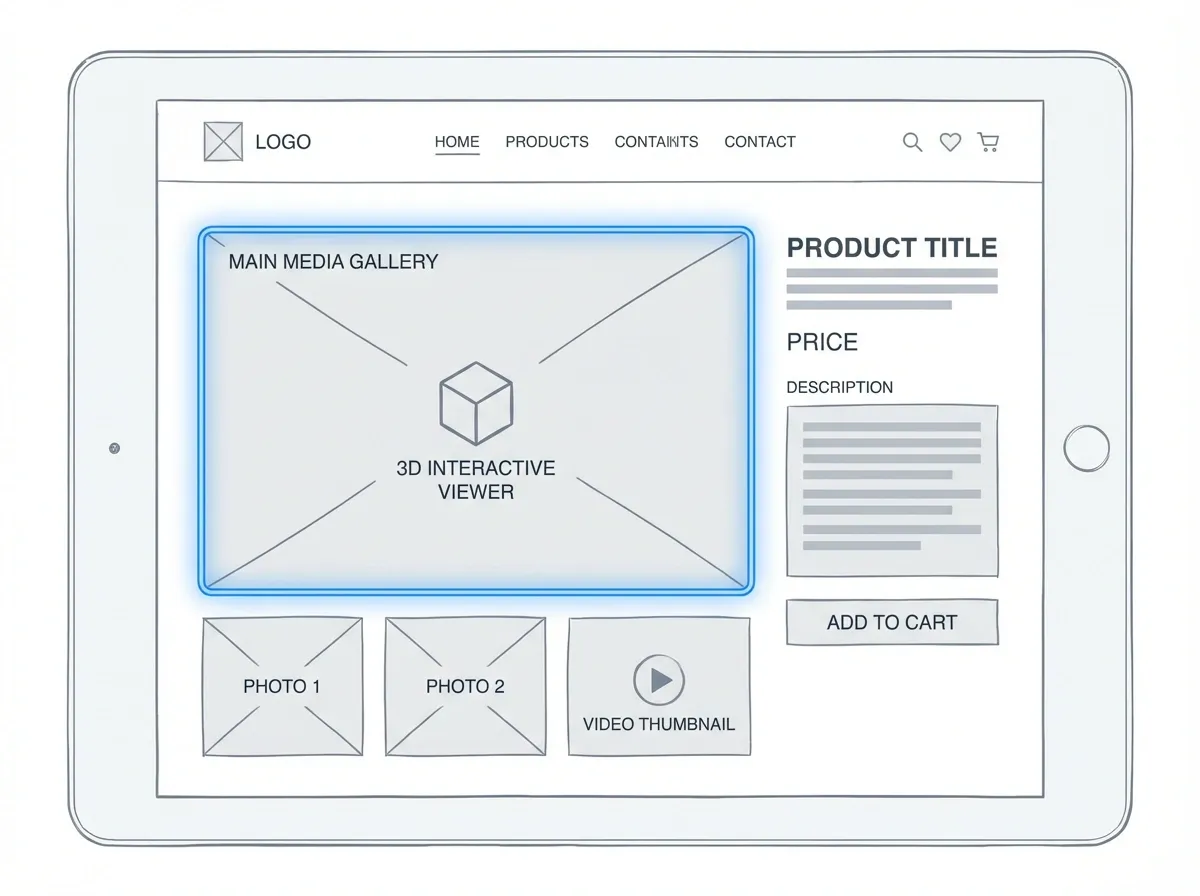
The reality is that most stores add 3D as a novelty module and then wonder why it does not move the needle. Placement and context matter.
Put 3D where it reduces friction, not where it looks cool
For most categories, the best placement is inside the main media gallery, alongside your ecommerce product photos and videos. It should feel like a normal part of the viewing flow, not a separate “tech demo” lower on the page.
Also, label it clearly. “View in 3D” or “Rotate” works. People do not want to interpret an unfamiliar icon while they are deciding whether to trust you.
Pair 3D with the right supporting media
3D shows shape and detail. Lifestyle imagery shows context. Short-form ecommerce product videos show function and scale quickly. A strong product page uses all three in a planned sequence, so each asset answers a different buying question.
If you are building a richer gallery experience, a structured product showcase can help you think about the story your visuals need to tell, not just the formats you can embed.
A practical workflow for producing 3D at scale
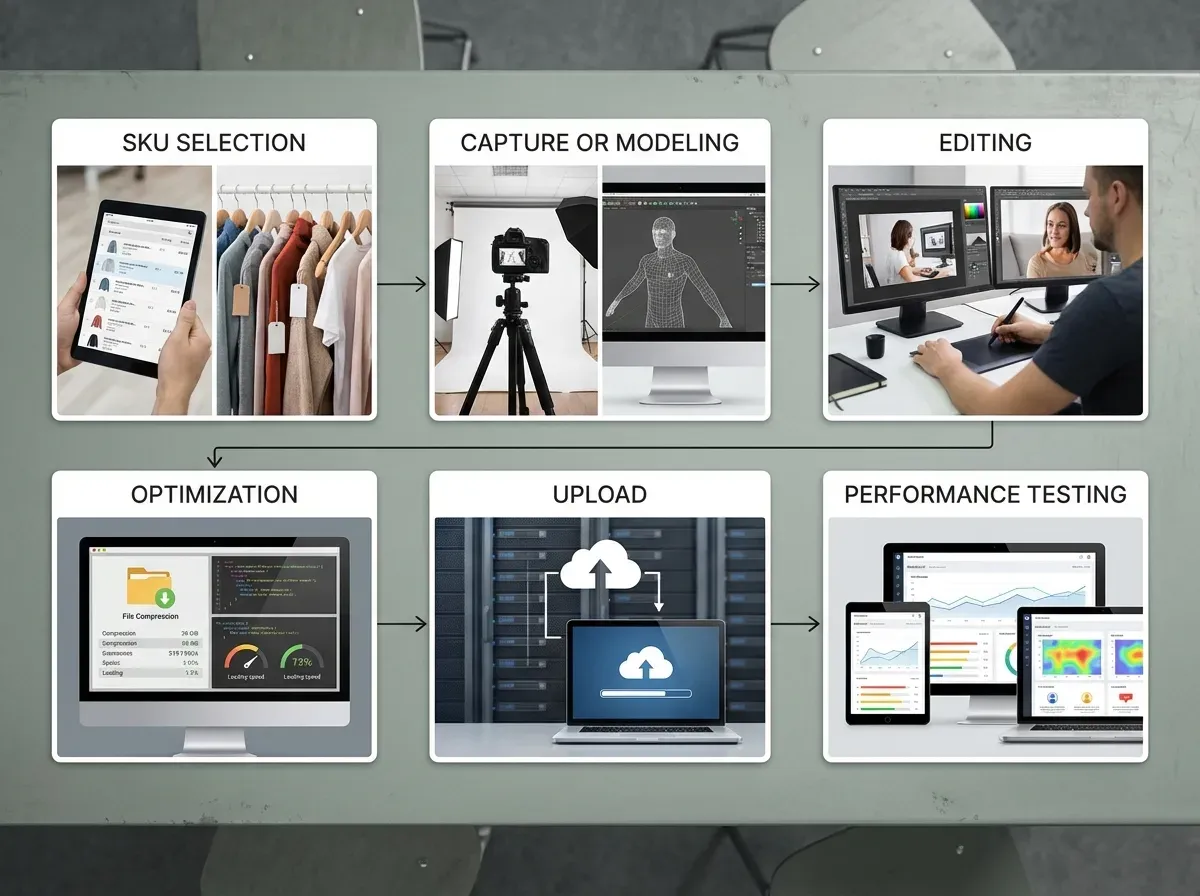
Whether you shoot a 360 set in a studio or build a digital pipeline for renders, scaling is where most teams get stuck. They can make one great 3D asset. They struggle to make 500.
Start with SKU triage (not every product needs 3D)
Pick products where 3D will most likely change a decision: top sellers, high-margin items, high-return items, and products where customers frequently ask for more photos. This keeps your first rollout focused and measurable.
Standardize lighting, color, and angle rules
Consistency is the invisible conversion booster. If each product uses a different lighting style or camera height, shoppers feel the catalog is messy. Standardization is also what makes your 3D assets easier to update when packaging changes.
Use AI tools to support the 3D workflow (without faking the product)
AI is useful around the edges of 3D production: generating clean backgrounds for ads, creating campaign variants, or improving image quality after export. One example is ProductAI, which can help you generate background variations with the AI Background Generator and prepare sharper assets with Increase Image Resolution when you need additional crops for marketplaces.
Think of it this way: you still want your core product geometry and color to be accurate. AI should support presentation and production speed, not rewrite what you sell.
Plan for on-site performance early
3D can be heavy. Keep files optimized, lazy-load where possible, and test on mobile connections. If your 3D module delays the first meaningful paint, it can hurt conversions even if the experience is great once loaded.
How to measure ROI and run clean A/B tests
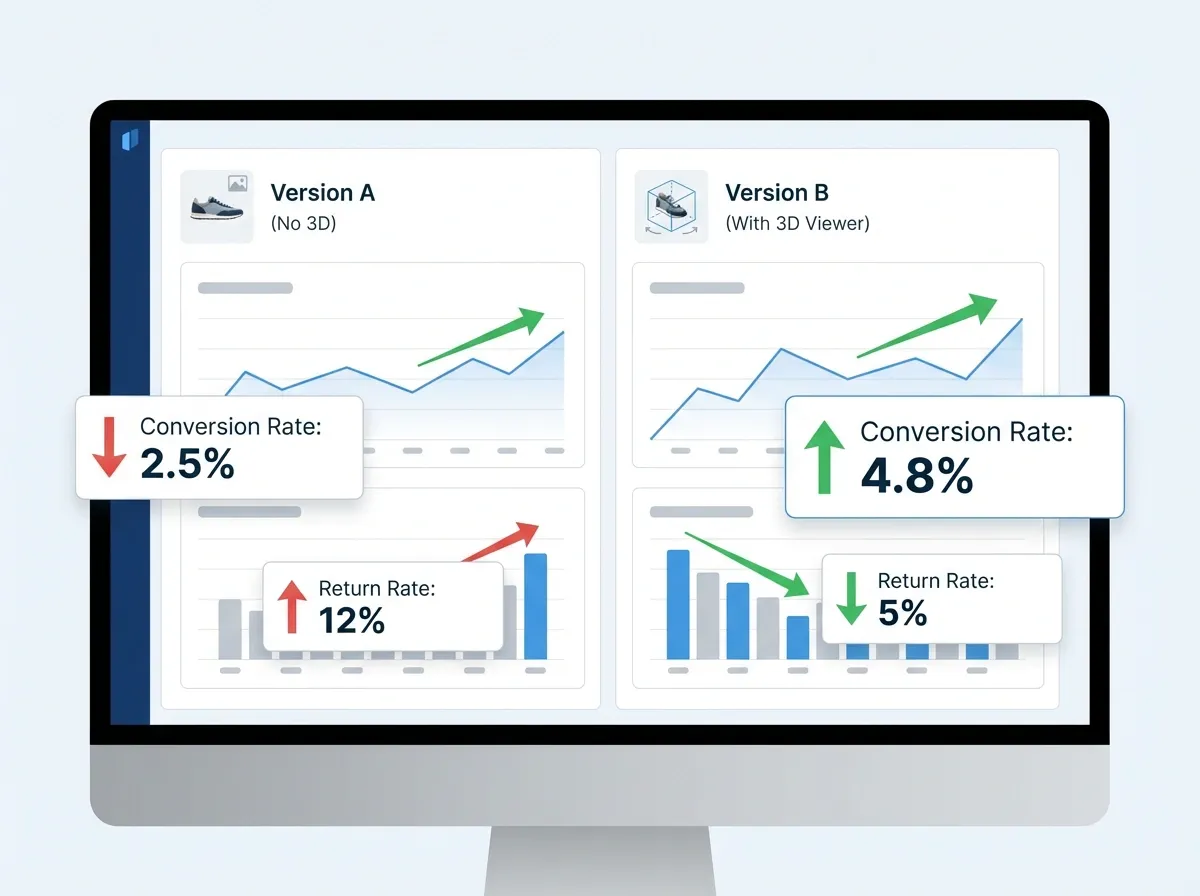
MOFU shoppers are comparing options, so your measurement needs to be practical and tied to money. If you do not measure, 3D becomes a cost center.
Metrics that actually matter
Conversion rate on PDPs where 3D is present versus absent (or before and after)
Add-to-cart rate and checkout initiation rate
Return rate and return reasons (especially “not as expected”)
Support tickets and pre-purchase questions per 1,000 sessions
Engagement signals: interaction rate with 3D, time on PDP, gallery depth
How to structure the test
Run tests on a product set large enough to avoid noise. If you have low traffic, group similar SKUs and test by category page routing, or roll out to half of your best-selling SKUs first.
Also, avoid bundling changes. If you add 3D, replace your images, rewrite your copy, and change price all in the same week, you will not know what did the work.
Budgeting reality check
3D costs range wildly based on complexity, volume, and whether you already have 3D product design files. If you are comparing agencies, studios, and internal production, it helps to understand typical ranges and what drives cost. This breakdown on Product Photography Pricing: How Much Should It Cost gives useful context when you are planning a mixed 2D and 3D roadmap.
Common mistakes that make 3D underperform
Most failures are not technical. They are expectation and execution problems.
Mistake 1: Treating 3D as a novelty
If 3D does not answer a specific buying question, shoppers will ignore it. Frame it as a utility: rotate to inspect, zoom to check texture, view size relative to common objects, or configure options clearly.
Mistake 2: Slow load times and clunky mobile UX
Mobile shoppers are impatient. If your 3D viewer loads slowly or hijacks scroll, you pay for it in bounce rate. Test on older devices and weaker networks, not just your office Wi-Fi.
Mistake 3: Inaccurate materials and colors
This is the trust killer. If your 3D model makes materials look too glossy, too matte, or just different from reality, you create returns. Match your 3D output to your known-good photography standards.
Mistake 4: No supporting 2D assets
Even with 3D, you still need crisp hero shots, detail macros, and lifestyle context. If you want a solid checklist for polishing AI-assisted imagery without losing accuracy, this post on Tips for Professional AI-Generated Product Photos is a helpful reference.
Mistake 5: Forgetting ecommerce product search
Your 3D viewer will not usually be indexed like a normal image. You still need strong filenames, alt text, and a complete set of standard images so your ecommerce product search and SEO do not lose coverage. 3D is an enhancement, not a replacement for image fundamentals.
Frequently Asked Questions
What is 3d ecommerce, in simple terms?
3d ecommerce means selling products online using 3D visuals, not just flat photos. That can include 360 photo spins, interactive 3D viewers, 3D renders from a digital model, AR previews, or even configurators for customized products. The goal is to make shoppers feel like they can “inspect” the item, which increases confidence. It is most useful when shape, scale, and physical details are part of the buying decision, like furniture, footwear, and premium goods.
Do 3D product photos actually increase conversions?
They can, but only when they reduce a real source of buyer uncertainty. If shoppers hesitate because they cannot judge size, materials, or details, 3D helps them self-verify and move forward. If the product is simple and low-risk, 3D may not change behavior much. The clean way to find out is to A/B test on a set of high-traffic product pages and track conversion rate, add-to-cart rate, and return reasons. Treat 3D as a measurable optimization, not a brand “upgrade.”
What is the difference between 3D photography and product rendering?
3D photography usually refers to capturing a real product from many angles, then presenting those photos as a 360 rotation. Product rendering uses a digital 3D model to generate images or interactive views, often without needing a physical product on set. Photography is strong for realism and true materials. Rendering is strong for consistency, rapid variant creation, and pre-launch visuals. Many brands use both: photos for hero shots and texture-critical views, renders for long-tail angles or configurable options.
Is a 3d product configurator worth it for smaller stores?
A configurator is worth considering when customization is core to your value proposition and when customers frequently ask “what will this look like if…” It can reduce support workload and misorders while increasing AOV by making upgrades easier to understand. For smaller stores, start narrow: configure one best-selling product line or one high-margin product where options are confusing in static images. If you can tie it to a reduction in returns or an increase in conversion on key SKUs, it becomes easier to justify expanding.
How do I add 3D to my ecommerce product page without slowing it down?
Start with performance as a requirement, not an afterthought. Use optimized files, lazy-load the 3D module, and keep your default view as a fast-loading hero image. Test on mobile devices, not just desktop. Also, limit auto-play behavior that blocks scrolling. If you embed an interactive viewer, measure page speed before and after, plus bounce rate and conversion rate. A slightly “cooler” page is not a win if it loads slower and loses shoppers at the top.
Which products benefit most from a 3d shopping experience?
Products that are judged by physical detail benefit most: furniture, home decor, consumer electronics, footwear, watches, jewelry, premium packaging, and configurable items. Anything with an important silhouette, material finish, or functional geometry tends to perform well in 3D. If customers regularly zoom in, request additional angles, or return items due to “not as expected,” those are strong signals. For products mainly differentiated by color or pattern, you may get more ROI from better lifestyle photography and variant coverage.
Can AI replace 3D product visualization work?
Not fully, at least not if accuracy matters. AI can generate scenes, edit backgrounds, and speed up content production, but true 3D product visualization depends on consistent geometry, materials, and lighting behavior across angles. Where AI helps is in supporting the workflow: creating campaign-ready background variations, improving resolution for specific crops, or generating supporting creative for ads. If you use AI, set rules to protect product truth: match color, avoid changing shapes, and validate against real photography or sample units.
How do I measure ROI for 3D ecommerce solutions?
Measure ROI using both revenue and cost signals. On the revenue side: conversion rate, add-to-cart rate, and AOV on SKUs with 3D. On the cost side: return rate and return reasons, support tickets, and time spent answering pre-purchase questions. Run a controlled test where possible and avoid bundling multiple site changes at once. If you also pay for production, calculate how many incremental orders or saved returns you need to break even. That keeps the decision grounded and repeatable.
Do I still need a traditional ecommerce product photography studio if I have 3D?
In most cases, yes, but you may need it differently. A studio helps you create hero images, lifestyle content, and color-accurate references that keep your catalog trustworthy. 3D adds interactive inspection and variant flexibility, but it does not always capture real-world material behavior as well as a camera. Many brands run a hybrid setup: shoot a core set of reference images in a studio, then expand angles, variants, and interactive views through 3D visualization and rendering workflows.
Will 3D help with SEO and ecommerce product search?
3D can improve engagement, which can indirectly help performance, but it does not replace SEO basics. Search engines and on-site search systems typically rely on standard images, alt text, structured data, and clear product information. Your 3D viewer might not be indexed like a normal image asset. So keep a complete image set, use descriptive filenames, and write helpful alt text. Treat 3D as an enhancement that improves shopper confidence after the click, not as your primary search visibility driver.
Key Takeaways
3d ecommerce boosts sales when it reduces uncertainty about size, shape, materials, or configuration.
Choose the simplest 3D format that answers the buying question: 360 spins, renders, viewers, AR, or configurators.
Place 3D inside the main gallery, and protect performance on mobile with optimized, lazy-loaded assets.
Measure ROI with conversion, add-to-cart, returns, and support volume, then scale 3D only where it wins.
Use AI to support production speed and consistency, but keep product accuracy as the non-negotiable standard.
Conclusion
3D ecommerce is not about making your product page feel futuristic. It is about removing doubt at the exact moment a shopper is deciding whether to trust you. If your products have meaningful physical detail, high return risk, or lots of variants, 3D can be a practical lever that improves conversion and cuts post-purchase pain.
Start small: choose a handful of SKUs where visual uncertainty is clearly hurting performance, add a 3D experience that loads fast, and measure the impact against a control group. Keep your standard gallery strong with clear hero images and detail shots, then use 3D to answer the questions 2D cannot. Over time, you will build a repeatable workflow that scales across your catalog without bloating costs or slowing your site.
If you want to explore AI-assisted image production, try ProductAI’s free tools and see how the workflow feels.
Last updated: February 2026
About the Author
Giles Thomas, Ecommerce & AI Product Photography Expert – Founder, AcquireConvert.
Giles helps ecommerce teams improve conversion rates by building high-performing product page experiences and visual content systems. His work focuses on practical, measurable uses of emerging tech—like 3D visualization and AI-assisted workflows—to reduce buyer uncertainty and increase sales.

Hi, I'm Giles Thomas.
Founder of AcquireConvert, the place where ecommerce entrepreneurs & marketers go to learn growth. I'm also the founder of Shopify agency Whole Design Studios.