3D Product Viewer: Interactive Models for Any Site (2026)

.webp)
Last updated: February 2026
What You Will Learn
What a 3D product viewer is (and what it is not)
Where 3D product views outperform images and video
3D asset types: glTF, USDZ, 360 spins, and “3D look” renders
3D product viewer requirements checklist
Setup steps: from model creation to site embed
Performance budgeting: how to keep 3D fast on mobile
Model quality checklist (what to ask your 3D artist or vendor for)
Virtual photography and “render once, repurpose everywhere” workflow
Marketplace and platform realities (Shopify, Amazon, and where 3D does not travel)
ProductAI as a practical alternative or complement
A 3d product viewer can lift conversion rates for products where texture, shape, and scale drive purchase decisions. Think footwear, furniture, home goods, beauty tools, and premium packaging. The catch is that “add a 3D model” is rarely a single step. You need the right type of 3D asset, a viewer that fits your tech stack, and a workflow that does not slow your pages or create a maintenance nightmare.
This guide breaks down what a 3D product viewer actually does, the different implementation routes, and a practical buying checklist. I will also show where AI product photography fits in, because many teams find they need better product photos and consistent angles before 3D is worth the investment.
What a 3D product viewer is (and what it is not)
.webp)
A 3D product viewer is a front-end component (usually WebGL-based) that lets shoppers rotate, zoom, and sometimes interact with a product model directly on your product page. In higher-end setups, it also supports AR so customers can place the product in their space.
It is not the same thing as a 360 photo spin. A 360 spin is a sequence of still images stitched into an interactive carousel. It can look great and load fast, but it does not allow true depth, perspective changes, or lighting shifts like a real-time 3D model.
It is also not the same thing as “3D product imagery” that was rendered in Blender or a CAD tool and exported as flat JPGs. Those images can be beautiful and consistent, but you lose interactivity. If you are still deciding, it helps to compare true interactive models with 3d product images and the cost of maintaining each.
Where 3D product views tend to win (and where they do not)
3D is most compelling when it reduces uncertainty. If a buyer is asking, “What does it look like from the side?” or “How thick is it?” interactivity can do more than another lifestyle photo.
Good use cases
Products with complex geometry: furniture, lighting, tech accessories, tools, footwear.
Customization: colors, materials, monograms, or modular components.
High AOV items: where reducing returns matters more than the added production cost.
B2B catalogs: when buyers need confidence before requesting a quote.
Common “not worth it yet” cases
Fast-moving SKUs where you cannot justify a new 3D model per variant.
Low-margin items where photography already converts well.
Catalogs with poor source assets (inconsistent angles, lighting, or product versions) that make model creation expensive.
3D asset types you will run into (and what to choose)
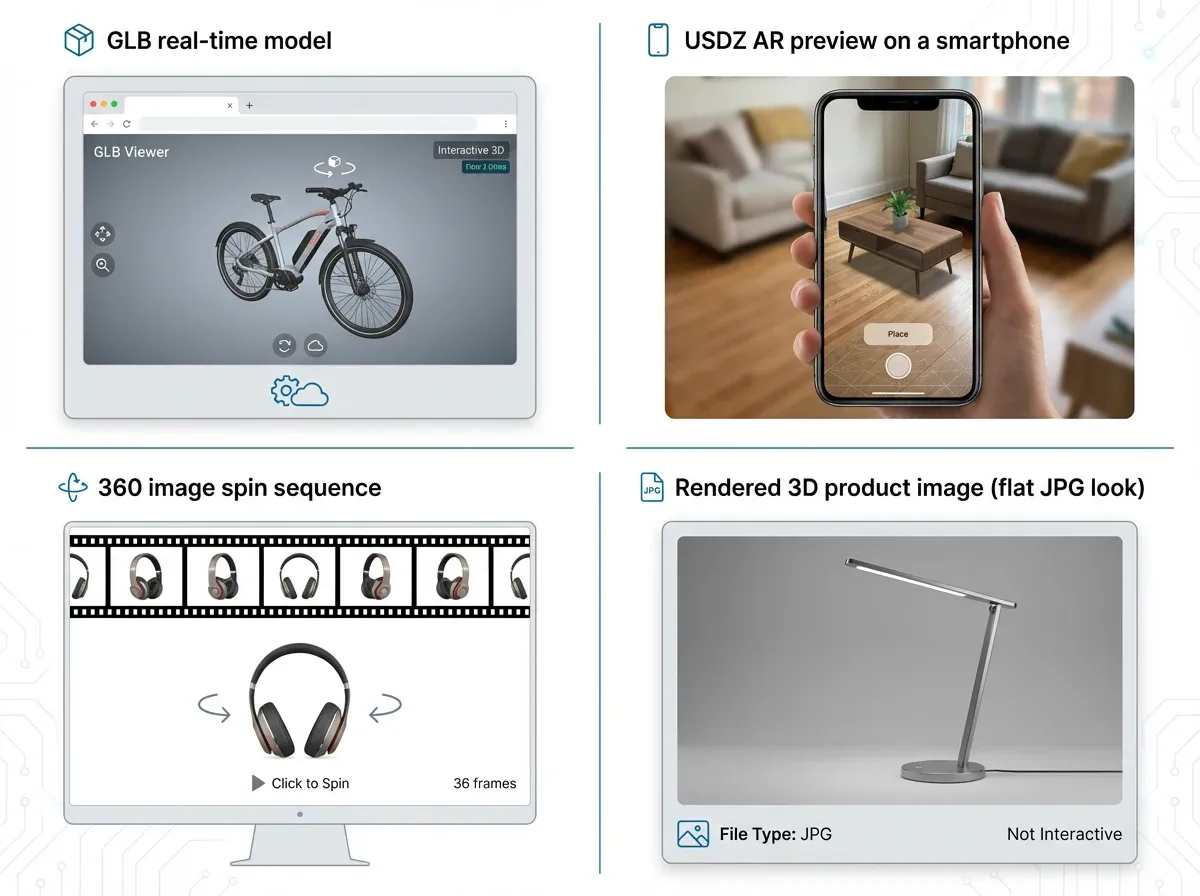
The biggest buying mistake is choosing a viewer first, then discovering your asset format or workflow does not match. Here are the formats and “pseudo-3D” options most e-commerce teams consider.
1) Real-time 3D models (glTF or GLB)
glTF/GLB is the workhorse for web. If your goal is smooth interaction and manageable file sizes, most teams aim for a GLB model optimized for real-time rendering.
2) AR models (USDZ for iOS, glTF for Android/WebAR)
If AR is part of the project, you will likely need USDZ support. Some viewers handle this for you, others require separate exports and logic.
3) 360 spins (image sequences)
A 360 viewer can be a great stepping stone because it is easier to produce than a true 3D model. If you are exploring this route, see our guide to choosing a 360 product viewer.
4) Rendered “3D look” imagery
This is where 3d product rendering often fits best: you render consistent angles and lighting for PDP images, ads, and marketplaces. It is not interactive, but the cost per SKU can be far lower than producing and maintaining full 3D models.
3D product viewer requirements checklist (what to evaluate before you commit)
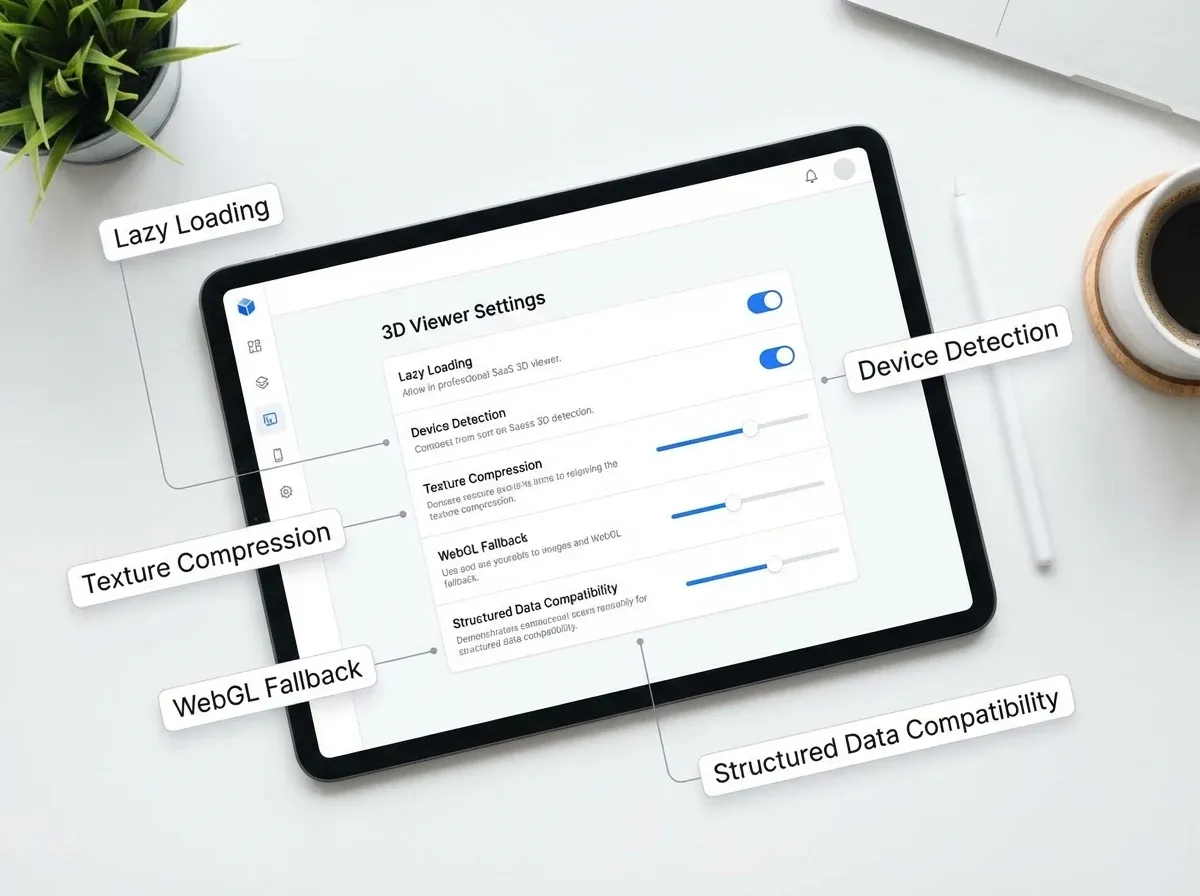
Use this as your procurement checklist, whether you are evaluating a SaaS platform, an open-source viewer, or a dev agency solution.
Performance and Core Web Vitals
Lazy loading and “click to load 3D” options.
Automatic device detection so low-power phones get a lighter experience.
Model compression and texture optimization guidance.
Fallbacks when WebGL is unavailable.
SEO and indexation
Clean HTML around the viewer so product copy is not buried.
Structured data support for products (usually handled by your theme, but the viewer should not break it).
Ability to keep standard images as primary media for search and marketplaces.
Workflow and collaboration
Asset pipeline: how you upload, version, and replace models.
Approvals and staging environments (especially for bigger catalogs).
Variant handling (colorways, materials, bundles).
Commerce platform fit
Shopify, WooCommerce, Magento, headless: confirm you can embed cleanly.
Compatibility with your image CDN, PIM, or DAM.
Support for marketplaces if you reuse assets off-site.
Total cost of ownership
The viewer subscription is rarely the main cost. The real budget line items are model creation, optimization, updates when packaging changes, and QA across devices. If you are trying to benchmark “what should this cost,” this pricing guide is useful: Product Photography Pricing: How Much Should It Cost.
How to set up a 3D product viewer on your site (practical steps)
Most implementations follow the same path, even if the tooling differs.
Step 1: Decide the experience you actually need
Interactive 3D on PDP only, or also category pages?
AR required or optional?
Hotspots, annotations, or “exploded views” needed?
Step 2: Create or source the 3D asset
This can come from CAD (best for manufacturers), photogrammetry (best for physical objects), or manual modeling (best for control). Whatever you choose, document naming conventions and versioning early.
Step 3: Optimize the model for web
You are balancing fidelity and speed. In practice that means reducing polygons, compressing textures, and testing real devices, not just a desktop dev machine.
Step 4: Implement viewer and measure impact
Start with a pilot SKU set. Track conversion rate, add-to-cart, time on page, bounce rate, and return rate. If the viewer slows the page or confuses shoppers, you will see it quickly.
Step 5: Build a repeatable content workflow
The best rollouts have a template: model checklist, QA checklist, and a release process. Without that, 3D becomes an expensive “special project” that never scales.
Performance budgeting: how to keep 3D fast on mobile
Here is the thing, most 3D product viewer projects fail for the simplest reason: the 3D module becomes the heaviest thing on the page. That is not just a technical problem, it is a merchandising problem. If shoppers have to wait to interact, they often do not interact at all.
From a practical standpoint, treat 3D like you would treat video. You do not autoplay a massive video file on every PDP, you set rules for when it loads and how it behaves.
What to do in a real rollout
Set a default experience that loads quickly: a standard image or thumbnail first, then 3D on click or after intent is clear.
Ship multiple quality levels if your viewer supports it, so low-end phones are not forced to render desktop-grade textures.
Keep texture resolution honest. Many models look sharp at typical zoom levels with smaller textures than your artist expects.
Test on actual devices, on cellular connections, not just in a desktop browser.
What many businesses overlook
If your viewer is slow, you will often see a double penalty: lower conversion and higher support load. People ask more questions when they cannot confidently “inspect” the product. That is why performance belongs in your requirements checklist, not in a dev ticket after launch.
Model quality checklist (what to ask your 3D artist or vendor for)
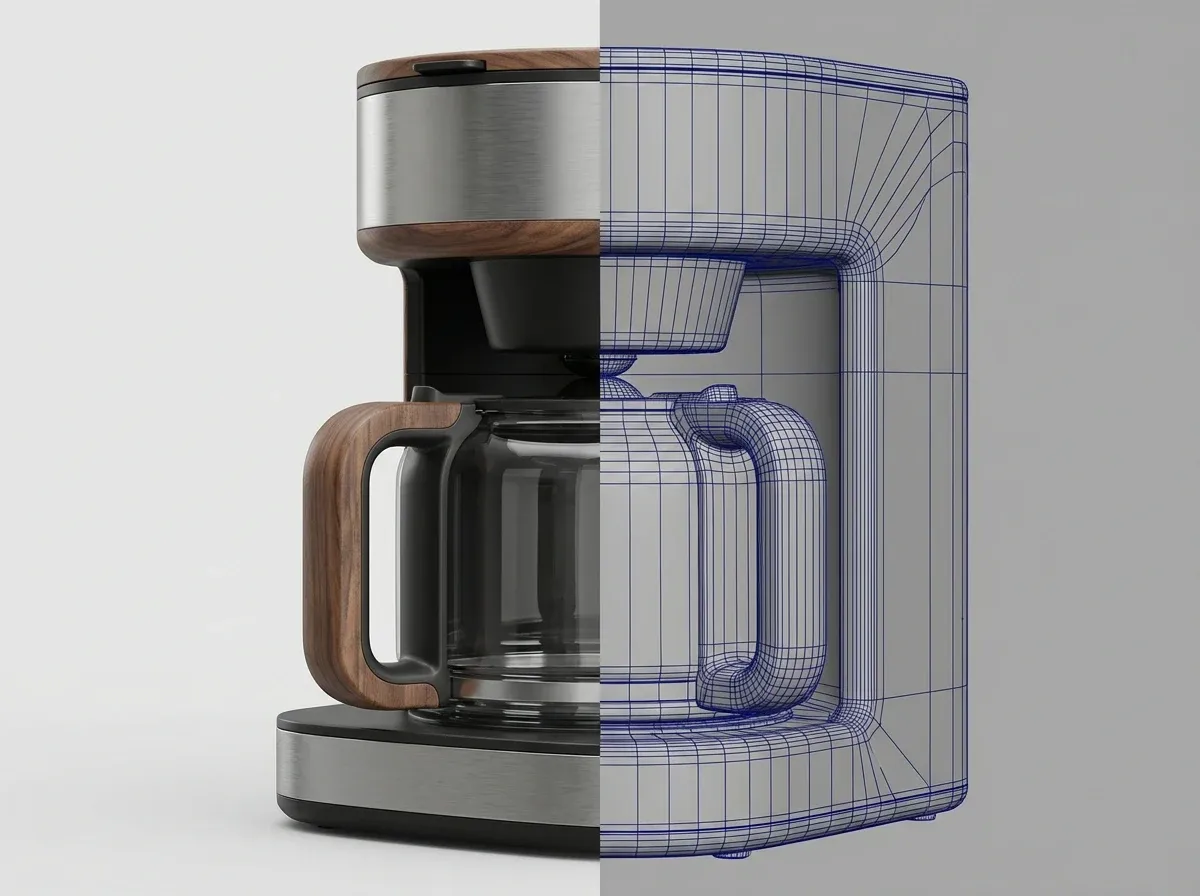
A viewer is only as good as the model you feed it. If you are outsourcing model creation, you want to avoid vague deliverables like “high quality GLB.” You want a checklist you can approve against.
Geometry and realism
Accurate proportions and scale, especially thickness and edge profiles.
Clean silhouettes at common angles, because that is what shoppers notice first.
Reasonable polygon counts for web, not “film quality” meshes.
Materials and textures
Correct material behavior, for example metal, glass, matte plastics, leather grain.
Legible labels and packaging text without shimmering or blur.
Consistent color management across variants so “black” does not change between SKUs.
Interaction details that affect conversion
Defined default camera angle that matches your hero image angle, so the page feels consistent.
Zoom limits and rotation behavior that feel controlled, not “spin wildly and lose the product.”
Clear fallback image behavior for browsers or devices that do not support the full experience.
Consider this, if you cannot write down what “good” looks like, you will end up approving models based on taste, not outcomes. The best teams standardize the checklist early so every new SKU gets faster and cheaper to produce.
Virtual photography and “render once, repurpose everywhere” workflow
Competitor teams often talk about “virtual photography,” and the idea is simple: once you have a high-quality 3D model, you can render a full library of supporting images without reshooting the physical product. That includes clean angles, closeups, and consistent lighting across a catalog.
Now, when it comes to ROI, this is one of the most realistic ways to justify 3D. Many brands do not need interactive models for every SKU, but they do need consistent media at scale. A single well-managed 3D asset can support multiple outputs.
What this looks like in practice
Interactive 3D for a small set of hero products where inspection really matters.
Rendered “angle library” images for most SKUs, using the same camera positions and lighting every time.
Variant generation for colors and materials, where it is cheaper to adjust a digital material than to reshoot inventory.
The reality is that you do not have to choose only one approach. The winning play is often a hybrid pipeline that gets you consistency first, then uses interactivity where it actually moves the conversion needle.
Marketplace and platform realities (Shopify, Amazon, and where 3D does not travel)
A 3D product viewer lives on your site. That sounds obvious, but it matters because many businesses assume they can build a 3D asset once and have it show up everywhere: marketplace listings, ads, email, and social. In reality, the “everywhere” part is mostly handled by 2D images and video.
What to confirm before you invest
If you are on Shopify or another templated platform, confirm the viewer embeds cleanly without breaking your media gallery, variant selectors, or theme updates.
If you rely on marketplaces, plan for a separate, marketplace-first media set. Most marketplaces prioritize standard images and have strict rules for backgrounds, cropping, and image order.
If your paid ads drive most of your traffic, remember that ads typically preview as static images. Your 3D viewer can still help once a shopper lands on the PDP, but your hero image still does most of the work.
Think of it this way, 3D is a PDP enhancement, not a replacement for strong catalog photography. That is why the best rollouts keep a strong baseline of 2D images and use 3D to remove uncertainty on the products that need it most.
Where ProductAI fits (even if you are investing in 3D)
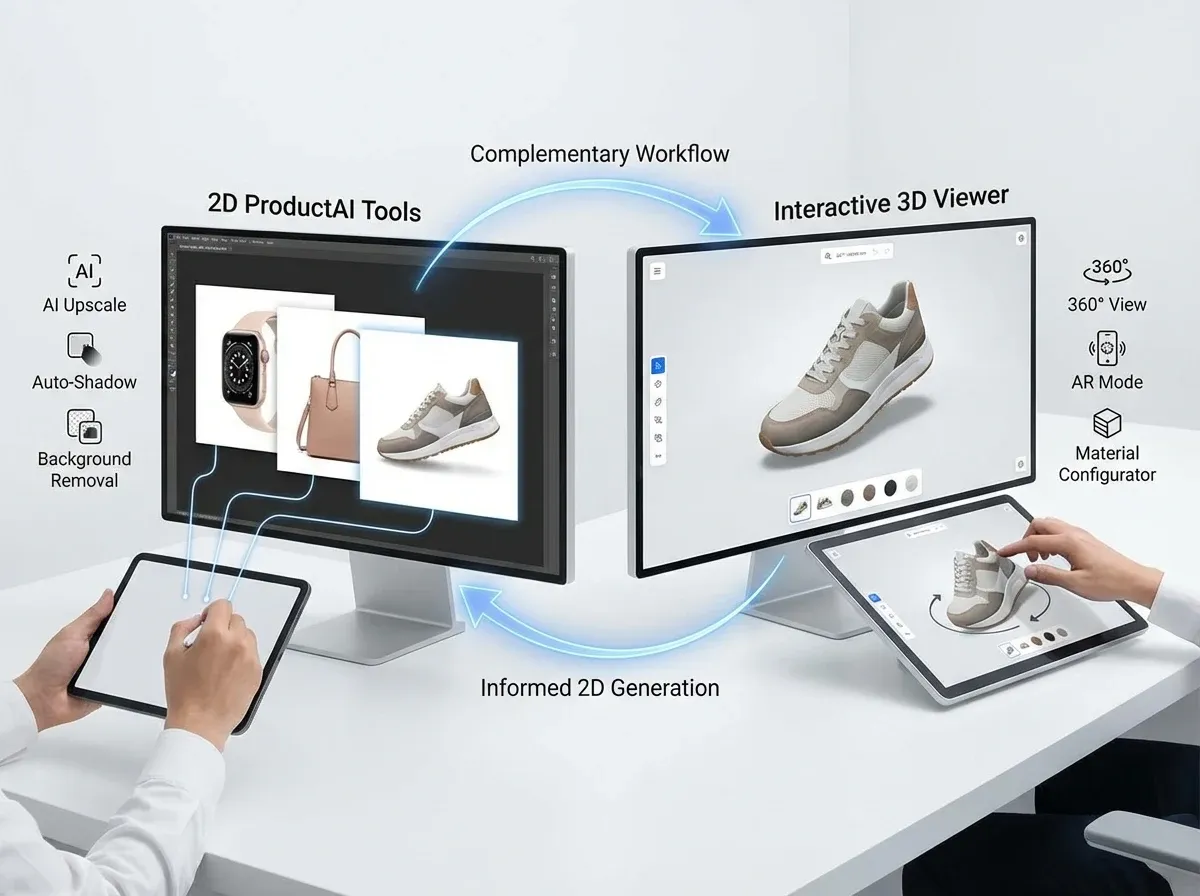
Many teams find that 3D only pays off after they fix the basics: consistent angles, clean cutouts, and on-brand backgrounds across every SKU. That is where ProductAI can complement a 3D product viewer workflow.
If you are producing spins, renders, or “standard” PDP imagery alongside interactive models, ProductAI helps you iterate fast on supporting visuals. For example, you can generate lifestyle backgrounds with the AI Background Generator, standardize marketplace-ready shots with the Free White Background Generator, and keep images crisp after cropping or resizing using Increase Image Resolution.
It is not a 3D model generator, and that is the point. Use it to improve the 2D media that still drives most product pages, ads, and listings. You can also use it to produce cleaner reference imagery that makes handoff to 3D artists or agencies smoother.
Pros and Cons
Strengths
Boosts shopper confidence for complex or high-value products by enabling rotation and zoom.
Can reduce pre-purchase questions and potentially reduce returns when the model is accurate.
Supports customization experiences (colors, materials) better than static galleries.
Creates premium brand perception when performance is fast and the UI is intuitive.
Pairs well with 2D media workflows, including 360 spins, renders, and consistent product photos.
Considerations
Real cost is model production and maintenance, not just the viewer subscription.
Performance can suffer on mobile if models are not optimized, hurting conversion.
Operational overhead increases: QA across devices, variant management, and asset versioning.
Not every catalog benefits equally, especially low-margin or frequently changing SKUs.
Buying guide: how to choose the right 3D product viewer
If you are comparing tools or vendors, I would focus on five criteria. This keeps you out of “feature bingo” and forces a decision that matches your business model.
1) Asset compatibility and future-proofing
Confirm supported formats (GLB/glTF, USDZ) and whether the platform locks you into proprietary hosting or export limitations. If you ever switch vendors, you do not want to rebuild your whole catalog.
2) Performance controls
Look for lazy-load options, thumbnails and fallbacks, and per-device quality settings. The best viewer is the one that does not hurt your Core Web Vitals. Treat performance as a hard requirement, not a “later” optimization.
3) Implementation effort and maintenance
If you run Shopify or another templated platform, confirm you can install without rewriting your theme. For headless stacks, confirm you get clean APIs, documentation, and predictable embed behavior.
4) Analytics and testing support
You should be able to run A/B tests or at least measure engagement with the 3D module. Without measurement, it is hard to justify scaling beyond a pilot.
5) Content pipeline: how you will actually produce assets
This is the part most teams underestimate. If you do not already have consistent media, start by tightening your photography workflow and background consistency. This article on real-world background decisions is a good reference: Location Backgrounds for Product Photography. Once your 2D baseline is strong, your 3D outputs tend to improve too.
Frequently Asked Questions
What is the difference between a 3D product viewer and a 360 viewer?
A 3D product viewer displays a real-time 3D model (often GLB/glTF) that shoppers can rotate and zoom with true depth. A 360 viewer typically uses a sequence of photos (a spin) that simulates rotation but does not allow changing perspective beyond the captured angles. 360 spins are usually simpler and cheaper to produce, while 3D models can enable AR and customization.
Do I need a 3D model to use a 3D product viewer?
Yes, for true interactive 3D you need a 3D asset. If you only have photos, you can still create interactive experiences using a 360 spin viewer. Some brands start with 360 to prove lift, then graduate to full 3D models for hero SKUs. Your decision should be driven by SKU value, complexity, and how often the product changes.
What file format is best for web-based 3D product views?
For most websites, GLB (binary glTF) is the most common option because it is designed for efficient real-time rendering. It supports materials and textures and tends to be friendlier to performance optimization. If you want AR on iOS, you will likely also need USDZ. The “best” format depends on your viewer and AR requirements.
Will a 3D product viewer slow down my product pages?
It can, especially on mobile, if the model is heavy or the viewer loads immediately. The practical fix is a combination of optimized models (polycount and texture compression) and smart loading behavior (lazy loading, click-to-load, fallbacks). Before rolling out, test a pilot set and compare conversion rate and page speed metrics against a control group.
Is a 3D product viewer good for SEO?
It can be neutral or positive, but it depends on implementation. Search engines still rely heavily on text, standard images, and structured data. Keep your primary product images and copy accessible in HTML, and treat 3D as an enhancement. Avoid burying content behind heavy scripts. Performance matters because slow pages can indirectly hurt rankings and user behavior signals.
How much does it cost to add 3D product views?
The viewer license or hosting is only part of the cost. The bigger variable is 3D asset creation per SKU, plus optimization, QA, and ongoing updates if your product changes. If you are budgeting, think in terms of pilot SKUs first, then a scalable pipeline. Your cost structure will look very different for CAD-ready manufacturers versus brands starting from scratch.
Should I use 3D product rendering instead of interactive 3D?
For many catalogs, yes. Rendering can produce consistent, premium imagery across angles and variants without the complexity of real-time 3D delivery. Interactive 3D tends to make sense for hero products, customization, or when returns are costly. A common approach is hybrid: rendered images for most SKUs, interactive 3D for top sellers or flagship items.
What products benefit most from interactive 3D models?
Items where shape, scale, and detail drive buying confidence: furniture, lighting, footwear, tools, and premium packaging. Also products with customization options, where 3D can visualize variants more clearly than image galleries. If you sell simple, low-cost items, you may see better ROI by improving photography, backgrounds, and merchandising before investing in 3D.
How does AI product photography help if I am investing in 3D?
Even with 3D, most PDPs still rely on 2D images for galleries, thumbnails, ads, and marketplaces. AI tools can help you standardize and scale those images fast. For example, you can generate consistent lifestyle scenes, create clean white-background versions, and upscale images after cropping. This makes the whole visual system stronger, not just the 3D module.
What is the fastest way to test whether 3D product views will lift conversion?
Run a small pilot with a clear hypothesis and measurable outcomes. Choose 5 to 20 SKUs where the product shape matters and traffic is sufficient. Implement 3D with strong performance safeguards, then compare add-to-cart, conversion, returns, and customer support tickets against similar SKUs without 3D. If you see lift, invest in a repeatable asset pipeline.
What should I ask a 3D vendor to deliver besides the model file?
Ask for a clear deliverable checklist: the final web-optimized GLB/glTF, a documented default camera angle, texture sizes used, and any recommended viewer settings for mobile performance. You also want versioning rules, so when packaging or materials change, you can update without breaking existing PDPs. If AR is in scope, confirm you will also receive the required AR formats and not just a single export.
Can I get value from 3D without adding an on-site 3D product viewer?
Yes. Many brands use 3D assets to produce consistent rendered images across angles and variants. That can improve your “standard” PDP gallery, ads, and marketplaces without introducing WebGL weight on the page. Interactive 3D is best treated as an enhancement for the SKUs where interactivity clearly reduces uncertainty.
How do I keep product colors consistent between 3D and photography?
Do not assume it will match automatically. You need a reference system: consistent lighting targets, material definitions, and a review step that compares the 3D output to approved photography. For variants, document what “true” color means for your brand and your category. Small shifts in gloss and shadow often matter more to shoppers than the exact hex value.
Does a 3D product viewer replace lifestyle photography?
No. A 3D viewer answers inspection questions, while lifestyle photography answers context and desire questions. Shoppers still want to see the product in a believable setting, in use, and sized relative to something familiar. The practical approach is to keep lifestyle shots and clean studio shots, then use 3D where interaction adds clarity.
Key Takeaways
A 3d product viewer is most valuable for complex, high-AOV, or customizable products where interactivity reduces uncertainty.
Your biggest risk is not choosing the wrong viewer, it is underestimating the 3D asset pipeline and maintenance.
Start with a pilot and measure performance and conversion before scaling catalog-wide.
Hybrid setups are common: interactive 3D for hero SKUs, 3d product rendering or strong photos for everything else.
AI photography tools can strengthen the supporting 2D media that still drives most e-commerce outcomes.
Conclusion
If you are considering a 3D product viewer, treat it like a merchandising investment, not a design experiment. The winning formula is simple: start with the SKUs where shoppers need to understand shape and detail, keep the experience fast on mobile, and build a repeatable asset workflow so you can scale beyond a handful of products.
If you are not ready for full interactive 3D across your catalog, you can still improve results by upgrading the visuals around your PDP. Explore your options for 3d product images, better product photos, and faster background workflows using ProductAI tools like the AI Background Generator.
Last updated: February 2026
About the Author
Giles Thomas, Ecommerce & AI Product Photography Expert – Founder, AcquireConvert.
Giles helps e-commerce teams improve conversion by building scalable product media systems, from Core Web Vitals-aware PDP experiences to practical workflows for 3D, rendering, and supporting 2D imagery. His focus is on choosing the right interactive and visual tools without compromising performance, SEO, or maintainability.

Hi, I'm Giles Thomas.
Founder of AcquireConvert, the place where ecommerce entrepreneurs & marketers go to learn growth. I'm also the founder of Shopify agency Whole Design Studios.