Try Photo Backdrops for Product Photos (2026)

.webp)
Last updated: February 2026
What You Will Learn
Best photo backdrops by product type and goal
When physical backdrops still make sense
Backdrop planning checklist (what to decide before you edit anything)
DIY photo backdrop setup for physical shoots (fast, cheap, consistent)
Textures and props: add depth without clutter
Backdrop requirements by channel (Amazon, Etsy, and your own site)
Fast ProductAI workflow: remove, swap, or generate
Which ProductAI tool to use (and why)
Tool: AI Background Generator
Platform: ProductAI
Speed: 25 seconds per image
Pricing: Free to try (credits included)
Try AI Background Generator Free
20 free credits. No credit card required.
If you sell online, “photo backdrops” are rarely about finding the perfect roll of paper. They are about getting consistent, conversion-focused backgrounds across every SKU, every colorway, and every channel. That is exactly where AI backdrops win: you can test clean white, soft lifestyle scenes, or high-contrast black in minutes, without rebuilding your studio.
This guide shows you the best backdrops for e-commerce product photography, plus how to create them quickly with ProductAI. If you want deeper reading on the core workflow, start with this pillar: ai background generator.
Best photo backdrops for product photography (what actually converts)
For most stores, the “best” backdrop is the one that reduces buyer doubt. It should clarify the product’s shape, color, and texture, and keep attention on the offer. Here are the backdrops I see work best across e-commerce catalogs.
1) Pure white backdrop (marketplaces, catalogs, and fast scale)
White backdrops are the default for a reason: they are predictable, easy to batch edit, and accepted on most marketplaces. If you are refreshing a catalog, launching dozens of SKUs, or cleaning up supplier images, the fastest route is a consistent white background that does not shift between shots.
Try Free White Background Generator Free
2) Light neutral backdrop (premium feel without distraction)
Soft grays, warm off-whites, and subtle gradients can make products feel more premium while still keeping the “clean catalog” look. This is a strong option for beauty, jewelry, and home goods where the shadows and edges matter, but you do not want a full lifestyle scene.
3) Black or dark backdrop (high contrast, luxury cues)
Black background photo editing is worth doing when contrast sells the product: reflective bottles, watches, tech, or anything with metallic details. The trick is to keep edges crisp and preserve natural reflections. If your original photo is low resolution or slightly blurry, upscale first before committing to black backgrounds.
Try Increase Image Resolution Free
4) Lifestyle backdrop (ads, landing pages, and storytelling)
Lifestyle scenes convert when they answer “what does this look like in my life?” Think kitchen counters, bathroom shelves, outdoor scenes, or a desk setup. The risk is inconsistency: different lighting and mismatched perspective can make a product look pasted in. AI helps you test lifestyle concepts quickly, then standardize the winners.
5) Branded backdrop (recognition at a glance)
If you are building a recognizable brand, a custom photo backdrop can be as simple as one consistent color, a repeated texture (stone, linen, matte paper), or a signature gradient. The goal is repeatability. You want customers to recognize your product images in a feed before they even see the logo.
If you want a swipe file of concepts, see: photo backdrop ideas.
Physical backdrops vs AI backdrops: what I recommend in 2026
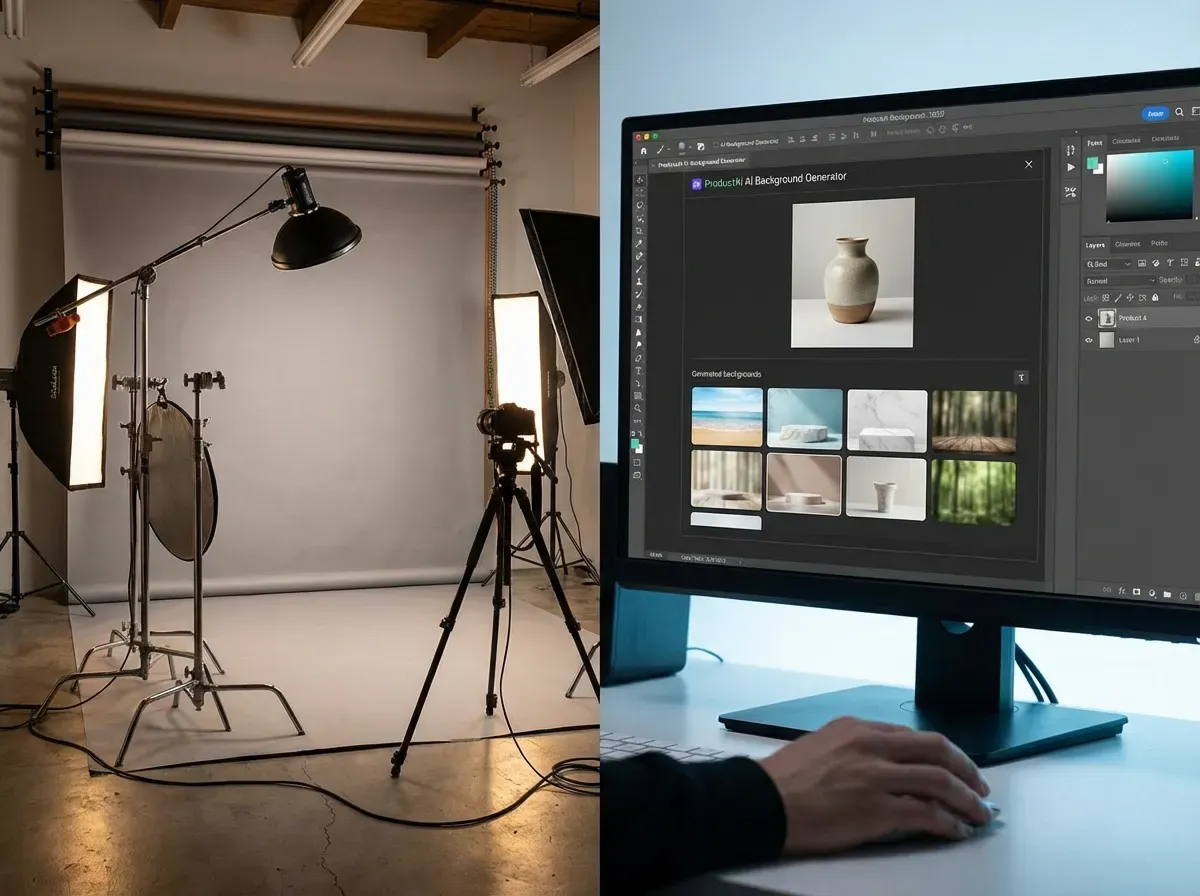
Physical backdrops are still useful when you need complex interactions like heavy reflections, transparent products that pick up background color, or highly specific shadows that must match reality. They are also good when you are shooting high volume in a controlled studio and the backdrop never changes.
AI backdrops shine when your bottleneck is time, budget, or consistency. If you are dealing with supplier photos, mixed lighting, or you need 10 creative variations for ads, AI is usually the fastest way to get “good enough to test,” then you can double down on the backdrops that actually lift CTR or conversion rate.
For most e-commerce teams, the winning workflow is hybrid: capture a clean, well-lit base photo once, then use AI for background photo editing and variations.
Backdrop planning checklist (what to decide before you edit anything)
.webp)
What many businesses overlook is that “backdrop choice” is really a usage decision. If you pick the right backdrop for the job, the editing gets simpler, and results look more credible.
Before you generate, swap, or reshoot, answer these questions:
What is the image for: a marketplace listing, a product page, a landing page, an ad, or social?
What is the product category: reflective, transparent, textured, or highly color-sensitive?
Do you need consistency across a full catalog, or just one hero image for a campaign?
What does the buyer need to understand instantly: size, finish, ingredients, or how it is used?
Which channel rules apply: pure white, no props, or lifestyle is allowed?
From a practical standpoint, this turns “infinite backdrop options” into a short list: one marketplace-safe standard, one on-site brand standard, and one lifestyle template for creative testing.
DIY photo backdrop setup for physical shoots (fast, cheap, consistent)
.webp)
Here’s the thing: even if you plan to use AI, your outputs get better when the base photo is clean. If you are shooting products yourself, you do not need a full studio to get a usable “master image” per SKU.
Use a sweep, not a wall
A sweep is a continuous backdrop that curves from vertical to horizontal, so you avoid a harsh corner line and hide small wall imperfections. For small products, a roll of white paper, poster board, or a flexible white sheet clipped to a table works well.
Stabilize first, then worry about style
Blurry images make backdrop work harder. Use a tripod if you have one, and prioritize even lighting. Once the product is sharp with clear edges, you can create white, neutral, dark, or lifestyle backdrops much more reliably in editing.
Control unwanted color casts
Shiny products pick up color from whatever is nearby. If your “white” setup is near a bright wall, colored fabric, or a window with strong color, you can end up chasing strange tints later. The simplest fix is to keep the immediate area neutral and the lighting consistent.
Textures and props: add depth without clutter
Textures can make a photo backdrop feel premium, but only if they stay in the background. When they compete with the product, conversion usually drops because the shopper has to work harder to understand what you are selling.
Pick textures that match the product’s job
Consider this: a kitchen product on a kitchen surface makes sense, but the same surface behind a tech accessory can look random. When you add context, keep it relevant to the product’s function.
Use “one texture + one accent” as a rule of thumb
If you are styling a physical scene, start with one main texture (wood, stone, concrete, fabric), then add one small accent item for depth. Extra props can quickly look like clutter, especially on marketplace thumbnails.
Keep edges and labels readable
Busy patterns are the fastest way to lose legibility on small screens. If your product has important text, ingredients, or fine detail, favor simpler backdrops and let the product do the work.
Backdrop requirements by channel (Amazon, Etsy, and your own site)
.webp)
Now, when it comes to backdrop choice, platform rules matter because they shape what you can test. A backdrop that performs on your site might get rejected, or simply underperform, on a marketplace.
Marketplaces: prioritize compliance and consistency
Most marketplace main images favor a clean white background and a straightforward product presentation. Even when rules allow some flexibility, the practical goal is consistency across your catalog so shoppers trust the listing at a glance.
Etsy and social-first marketplaces: lifestyle can be the differentiator
When shoppers browse visually, context can be the hook. In those channels, a lifestyle photo backdrop that communicates “this is what it looks like in your home” can be more valuable than perfect uniformity. The tradeoff is you still need a clean, accurate product representation for trust.
Your own site: build a repeatable brand standard
Your product pages benefit from a consistent look that makes the catalog feel cohesive. A neutral or lightly branded backdrop can elevate perceived quality, and you can still keep a white version ready for any channel that needs it.
Fast ProductAI workflow for photo backdrops (remove, swap, or generate)
.webp)
ProductAI is built for product photography workflows, so you can move from a basic product shot to a polished backdrop in a few steps. In practice, I use it in three ways, depending on what the business needs.
Option A: Generate a new backdrop from scratch (best for ads and lifestyle scenes)
Use AI Background Generator when you want to create an entirely new scene. This is the quickest route to testing seasonal creative, “on-brand” environments, and ad variations without setting up a studio.
Try AI Background Generator Free
Option B: Swap the backdrop while keeping control (best for consistency)
Use the Background Swap Editor when you want more control over placement and the overall look. This is useful for creating consistent catalogs: same framing, same product scale, different backdrop styles for different collections.
Try Background Swap Editor Free
Option C: Fix and polish your existing image (best for quick cleanups)
Use Magic Photo Editor when you need practical fixes: remove distractions, refine edges, clean up a background photo editing mistake, or make small creative adjustments without restarting your whole workflow.
Need a more detailed walkthrough? This guide is solid: How to Remove Background from Image: Complete Guide.
Which ProductAI tool should you use for your backdrop goal?
If you are choosing between tools, match the tool to the output you need, not the feature list.
If you need marketplace-ready images
Start with a clean white output so every SKU looks consistent. Use the white tool for speed, then upscale if you need sharper edges for zoom or larger placements.
Free White Background Generator
If you want creative variations for ads
Generate several lifestyle backdrops quickly, then keep what performs. The ability to iterate is the advantage here, especially when you are testing hooks and angles.
If you want a controlled “studio look” across a catalog
Use swapping so the product stays consistent and your backdrop changes. This is often the simplest path to “custom photo backdrops” that still look uniform across collections.
If you are evaluating editors more broadly, see: best ai photo editor. If you specifically want the swapping workflow, this page helps: swap background.
Important limitations (so you get better results)
AI backdrops are fast, but they are not magic. Results vary based on your input image quality. A clean, well-lit product photo with clear edges consistently performs better than a dark, blurry shot.
Also, ProductAI is credit-based, so very high volume teams should plan their usage. Some features are in beta, and there can be a learning curve if you want very specific art direction. If you need pixel-perfect compositing for complex scenes, you may still want a designer in the loop for the final hero images.
Pricing (what I can confirm from tool data)
The Product tool confirms you can try ProductAI tools with free credits via the official tool pages linked above. However, the About tool returned no data in this run, so I cannot responsibly publish a full plan table (price, credits, resolution) without verified current figures.
If you are ready to test backdrops, the fastest path is to use the free credits and see what output you get for your specific products.
Try AI Background Generator Free
Frequently Asked Questions
What are the best photo backdrops for selling products online?
For most stores, start with white (marketplaces and consistency), then add one neutral “brand standard” backdrop for your site. Use lifestyle backdrops for ads and landing pages where context increases desire. If your products rely on shine or contrast, test black backgrounds, but only after ensuring your base image is sharp enough to preserve clean edges.
Do AI-generated backdrops look fake?
They can if the input photo is low quality or if the scene lighting does not match the product. The best results come from a well-lit base photo with clear separation from the original background. If something feels off, use the Background Swap Editor for more control, or clean details with Magic Photo Editor instead of regenerating from scratch.
How do I create custom photo backdrops without a studio?
Use a consistent base product shot, then generate or swap backgrounds to match your brand. I recommend creating 3 to 5 “approved” backdrop styles (white, neutral, lifestyle, seasonal, and dark) and applying them across your catalog. That gives you consistency without being stuck with a single look.
What is the fastest way to get a white backdrop for product photos?
Use the Free White Background Generator. It is designed specifically for quick, clean catalog outputs. If you plan to use the images in larger placements (hero banners, high-resolution zoom), upscale afterward so edges and textures stay crisp.
Is background photo editing better than reshooting?
If the product is in focus and properly exposed, editing is almost always faster than reshooting. Reshoots make sense when the base photo is unusable (motion blur, heavy shadows hiding details, poor color accuracy). A practical approach is to reshoot one clean “master” image per SKU, then use AI to create variations for different channels.
How many backdrop variations should I test for ads?
I like to start with 5 to 10 variations around one clear concept (for example, “bathroom shelf,” “spa tile,” “neutral gradient”). Keep the product angle and crop consistent so you can isolate the impact of the backdrop. After you have winners, standardize them into repeatable templates for future launches.
Can I do black background photo editing with ProductAI?
Yes, you can generate or swap to a dark backdrop, then refine the final look in the editor. For black backgrounds, pay attention to edge halos and reflections. If your output looks soft, run Increase Image Resolution first to improve clarity before committing to a dark, high-contrast style.
What is a “sweep,” and why does it matter for product photos?
A sweep is a continuous backdrop that curves from the wall down onto the surface the product sits on. It matters because it removes the hard corner line that often shows up with a plain wall, and it gives you a cleaner starting point for background photo editing.
How do I choose a backdrop based on where the photo will be used?
Start with the strictest requirement first. If you need a marketplace main image, build a clean white version. If you need a product page image, create a consistent neutral or branded standard so your catalog looks cohesive. If you need ads, test lifestyle variations that reinforce the product’s use case, then keep the winners.
What backdrops work best for reflective or transparent products?
Reflective and transparent products often look best on simple backdrops where lighting is controlled, because they pick up color and shapes from the scene. If your outputs look odd, it is usually because the base photo had messy reflections or color casts. In those cases, a physical shoot with a clean sweep can be worth it, then you can use AI for variations once you have a strong master image.
What is the biggest mistake with lifestyle backdrops?
Adding context that is not relevant to the product. Props that are off-theme, cluttered backgrounds, or textures that fight the label reduce trust. A lifestyle scene should answer one question quickly: where is this used, and what does it feel like to own it?
Ready to try photo backdrops that match your brand?
If you want better product photos without rebuilding your entire studio setup, start by testing AI backdrops on 3 to 5 bestsellers. Generate a lifestyle scene for ads, create a consistent neutral look for your site, and keep a clean white version ready for marketplaces. You will know quickly what looks credible for your products, and what actually saves time.
Try AI Background Generator Free
Last updated: February 2026
About the Author
Giles Thomas, Ecommerce & AI Product Photography Expert – Founder, AcquireConvert.
Giles helps e-commerce teams create consistent, conversion-focused product imagery at scale using practical AI workflows. His work focuses on reducing production time and improving catalog performance across marketplaces, ads, and product pages.

Hi, I'm Giles Thomas.
Founder of AcquireConvert, the place where ecommerce entrepreneurs & marketers go to learn growth. I'm also the founder of Shopify agency Whole Design Studios.