Best AI Product Photography Tools (2026 Guide)


If you run a Shopify store, Etsy shop, or fast-moving ecommerce catalog, product imagery can become a bottleneck long before traffic does. You need clean backgrounds, consistent sizing, sharper details, and lifestyle-style visuals that actually fit your brand. The challenge is choosing a tool that saves time without making your listings look synthetic or inconsistent. This guide compares the best ai product photography tools using a practical store-owner lens: image cleanup, background editing, catalog speed, and real merchandising utility. If you are still refining your setup, it helps to review what a strong product photography studio process should cover before you rely on AI alone.
Contents
Overview
The best ai product photography tools are not all trying to solve the same problem. Some focus on background cleanup for marketplace-ready images. Others help you create alternate scenes, upscale older product shots, or remove distracting text and overlays from source files. That matters because most ecommerce teams do not need one magic tool. They need a workflow.
For example, a store with 50 SKUs may care more about speed and consistency than advanced scene generation. A fashion brand may want apparel-friendly edits and on-brand lifestyle context. A beauty merchant may need controlled image variation that still keeps packaging, shades, and finishes accurate. If that is your use case, adjacent AI visual workflows like this ai makeup generator guide can help you think through where AI visuals help and where precision matters more.
From the current tool data available, the strongest options center on editing and enhancement rather than promising a full replacement for professional shoots. That is usually the more realistic ecommerce use case anyway. AI can help reduce manual production time, repurpose existing assets, and support testing. It should still be reviewed against your merchandising standards, return-risk concerns, and platform image requirements.
Why AI Product Photos Look Inconsistent (And How to Fix Style Drift)
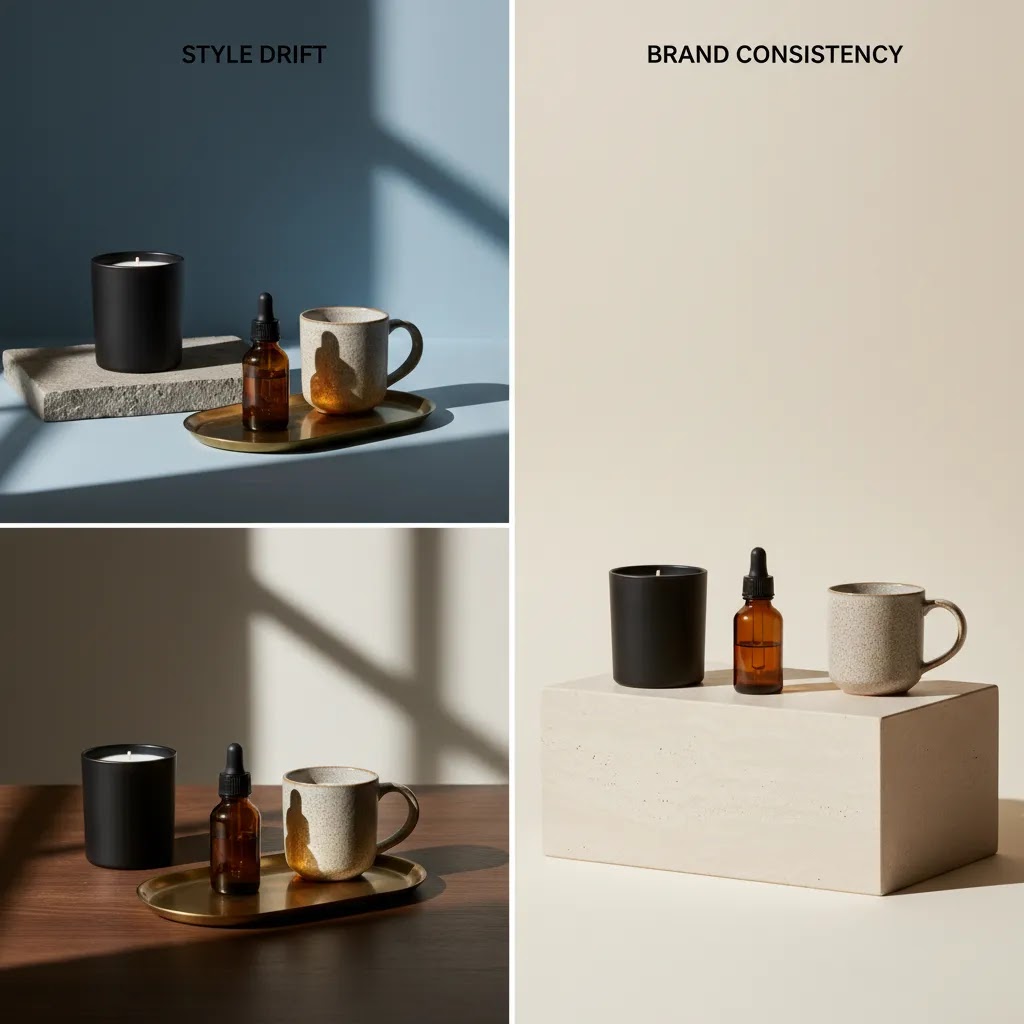
Here is the thing: one of the biggest practical problems store owners run into is not whether an AI image looks good in isolation. It is whether it matches the rest of your catalog. When AI edits or generates images in batches, you can get what I call style drift. That is when lighting, shadows, camera feel, background texture, and color tone shift from one product to the next, even if you think you asked for the same thing.
On a Shopify collection page, style drift shows up fast. One SKU looks like it was shot in a bright studio, the next looks warmer, one has a hard shadow, the next is floating with no grounding. Even if each image is individually acceptable, the set can look messy, which can lower perceived brand quality and make the store feel less trustworthy.
From a practical standpoint, the fix is mostly process, not more generation.
How to prevent style drift across Shopify and Etsy listings
Start by locking a reference set. Pick 3 to 5 images that represent the look you want for your catalog, for example your best sellers with your preferred lighting and background. Use those as your standard when you generate or edit new images, and compare every batch to them before you upload.
Standardize your crop and aspect ratios early. If you are using square images on Shopify, keep them square all the way through, including your AI exports. If you are mixing 1:1, 4:5, and wide crops, your catalog will look inconsistent even if the background is perfect.
Keep a consistent background recipe. If your brand uses a clean white, make that “true white with a soft natural shadow” every time, not sometimes white, sometimes light gray, sometimes textured. If you use a lifestyle look, define it tightly, for example “light oak countertop, bright window light from the left, shallow depth of field” and keep it stable across the batch.
Use the same prompt structure each time, and if your tool supports it, reuse templates, presets, or seed controls. Not every tool exposes seeds, but the broader point stands: you want repeatable inputs, not one-off creative writing. Repeatability is how you get a catalog that looks like a catalog, not a random set of images.
A lightweight QA checklist before uploading to Shopify
Before you publish, do a quick quality pass on the images that will actually carry conversion weight, especially your first image and your collection thumbnails. Check edges for halos or clipped parts, shadow direction for consistency, and white balance so your product does not suddenly look warmer or cooler than your known-good photos.
Color accuracy matters most on products where “shade” is the product, cosmetics, apparel colorways, home decor, and anything customers buy based on hue. Compare against a real reference photo you trust, not just against other AI outputs.
Know when to stop generating. If you are 10 or 15 attempts in and the tool keeps changing the product finish, text, or geometry, that is a good signal to switch tactics. Use manual edits on a real photo, simplify the background, or revert to a cleaner baseline image rather than forcing a perfect generation that may never arrive.
Key Features to Compare
When comparing ai product photo tools, start with the tasks you repeat every week. Most store owners get better results from a focused tool stack than from choosing the broadest product on paper.
If you are already evaluating adjacent tools such as photoroom, this is a good point of comparison. You want to look past marketing language and ask a simpler question: which product removes the most friction from your current image pipeline?
Product Photography AI Prompts That Actually Work (Backgrounds, Props, and Apparel)
Most disappointing AI product photo results are not really “bad AI.” They are vague inputs. If you want repeatable images that hold up on product pages, you need a prompt structure you can reuse across SKUs and collections.
A simple prompt framework you can reuse
Think of it this way: your prompt should read like a mini creative brief, with guardrails that protect the product.
Start with: the product, the angle, and the lighting. Then define background, surface, and shadow. Finish with brand mood. Add constraints that prevent product changes.
In practice, your structure could look like this:
Product + angle: “Photo of a [product], [front three-quarter angle], centered in frame.”
Lighting: “[soft studio lighting], [light coming from left], [natural shadow].”
Background + surface: “[pure white background], [subtle grounding shadow], [no props].”
Brand mood: “[clean, premium, minimal].”
Constraints: “Do not change the product color, shape, label text, packaging, or logo. No extra objects. No extra text.”
Prompt examples for common ecommerce needs
White background (catalog and feeds)
“Photo of a [your product] centered, front angle, soft studio lighting, pure white background, subtle natural shadow under the product, sharp edges, realistic texture. Do not change the product, do not change label text, do not add props, do not add reflections, no extra text.”
Lifestyle countertop scene (kitchen, beauty, home)
“Photo of a [your product] on a light oak countertop, bright natural window light from the left, soft shadow to the right, shallow depth of field, clean modern kitchen background blurred, premium minimal aesthetic. Do not change the product color, shape, logo, or packaging text. No extra accessories.”
Holiday theme (use carefully)
“Photo of a [your product] centered on a neutral surface, warm soft lighting, subtle holiday decor in the background out of focus, minimal and tasteful, not cluttered. Keep product exactly the same, no changes to label or color, no added text.”
In-hand context (scale and realism)
“Photo of a [your product] held in a human hand, natural daylight, realistic skin texture, product in focus, background softly blurred. Do not change the product size, shape, or packaging text. No extra items in hand.”
Apparel-specific (reducing weird drape and texture artifacts)
“Photo of a [t-shirt/hoodie] on a mannequin, front view, even studio lighting, neutral light gray background, realistic fabric texture, natural folds, accurate seams and stitching. Keep garment color accurate, do not add logos, do not change neckline, do not alter fit, no extra accessories.”
For apparel, you will typically get better outcomes when you give the AI fewer chances to invent. Simple backgrounds, stable lighting, and clear fit constraints usually beat complex lifestyle scenes for core product images.
What many store owners overlook: negative prompts and guardrails
If your tool supports negative prompts, use them. This is where you explicitly list what you do not want, and it can reduce the most common ecommerce failures: changed logos, altered packaging copy, extra accessories, random text overlays, and “helpful” props that do not match your product.
Even with strong prompts, plan on human review. Any AI output used on a live Shopify product page should be checked for product truth: the goal is to present the item more clearly, not to accidentally create a different item in the customer’s mind.
Tool Comparison
Based on the current product data available, these are the most relevant options for ecommerce merchants comparing AI product photography tools.
| Tool | Best For | Primary Use | URL |
|---|---|---|---|
| AI Background Generator | Creating alternate product scenes | Generate new backgrounds for product images | View tool |
| Free White Background Generator | Marketplace-ready listing images | Create clean white product backgrounds | View tool |
| Increase Image Resolution | Improving older or low-quality assets | Upscale product images | View tool |
| Remove Text From Images | Cleaning sourced or repurposed image files | Remove overlays and text elements | View tool |
| Background Swap Editor | Controlled lifestyle scene editing | Swap product backgrounds manually with AI assistance | View tool |
| Place in Hands | Contextual product presentation | Show products in-hand for merchandising | View tool |
| Magic Photo Editor | General editing flexibility | Broader AI photo editing workflow | View tool |
| Creator Studio | Centralized creation workflow | Manage product image creation and editing | View tool |
The data provided does not include current pricing, ratings, or full feature depth for these tools, so the fairest evaluation is use-case based. If pricing is a deciding factor, verify current plans directly with the provider before committing.
Pros and Cons
Strengths
Considerations
Free vs Paid AI Product Photography Tools: What You Give Up (And When It Still Makes Sense)
A lot of store owners search for free ai product photo tools first, and that is reasonable. If you are trying to clean up your first 20 listings or test whether AI editing fits your workflow, a free tier can be enough to learn what is possible.
The reality is that “free” usually comes with operational limits that matter once you are working at catalog speed.
Typical limitations to look for in free tools
Pay attention to export quality and usage rules. Common constraints include watermarks, capped export resolution, limited background quality, daily or monthly batch limits, and fewer controls for repeatable outputs. Another big one is commercial use terms. Even if a tool lets you generate an image, you still want to confirm the license allows you to use it in a live Shopify store, Etsy listing, and ads.
Also watch for consistency controls. Some free tools are fine for one-off cleanup, but they do not give you enough control to keep a whole collection looking uniform.
When a free tool is fine for Shopify and Etsy sellers
A free tool can make sense when you are testing, creating drafts, or cleaning up a small set of images. It is also useful when the job is narrow, like removing a background, and your quality bar is “good enough for a thumbnail” while you plan a better core image set later.
When paid features usually matter
Paid plans tend to become more attractive when you are doing batch processing, need higher resolution exports for zoom and ads, or want reusable templates that prevent style drift. If you launch seasonal collections, run paid social regularly, or update your catalog every month, consistency and throughput start to matter more than saving a small amount on a tool.
How to evaluate value without obsessing over pricing tables
Instead of comparing features in isolation, measure workflow impact. Time saved per SKU is one part, but rework rate is the hidden cost. If you save five minutes generating an image but spend ten minutes fixing edges, correcting color, and re-exporting, that is not a win.
Consider how often you need consistent outputs across a set. A single hero image can be hand-reviewed, but a 40-SKU collection page needs a system. In many cases, the tool that helps you create repeatable, on-brand images with less QA is the one that ends up being “cheaper” in real operational terms, even if it is not the cheapest plan on paper.
Who These Tools Are For
AI product photography tools are a strong fit for ecommerce operators who already understand their image standards and want to move faster. That includes Shopify merchants refreshing collection pages, Etsy sellers cleaning up listing photos, and in-house teams repurposing older assets for ads, email, and seasonal launches.
They are especially useful if you have straightforward products, limited studio time, or a growing catalog that needs consistency more than high-concept art direction. They are less suitable if your brand relies heavily on exact material rendering, luxury positioning, or tightly controlled campaign photography. In those cases, AI can still help with editing and variants, but it works best as support rather than the full production strategy.
AcquireConvert Recommendation
If you are choosing between AI image tools for your store, start by matching the tool to the job rather than chasing the broadest feature list. In practice, most merchants get the best results from a simple stack: one tool for background cleanup, one for enhancement or upscaling, and one for controlled scene variation. That approach is usually easier to operationalize across a live catalog.
AcquireConvert focuses on this kind of practical decision-making for ecommerce teams. Giles Thomas brings a practitioner perspective as a Shopify Partner and Google Expert, which is useful when your image choices affect product page conversion, feed quality, and paid acquisition performance. For more context before you commit, read our guide to ai photography, compare related tool evaluations, and use these recommendations as part of your broader merchandising process rather than as a standalone shortcut. If you are actively evaluating options, compare workflows side by side and pressure-test them on a few real SKUs before rolling anything out storewide.
How to Choose the Right Tool
Here are the criteria that matter most if you want an AI product photography tool to improve production efficiency without creating new merchandising problems.
1. Start with the image task, not the tool category
If your main issue is inconsistent supplier images, a white background or cleanup tool may be enough. If your issue is stale PDP imagery, background swaps or in-hand placements may be more useful. Store owners often overbuy here. The right answer is usually narrower and more operational.
2. Test on your hardest SKUs
Do not validate a tool on a simple object against a plain backdrop and assume it will work across your catalog. Test reflective products, textured fabrics, transparent packaging, or items with fine edges. Apparel brands should be especially careful, since folds, drape, and fit cues can look unnatural with weak edits. That is one reason the best ai product photography tools for apparel are usually the ones that preserve product truth, not just visual polish.
3. Review outputs where conversion risk is highest
Your hero image, mobile first image, variant swatches, and ad creatives deserve the closest review. AI outputs that look acceptable in a thumbnail can break down under zoom or on a high-intent product page. Make sure shadows, outlines, and proportions still feel believable.
4. Check workflow fit with Shopify operations
Ask practical questions. Who on your team will use it? Can they process batches quickly? Will filenames, dimensions, and export quality fit your existing Shopify media process? If a tool creates more QA work than it saves, it is probably the wrong fit.
5. Use AI where it improves speed, not where it weakens trust
Trust is the real decision filter. If edited images make products look materially different from what arrives in the box, return risk can rise and customer confidence can fall. The best ai tools for product photography editing help you present products more clearly, not less accurately.
Frequently Asked Questions
What is the best AI product photography tool for Shopify stores?
The best choice depends on your image bottleneck. Shopify merchants who need cleaner catalog images may prefer white background or background editing tools. Stores testing merchandising concepts may get more value from background swap or in-hand visuals. The right tool is the one that improves speed while keeping product images accurate and consistent across your store.
Can AI product photography replace a professional product shoot?
Usually not completely. AI tools are most useful for editing, enhancement, and creating additional asset variations from existing photos. For hero imagery, premium campaigns, or products where texture and color accuracy are essential, professional photography still has an important role. AI works best as a support layer, not an automatic replacement.
Are AI product photography tools good for apparel brands?
They can be, but apparel is one of the tougher categories. Fabric texture, folds, drape, and fit cues need careful review. AI can help with background cleanup, resolution improvement, and alternate scene testing, but fashion merchants should inspect outputs closely before using them on high-intent landing pages or ads.
Which AI tool is best for white background product photos?
Based on the current product data, Free White Background Generator is the most directly aligned option for that task. It is a practical fit for catalog cleanup, marketplace requirements, and cleaner collection pages. You should still review image edges and shadows manually before publishing.
Do these tools include pricing?
The current tool data available for this article does not include pricing details. That means you should verify current plans, usage limits, and any export restrictions directly on the provider website before making a purchasing decision. Pricing is subject to change.
What is the best AI tool for improving old product images?
Increase Image Resolution stands out for merchants working with older or lower-quality assets. It may help when you need sharper images for modern PDP layouts, mobile zoom, or ad placements. It is still worth checking whether upscaling preserves detail naturally on your specific products.
Are AI lifestyle backgrounds safe to use on ecommerce product pages?
They can be useful if they stay faithful to the product. The main risk is over-stylization that makes scale, finish, or color feel misleading. Use AI lifestyle scenes as a complement to accurate core product images, not as the only visual proof on the page.
How should Etsy and Shopify sellers test these tools?
Start with 5 to 10 real SKUs and compare results against your current workflow. Measure time saved, QA effort, and how well the outputs fit your listing standards. The best tools for product photography Etsy Shopify sellers use are usually the ones that reduce repetitive editing work without creating inconsistencies across the catalog.
What if I need broader editing flexibility instead of one single task?
Magic Photo Editor or Creator Studio may be better fits if you want a more general editing environment rather than a single-purpose tool. That can be helpful for internal teams managing multiple image tasks. The trade-off is that broader tools may require a bit more process discipline to keep outputs consistent.
What are the best free AI product photography tools?
It depends on the task, because many free tools are designed around one job rather than a full workflow. For basic needs like background generation and white background images, the AI Background Generator and Free White Background Generator listed above are aligned with those use cases. Before you rely on any free tool for a live store, check export resolution, watermark rules, batch limits, and commercial use terms, since those constraints often determine whether it is practical for a real catalog.
How do I write prompts for AI product photography (so the product doesn’t change)?
Use a repeatable structure and add explicit constraints. Define the product, angle, lighting, background, and shadow, then add guardrails like “do not change color, shape, logo, label text, packaging, or proportions” and “do not add props or extra text.” If the tool supports negative prompts, list what you want to avoid, such as extra accessories, altered branding, or changed packaging copy. You should still manually review outputs before publishing, especially for hero images and high-intent product pages.
Why do AI product photos look different each time, and how can I keep them consistent?
This is often style drift. Small changes in prompts, settings, crops, or the model’s randomness can lead to shifts in lighting, shadow direction, background tone, and overall camera feel. To keep outputs consistent, lock a reference set of images, standardize aspect ratios, keep the same background recipe, and reuse the same prompt structure. If your tool offers templates, presets, or seed controls, reuse them across the whole batch. When you cannot get a stable look after multiple attempts, it is usually better to stop generating and switch to manual edits on a real photo.
Is Claid AI good for product photography?
It can be a viable option for some ecommerce workflows, especially if you are focused on editing and enhancement rather than full scene invention. The key is to evaluate it the same way you would evaluate any product photography ai tool: test on your hardest SKUs, review for edges, shadows, and color accuracy, and confirm export quality and commercial terms before you use outputs across Shopify listings or ads. Results vary by category, and human review is still important for brand consistency and product truth.
Key Takeaways
Conclusion
The best ai product photography tools can save meaningful time for ecommerce teams, but only if they fit your actual workflow. For most merchants, the smartest move is not finding one tool that does everything. It is building a lean process that improves image consistency, speeds up editing, and protects customer trust. Start with a few representative SKUs, compare output quality carefully, and only then decide what belongs in your catalog production stack. If you want more practical guidance, explore AcquireConvert’s related evaluations and photography resources. Giles Thomas’s perspective as a Shopify Partner and Google Expert is especially useful when image decisions affect both conversion and acquisition performance across your store.
This article is editorial content created for ecommerce education. It is not a paid endorsement unless explicitly stated otherwise. Pricing was not available in the current product data and may change at any time, so verify costs and terms directly with the provider. AI image tools may improve workflow efficiency, but results vary by product type, image quality, and implementation. No specific performance outcomes are guaranteed.

Hi, I'm Giles Thomas.
Founder of AcquireConvert, the place where ecommerce entrepreneurs & marketers go to learn growth. I'm also the founder of Shopify agency Whole Design Studios.