Product Photography Accessories Worth Buying (2026)

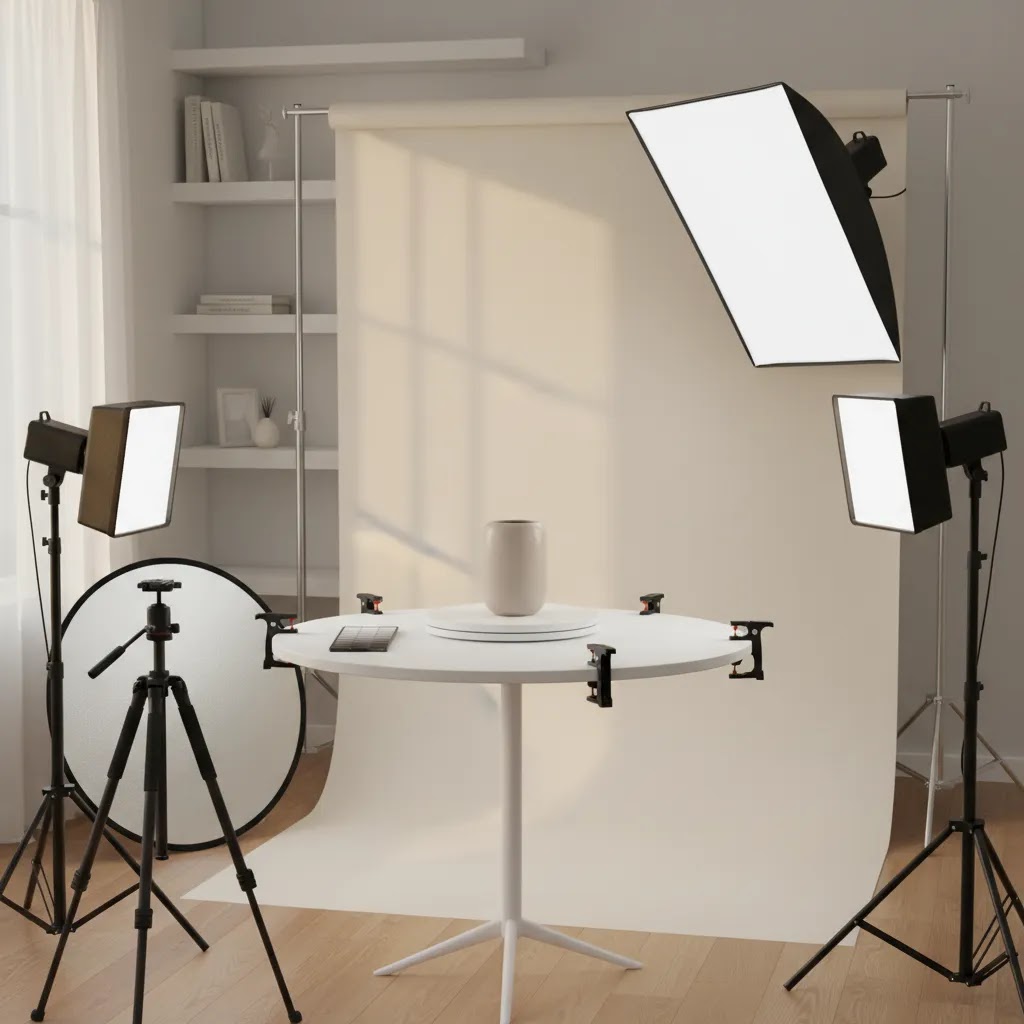
If you sell online, the right product photography accessories can improve image consistency far more than most store owners expect. A few well-chosen tools, such as lighting modifiers, reflectors, clamps, and background supports, often matter more than buying a more expensive camera. For Shopify merchants, that means faster shoots, cleaner product pages, and fewer reshoots when launching new collections. This guide focuses on accessories that are actually worth paying for, plus where AI tools can support your workflow after the shoot. If you are building a better product photography studio at home or in a small workspace, start with accessories that improve repeatability, not gadgets that add complexity.
Contents
Overview
Product photography accessories are the support tools around your camera or phone setup that help you produce more usable ecommerce images. That includes tripods, light stands, softboxes, reflectors, sweep backdrops, clamps, diffusers, turntables, and color cards. For most store owners, these purchases have a direct operational benefit. They reduce setup time, make lighting more repeatable, and help your catalog look consistent across product pages, ads, and marketplaces.
The key point is that accessories should solve a specific workflow problem. A tripod helps maintain framing across variants. A reflector lifts shadows without adding another light. A sweep backdrop gives you clean edges for marketplace listings. If you are also exploring ai photoshoot workflows or broader ai product photography options, accessories still matter because AI performs better when the original photo is sharp, evenly lit, and clearly separated from the background.
AcquireConvert evaluates ecommerce tools and workflows through the lens of real store execution. Giles Thomas brings Shopify Partner and Google Expert experience to these recommendations, which matters if your images need to work not just on product pages, but also in ads, shopping feeds, and landing pages.
Accessories Worth Buying First
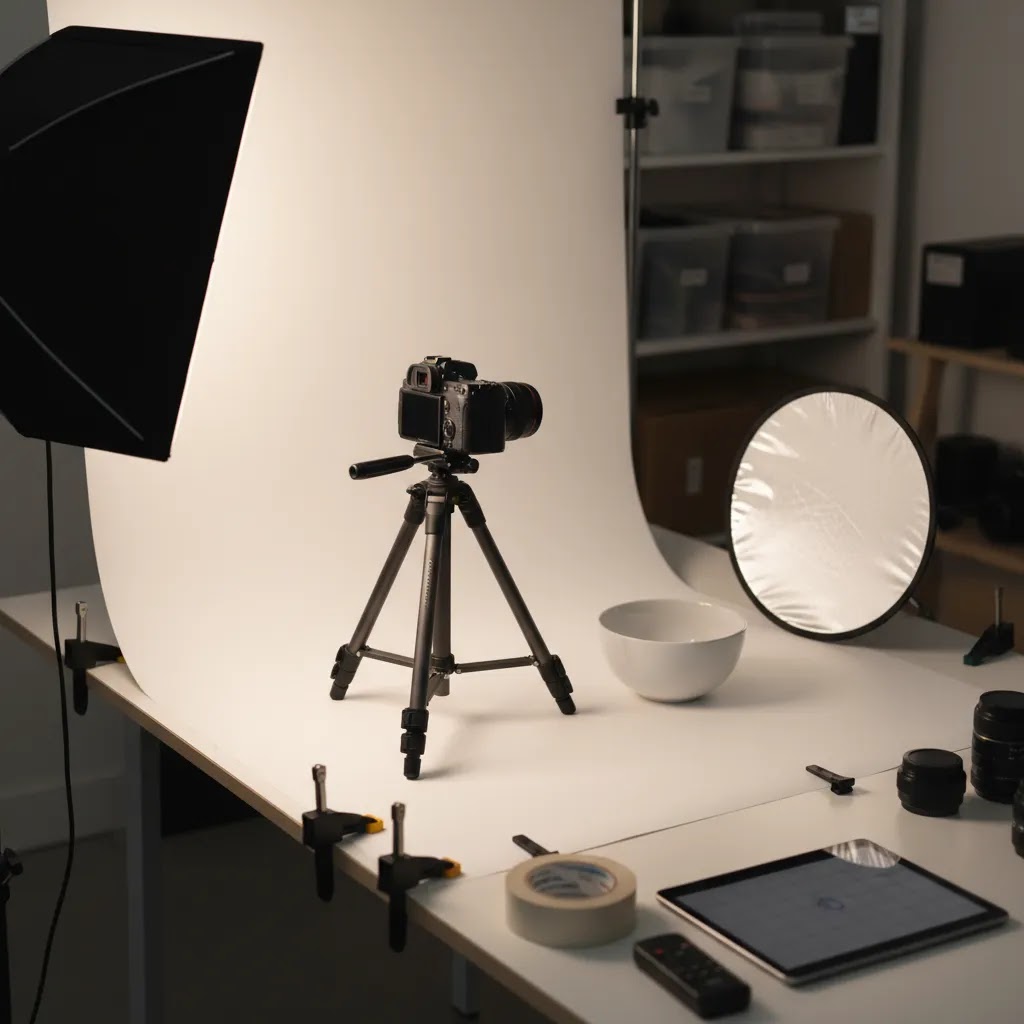
1. TripodA stable tripod is usually the first smart purchase. It improves sharpness, keeps framing consistent, and makes it easier to create matching images across a collection. This matters for Shopify collection pages where visual consistency affects perceived trust.
2. Softbox or diffusion lightingHarsh overhead room lighting creates uneven shadows and color issues. A softbox, light tent, or diffusion panel gives you softer, more predictable light. If lighting is your weak point, spend here before upgrading your camera body. You can also browse AcquireConvert's Product Photo Lighting resources for setup ideas.
3. Reflectors and bounce cardsThese are low-cost but highly useful. Reflectors help fill shadows on glossy packaging, bottles, jewelry, and cosmetics. Foam boards can do the same job for less, but purpose-built reflectors are easier to position and store.
4. Background support and sweep backdropsWrinkled backgrounds create extra editing work. A proper support stand with seamless paper or vinyl helps you get cleaner raw images, especially for white background product shots and product photography mockup prep.
5. Clamps, clips, and mounting puttySmall accessories often save the most time. Clamps hold reflectors and backdrops in place. Mounting putty stabilizes items that fall over. For small products, these tools can prevent constant retakes.
6. Turntable for multi-angle imagesIf you photograph shoes, skincare, candles, or packaged goods, a turntable helps with angle consistency. It is also helpful if you want source images for short-form video or 360-style creative.
7. Color checker or gray cardIf accurate color matters to returns and customer expectations, this is worth owning. Apparel, cosmetics, and home decor stores can benefit most. For beauty brands, crossover tools such as an ai makeup generator may help with creative variations later, but accurate source color is still the priority.
After capture, software can help with cleanup. From the available product data, ProductAI offers relevant tools such as AI Background Generator, Free White Background Generator, Increase Image Resolution, and Remove Text From Images. There is also Magic Photo Editor for editing tasks and Creator Studio for broader image creation workflows. These tools may help supplement your accessory setup, especially if you want a practical bridge between physical photography and ai based product photography.
Product Photography Props and Styling Tools (That Actually Save Time)
Here is the thing: props and accessories are not the same purchase decision. Accessories help you capture a clean, repeatable image. Props help you communicate scale, use, and brand feel. If you confuse the two, you end up with a drawer full of random styling pieces and a catalog that still looks inconsistent.
From a practical standpoint, props matter most in three situations. First, when your customer needs help understanding size, such as jewelry, small skincare, supplements, or tech accessories. Second, when context increases clarity, such as showing a candle on a tray or a cosmetic bag next to a mirror. Third, when you are building brand consistency for Shopify collections, ads, and email campaigns, so your imagery has a repeatable look rather than a different vibe every shoot.
What many store owners overlook is that the best prop setup is usually a small, repeatable kit, not a growing pile of one-off items. If you can pull the same few pieces for every launch, your shoots speed up and your catalog looks intentional.
High-utility prop categories worth keeping in a small kit
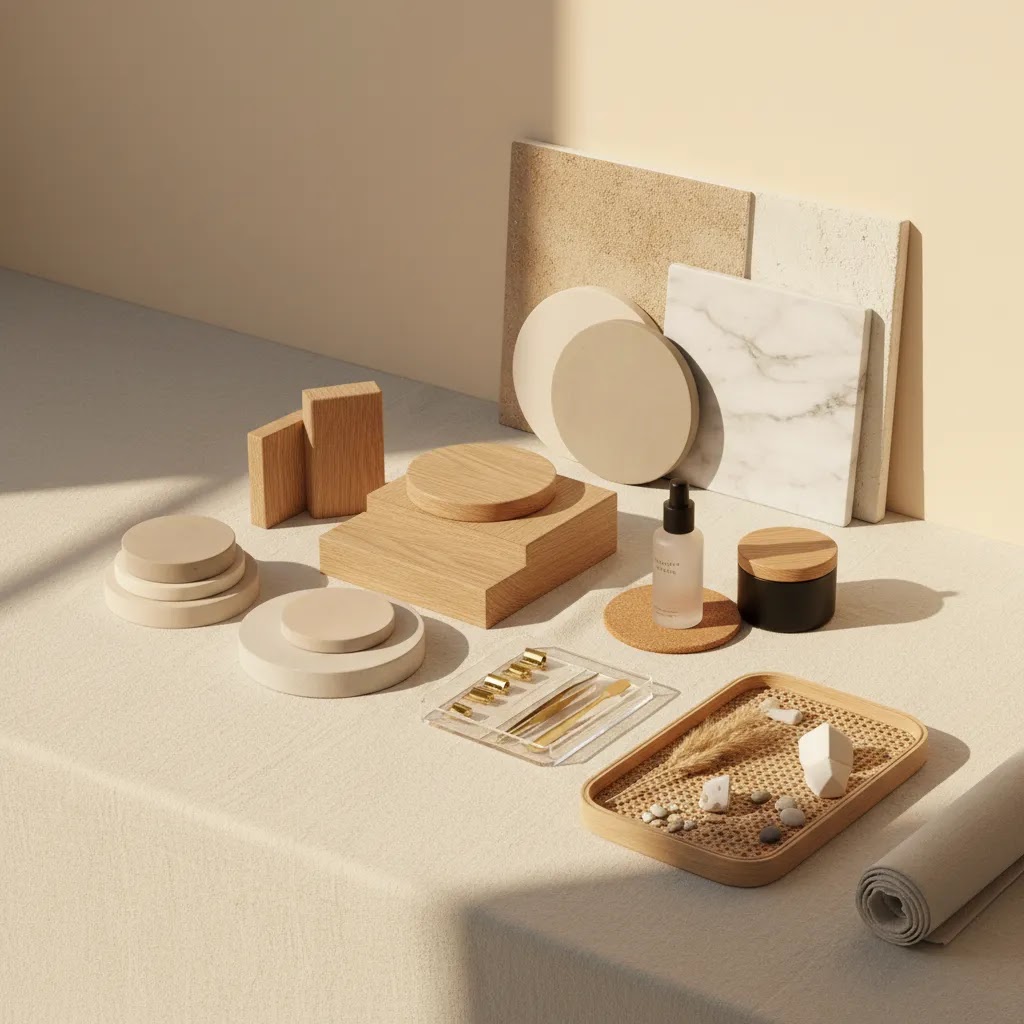
If you want props that support ecommerce images without distracting from the product, start with categories that work across many SKUs. Backdrops and surfaces are the biggest win, such as a matte board, textured vinyl, tile, or a simple wood surface. Small set pieces are next, such as neutral trays, shallow bowls, or a simple cutting board, which help you group items without making the photo feel cluttered. Risers and blocks are also surprisingly useful because they add height variation fast, especially for bundles or multi-item shots.
Acrylic or plexi sheets can give you a clean reflective look or a bright, modern surface. Fabric, such as neutral linen or cotton, works well for soft shadows and lifestyle-feeling photos, but it needs to be kept wrinkle-free. Faux foliage can add a hint of life, but consider using it sparingly. If it becomes the main visual element, your product stops being the hero.
Think of it this way: your prop kit should be repeatable, neutral, and fast to reset. That is how you get variety without starting from scratch every time.
The “one tricky shot” helpers that save you from retakes
Some accessories sit right on the line between props and problem-solvers. Product stands help with shoes, hats, bags, and apparel details. Clear supports can hold items at an angle without drawing attention. Fishing line is useful for floating effects or stabilizing tall items, but it usually requires careful placement and cleanup in editing.
Museum gel is one of those unglamorous purchases that stops products from sliding, rotating, or slowly falling out of position. If you shoot glossy items, gloves can prevent fingerprints, and a lint roller becomes a daily tool for fabric products, apparel, and any packaging that picks up dust. A small dust blower also helps, because close-up product images make every speck show up, especially on black or glossy surfaces.
The reality is that styling is not about making a scene. It is about reducing friction in your workflow while making your images clearer and more consistent for shoppers.
Pricing and Costs
Unlike software, accessories are usually one-time purchases, but costs can add up if you buy without a workflow plan. A sensible approach is to split spending into three layers: capture stability, lighting control, and background control. For many small stores, that means buying a tripod first, then diffusion or soft lighting, then backdrop support and small grip tools.
If you are comparing that against AI editing options, the current Products data available here includes ProductAI tools and editors, but no pricing details were returned for those tools. That means it would be inaccurate to quote plan costs or subscription tiers. If you want to test AI support without committing to a larger workflow change, the best use case is usually background cleanup or image enhancement after you have improved your source photos with physical accessories.
That distinction matters. If your images are poorly lit or blurry, software can only correct so much. If your images are already sharp and evenly exposed, AI tools may reduce editing time and help you produce more beautiful product photography at scale. If you are evaluating software options next, AcquireConvert's Photoroom coverage is a logical next step.
Ready-Made Kits vs. Building Your Own Setup
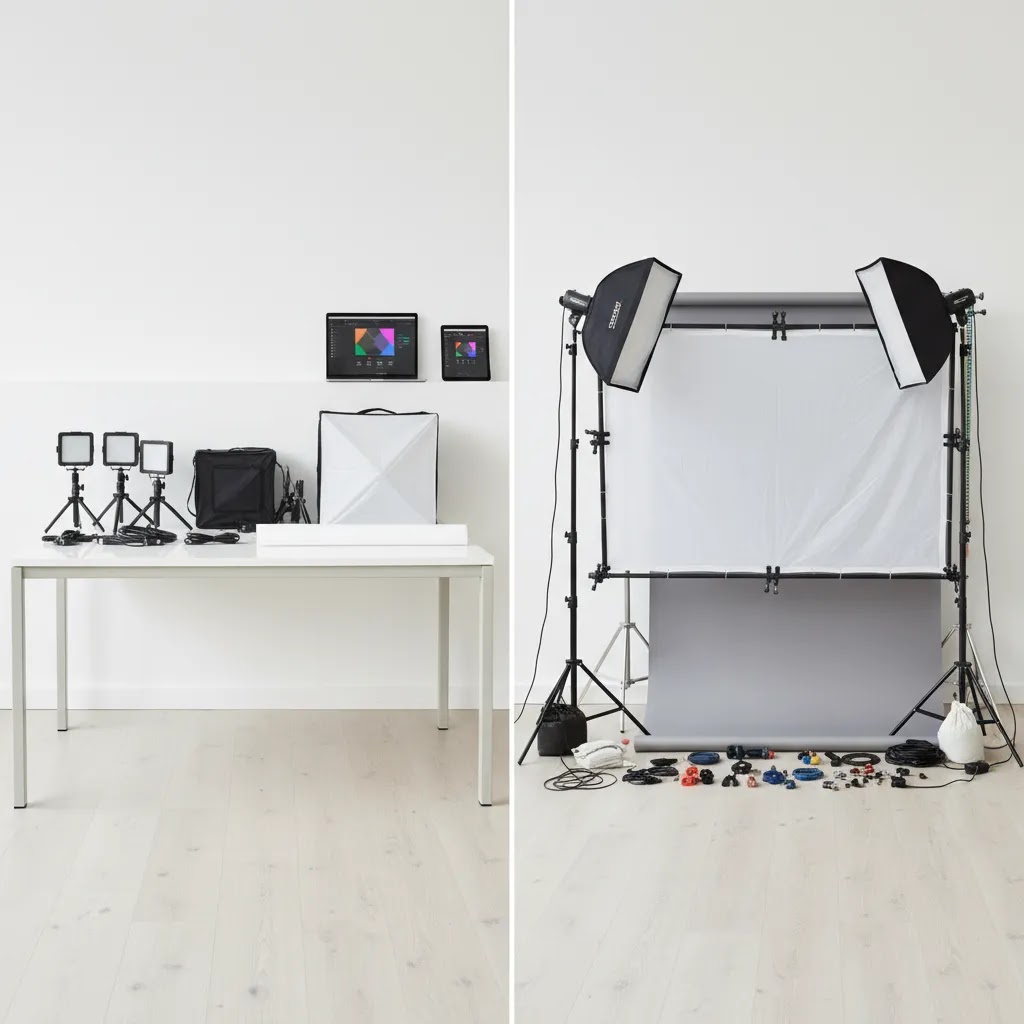
Now, when it comes to buying accessories, you have two paths. You can buy a ready-made tabletop kit, or you can piece together individual items. Neither option is “right,” but one will fit your workflow better.
Ready-made kits are usually about speed. If you want to start shooting this week, need fewer decisions, and want everything to store in one place, a kit can be the fastest way to get to consistent light and a clean background. Piecing together a setup is usually better if you already know your bottleneck, have limited space constraints, or want a clearer upgrade path over time.
What to look for in a kit, and where kits disappoint
Most kit disappointment comes from size and stability. A kit may look large online but still be too small for real products once you add breathing room around the item. For white background shots, you need enough background coverage to avoid hard edges and weird corners, especially if you shoot taller products like bottles or boxed goods.
Diffusion quality matters too. Thin diffusion material can create uneven hotspots that still need editing. Stand stability is another common issue. Lightweight stands can be fine for small LED panels, but they can tip or sag with larger modifiers. Also look closely at what is actually included. Some kits include clamps that are too weak, or not enough clamps to hold backdrops tight and wrinkle-free.
If you shoot weekly, think about storage footprint. A kit that folds down neatly may beat a “better” setup that lives half assembled in your hallway because it is annoying to put away.
A simple framework based on product size
For small items, a tabletop setup is usually the highest leverage option. A light tent or small diffusion setup paired with a compact sweep and a solid tripod can cover a lot of catalog work.
For medium products, a single backdrop stand with a sweep and a more capable soft light tends to be the sweet spot. You get more flexibility for height and angles without needing a full room buildout.
For larger products, you typically need wider background support and stronger stands. The accessories become less about “photo gear” and more about grip and stability. If you fight your setup every time you shoot, you will avoid shooting, which is the opposite of what you want when your Shopify store depends on fresh creative.
Trust and Credibility
Accessory advice is full of generic recommendations, but ecommerce merchants need to judge purchases by output quality and workflow efficiency, not hobbyist enthusiasm. The best accessories are the ones that reduce inconsistency across your catalog and support repeatable images for your product pages, ads, and marketplaces.
That is also why it helps to separate hardware from software claims. AI tools can support cleanup, background generation, resolution enhancement, and mockup production. They cannot replace the need for stable framing, clean lighting, and accurate color if your store depends on customer confidence. This is especially important for catalog-heavy stores and for merchants selling on channels where image compliance matters.
AcquireConvert approaches this from a practical ecommerce angle. Giles Thomas's Shopify Partner and Google Expert credentials add weight here because product images affect conversion rate, shopping feed quality, and paid acquisition performance, not just aesthetics. For a wider view of image workflows, the Catalog Photography section is worth bookmarking.
Where to Buy Product Photography Accessories (and How to Avoid Bad Purchases)
Store owners often search for product photography accessories “near me” for one reason: they want to avoid buying the wrong thing, waiting for shipping, or dealing with returns on bulky gear. That is a sensible instinct, but not everything needs to be bought locally.
Consider this: local pickup helps most for large, awkward, or fragile items. Background rolls, backdrop stands, and larger modifiers can arrive damaged, or they can be expensive to ship back. Being able to inspect stand stability and connector quality in person can save you time if you plan to shoot every week. Online buying is usually fine for small grip tools like clamps, color cards, putty, and small reflectors, since returns are simpler and the items are less likely to be damaged in transit.
How to evaluate accessory quality quickly
When you are trying to avoid bad purchases, you need a few quick checks. For stands, look for a clear load rating and pay attention to how the sections lock. A stand that slowly slips is not just annoying, it creates inconsistencies across a shoot. For diffusion, look for material that feels consistent and neutral, because cheap diffusion can introduce an unwanted color cast that makes product colors harder to match across your Shopify catalog.
For backdrops, thickness and crease resistance matter. Thin materials wrinkle easily and create distracting gradients that you end up correcting in editing. If you care about clean whites, pay attention to color neutrality. A backdrop that is slightly blue or slightly warm can be “fixed,” but it adds work and makes batch editing less predictable.
Returns, replacements, and the reality of shooting weekly
If you shoot often, replacement planning becomes part of the cost. Seamless paper gets scuffed and needs to be cut down or replaced. Clamps wear out, especially if you overtighten them. Backdrops get damaged in storage if they are folded or pushed into a corner, so it is worth thinking about how you will store them before you buy the biggest option.
The way this works in practice is simple: buy fewer items, choose accessories you can trust, and set up storage so your gear stays shoot-ready. That is what keeps your product photography consistent over time.
Pros and Cons
Strengths
Considerations
Who This Advice Is Best For
This guidance fits Shopify store owners, marketplace sellers, and small ecommerce teams that shoot products in-house. It is especially relevant if you have recurring launches, a growing SKU count, or inconsistent product pages caused by uneven lighting and framing. It also suits lean brands deciding between buying accessories, outsourcing, or testing ai product photography software.
If your products are highly reflective, color-sensitive, or premium priced, accessories are usually a better first investment than relying on fully automated editing. If you only need occasional creative lifestyle images, then a mix of basic hardware and selective AI support may be enough.
How to Get Started
Start by reviewing your last 20 product images. Look for repeated problems such as blur, harsh shadows, inconsistent crop, inaccurate whites, or distracting backgrounds. Then buy accessories that address those specific issues in order.
If you want a practical hybrid workflow, shoot clean source images first, then use editing tools for background replacement, white background output, or resolution enhancement. That approach is usually more reliable than trying to fix weak photos entirely in software.
Frequently Asked Questions
What is the first product photography accessory I should buy?
For most ecommerce stores, the first purchase should be a tripod. It improves sharpness, keeps framing consistent across SKUs, and helps you produce repeatable catalog images. If your current problem is harsh shadows rather than blur, soft lighting or a diffusion setup may be the better first buy.
Are product photography accessories better than AI tools?
They solve different problems. Accessories improve the quality of the original image, while AI tools typically help with editing, enhancement, or background changes afterward. In most cases, accessories should come first because better source images give you more reliable results from any software workflow.
Can I use AI tools instead of building a full home studio?
You can reduce the need for a large studio, but you still need clean, well-lit source images for the best output. AI may help with background generation, white background edits, or mockups, but it will not fully replace stable lighting and accurate color if your products need trustworthy presentation.
Do I need expensive lighting for Shopify product photos?
No. You need controlled lighting, not necessarily expensive lighting. A simple soft light or diffusion setup can be enough for many products. The goal is consistent exposure, softer shadows, and accurate color across your catalog, especially if you update collections often.
What accessories help most with small product shoots?
For small items, the most useful accessories are a tripod, a compact soft light, reflectors, clamps, and mounting putty. These help stabilize products, soften glare, and reduce movement between shots. A clean backdrop is also important because close-up images make every crease and dust mark more visible.
Should I buy accessories or outsource my product photography?
If you launch products regularly, accessories often make sense because they spread their value across many shoots. If you have a small catalog and high-end products that need polished creative work, outsourcing may be the better option. Your decision depends on volume, standards, and internal time available.
What are the best product photography accessories for beginners?
For beginners, prioritize accessories that reduce variables: a tripod for consistent framing, a softbox or diffusion setup for predictable light, a simple sweep backdrop for clean backgrounds, and a few clamps plus mounting putty to keep everything in place. If you sell products where color accuracy drives customer satisfaction, add a gray card or color checker once your basic lighting is stable.
What are good product photography props ideas for ecommerce photos?
Good props are the ones that support the product story without stealing attention. Neutral surfaces and backdrops are the most reusable. Simple risers or blocks help create height variation for bundles. Trays and small dishes work well for grouping. A small amount of fabric can soften the scene, and light faux greenery can add life if it matches your brand. The goal is a repeatable “prop kit” that produces consistent images across your Shopify catalog.
Is it better to buy a product photography kit or individual accessories?
It depends on your constraints. A kit is often better if you want faster setup, fewer decisions, and compact storage. Individual accessories are often better if you already know what your products need, want more control over size and quality, and expect to upgrade parts of the setup over time. For many stores, a kit works well for small tabletop products, while a pieced-together setup makes more sense as products get larger or more reflective.
Where can I buy product photography accessories near me?
Buying locally can be useful for bulky or fragile items like backdrop stands, large modifiers, and backdrop rolls, since you can inspect stability and avoid shipping damage. For smaller items like clamps, putty, gray cards, and small reflectors, online purchasing is usually fine. Whichever route you choose, check return policies, since wear-and-tear replacements are common if you shoot frequently.
Key Takeaways
Conclusion
The product photography accessories worth buying are the ones that make your shoots more consistent, faster, and easier to repeat. For most online stores, that means prioritizing a tripod, controlled lighting, reflectors, and a proper backdrop setup before looking at more specialized gear. If you also want to experiment with free ai product photography or editing support, do it after fixing the basics. Strong source images give every editing tool a better chance of producing usable results. If your current images feel uneven or slow to produce, audit your workflow today and invest in the accessory that removes your biggest bottleneck first.
AcquireConvert may receive affiliate compensation from some third-party links mentioned in this article, where applicable. Product and pricing information should be verified on the provider's site before purchase. Outcomes from accessories, AI editing tools, or photography workflows will vary based on your product type, lighting, skill level, and implementation quality. No specific performance or sales results are guaranteed.

Hi, I'm Giles Thomas.
Founder of AcquireConvert, the place where ecommerce entrepreneurs & marketers go to learn growth. I'm also the founder of Shopify agency Whole Design Studios.