AI Background Generator for Product Photos (2026)


If you sell online, your product image background is not a small design choice. It affects clarity, trust, ad performance, and how polished your store feels at first glance. An ai background generator can help you create cleaner catalog images, faster lifestyle scenes, or campaign-ready visuals without booking a full shoot every time. That is especially useful for Shopify merchants who need new assets for product pages, ads, email, and social content on a tight timeline.
This page evaluates AI Background Generator for product photography use, with a practical focus on ecommerce workflows. You will see where it fits, where it falls short, and how it compares to doing the work manually. If you are still mapping the broader workflow, start with AcquireConvert’s Background Removal & Editing resources for related tools and tactics.
Contents
- What AI Background Generator Does
- Key Features for Ecommerce Teams
- AI Background Generator Prompts for Product Photos (With Examples)
- Pros and Cons
- Export Quality, File Requirements, and “HD/4K” Reality Checks
- Who It’s For
- AcquireConvert Recommendation
- How to Choose the Right Setup
- Login, No-Signup, and Privacy Considerations for Store Assets
- Frequently Asked Questions
- Key Takeaways
- Conclusion
What AI Background Generator Does
AI Background Generator is a browser-based tool from ProductAI Photo built to create or replace image backgrounds for product visuals. It is available here: AI Background Generator. For ecommerce teams, the main appeal is speed. Instead of staging a new scene or manually compositing images in traditional editing software, you can generate alternate backgrounds that better match your brand, campaign theme, or channel requirements.
In practice, this is most useful in three situations. First, you need more variety from a limited product shoot. Second, you want to test lifestyle-style imagery without a full reshoot. Third, you have marketplace or catalog images that need cleanup before they go live on your site or into paid ads.
That said, AI-generated backgrounds are not automatically better than a standard white background or a professionally art-directed scene. For many PDPs, plain, consistent images still convert better because they reduce distraction. For others, especially beauty, gifting, home, and fashion accessories, generated scenes may improve visual storytelling if they stay believable and product-focused.
If your starting files are cluttered, an ai background remover is often the first step before generating a new scene. If your images are soft or too small after export, pairing the workflow with an image upscaler may help prepare assets for sharper storefront use.
Key Features for Ecommerce Teams
From the product data available, AI Background Generator’s core value is focused and straightforward. It is designed to generate new image backgrounds for product photos online, which makes it relevant for merchants who want fast creative variations without moving into a heavier editing workflow.
Here are the practical feature angles that matter most for store owners:
- Background generation for product photos: Useful for creating alternate visual settings around a product for campaigns, seasonal collections, social posts, and landing pages.
- Online access: Because the tool is web-based, you can use it without installing desktop software. That is helpful for lean teams, virtual assistants, and founders working across multiple devices.
- Free-entry positioning: The product URL indicates a free ai background generator workflow. You should still verify any current limits, credit usage, export restrictions, or premium upgrades directly with the provider because pricing and access terms may change.
- Fast asset expansion: For stores with only a few original product shots, generated backgrounds can stretch existing content into more ad creatives and merchandising placements.
Within the same ProductAI Photo ecosystem, there are adjacent tools that may matter depending on your workflow. Free White Background Generator is more aligned with clean catalog imagery. Background Swap Editor appears better suited if you want more direct editing control over replacement backgrounds. Magic Photo Editor and Creator Studio suggest a broader creative workflow for merchants building multiple assets, not just one-off replacements.
For many merchants, the most important question is not whether AI can generate a background. It is whether the output looks believable enough to support buying intent. If edges look off, shadows do not match, or reflections feel unnatural, shoppers may not trust what they are seeing. That is why generated backgrounds work best when the product itself remains accurate, well lit, and visually dominant.
If the source image includes packaging text or distracting elements, you may also need to remove text from image files before final export. And if you want a broader toolset around retouching and creative cleanup, reviewing a best ai photo editor guide is a sensible next step.
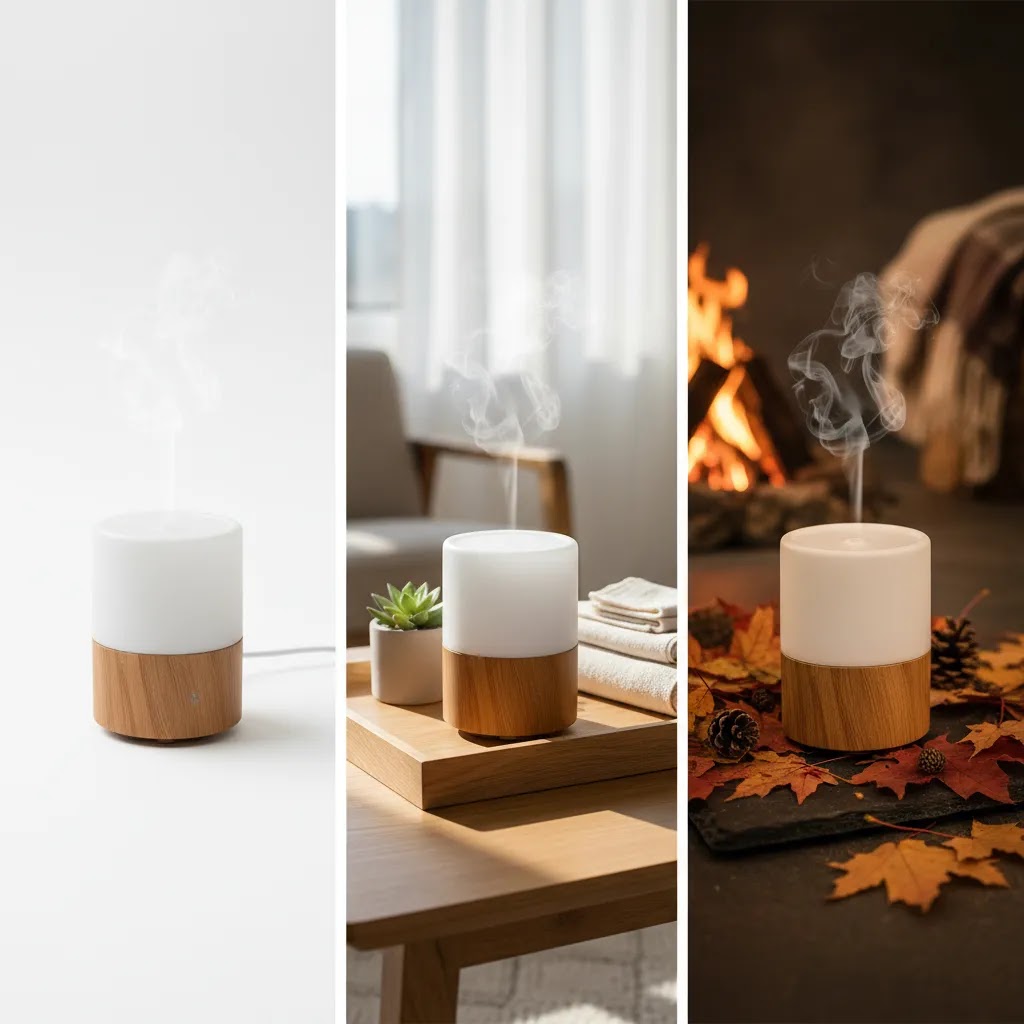
AI Background Generator Prompts for Product Photos (With Examples)
Here’s the thing: for ecommerce, the best prompt is usually the one that protects the product. Your goal is not to redesign the item. Your goal is to control everything around it so the output still looks like a real product photo you would trust on a Shopify product page.
From a practical standpoint, strong prompts do three jobs: they tell the tool to keep the product unchanged, they describe the background you want, and they lock down lighting and camera feel so the scene stays believable.
How to write prompts that keep the product accurate
Start your prompt with instructions that are about product protection, then move outward to the environment. The way this works in practice is you want to minimize “creative interpretation” around logos, labels, materials, and shape.
- Tell it what not to change: keep the product exactly the same, do not change label text, do not change logo, do not change color, do not add extra items.
- Control lighting: soft studio lighting, bright natural window light, warm evening light, no harsh shadows.
- Control camera feel: straight-on, 3/4 angle, eye-level, shallow depth of field, crisp focus on product.
- Control surface and grounding: product sitting on a surface, natural shadow under product, realistic contact shadow.
Prompt templates you can reuse
Use these as starting points, then swap in your product type and brand style. Generate multiple variations and keep the winners, rather than trying to nail it in one go.
- Clean studio: “Keep the product unchanged. Place it on a clean white studio background with a subtle gradient. Soft even studio lighting, natural shadow under the product, sharp focus, realistic product photo.”
- Lifestyle, believable but controlled: “Keep the product unchanged. Place it in a bright modern kitchen counter scene. Natural window light from the left, shallow depth of field, background slightly blurred, realistic shadow and reflections.”
- Seasonal campaign: “Keep the product unchanged. Holiday themed background with subtle pine greenery and warm bokeh lights in the distance. Product remains the main focus, soft warm lighting, no extra objects touching the product.”
- Premium minimal: “Keep the product unchanged. Minimal luxury background, neutral stone surface, soft shadow, high-end editorial lighting, muted tones, clean composition, product centered.”
- UGC-style: “Keep the product unchanged. Realistic handheld unboxing vibe on a tabletop, casual natural light, slight imperfection but sharp focus on the product, authentic photo style.”
Quick negative prompt list to reduce weird outputs
Many tools support negative prompts, or at least benefit from you stating what you do not want. This is where you prevent the classic ecommerce issues: warped logos, extra props, and shadows that do not match your original photo.
- No extra text, no misspelled label text, no changed logo
- No extra products, no hands, no people, no extra packaging
- No distorted shape, no melted edges, no duplicate product
- No harsh unrealistic shadows, no floating product, no incorrect reflections
A simple iteration workflow that works for Shopify assets
What many store owners overlook is that you can treat this like creative testing. You do not need perfection on the first generation. You need a repeatable review process before anything touches a PDP or goes into paid traffic.
- Generate 5 to 10 variations from the same base photo and prompt theme.
- Pick 1 to 2 winners that look most realistic at normal viewing size.
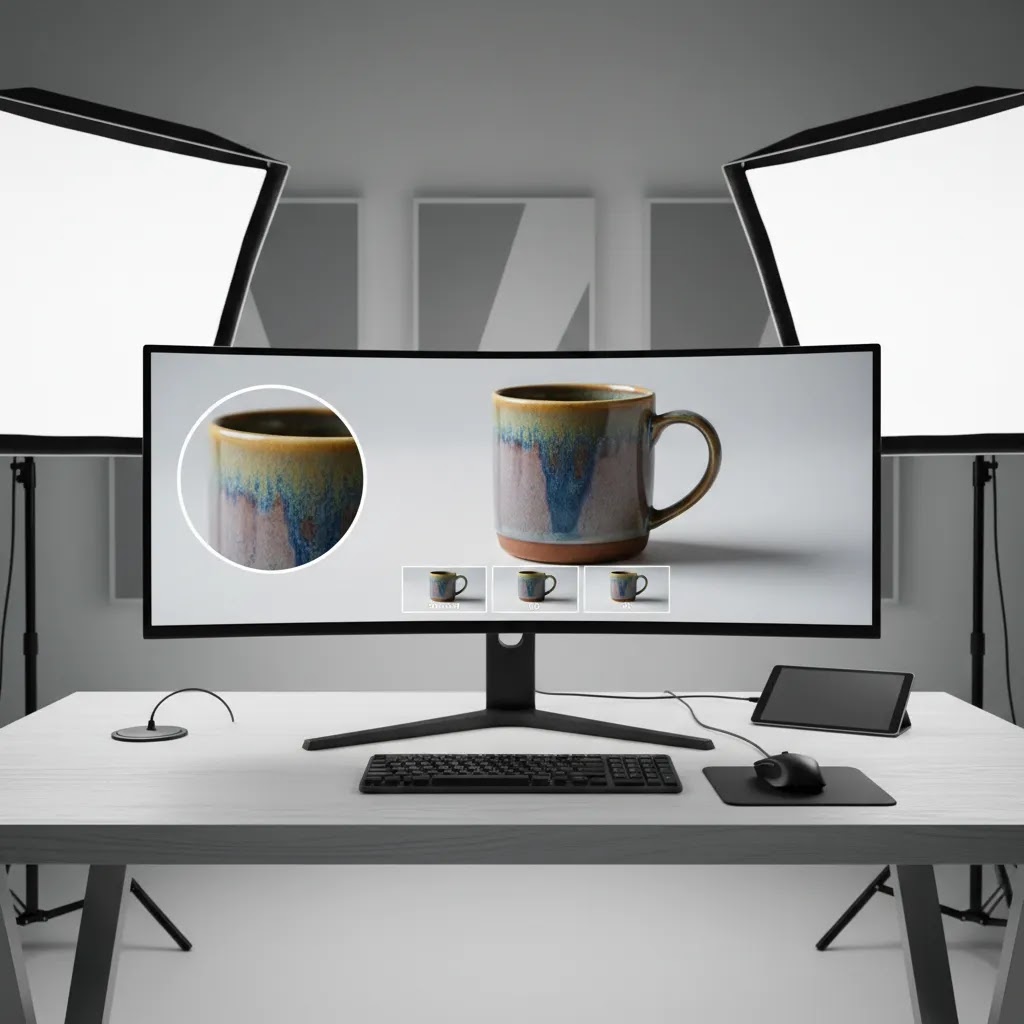
- Zoom in and sanity check edges, shadows, reflections, label clarity, and whether the product still looks like your real item.
- Compare against your brand look: consistent background style, color temperature, and overall polish across the collection.
- Only then export and upload to Shopify, and test the asset by channel before rolling it out across your catalog.
Pros and Cons
Strengths
- Good fit for ecommerce teams that need faster visual iteration from a limited set of original product photos.
- Browser-based access makes it approachable for founders, marketers, and non-design team members.
- Useful for generating campaign-specific or seasonal imagery without organizing a full reshoot.
- Can support ad testing by creating multiple creative angles around the same product.
- Pairs well with adjacent image cleanup tools such as background removal, upscaling, and text removal.
- Especially practical for small stores that need more content output from lean internal resources.
Considerations
- Generated scenes may look artificial if the source product image has poor lighting, weak cutouts, or inconsistent perspective.
- Not every product category benefits equally. Technical products and premium goods often need stricter visual realism.
- You may still need manual review and editing before publishing to a product page or running paid traffic.
- Current pricing, credit limits, and export quality details were not provided in the available product data, so you need to verify them directly with the provider.
Export Quality, File Requirements, and “HD/4K” Reality Checks
Now, when it comes to “ai background generator hd” or “ai background generator 4k” claims, it helps to be clear about what you actually need for ecommerce. Most of the time, you are not trying to create a cinematic image. You are trying to create a sharp product photo that holds up on a PDP zoom, a collection grid, and paid ads without looking compressed.
What “HD” and “4K” usually mean for product images
In ecommerce practice, “HD” often gets used as shorthand for “looks sharp on screen,” not a consistent export standard. “4K” usually refers to a pixel dimension around 3840 x 2160, but that number alone does not guarantee quality. Sharpness also depends on compression, edge detail, and whether the generated background matches the lighting and noise level of your original product photo.
The reality is your source image resolution still sets the ceiling. If your starting product photo is small or soft, a generated background can look great while the product itself still looks low quality. That mismatch can hurt trust. If you need larger, sharper assets, it often means improving the source file first, then generating the background, then upscaling if needed.
A quick checklist to verify before you commit to a tool
Before you build this into a repeatable workflow, confirm the basics. Tools vary a lot here, and the details matter for Shopify and ad use.
- Supported input formats, typically JPG and PNG.
- Maximum upload size and any dimension limits.
- Whether it supports transparent backgrounds if you want to composite later.
- Export formats and whether exports are watermarked or compressed on free tiers.
- Edge handling quality for hard cases like hair, glass, shiny packaging, and reflective products.
Output specs change over time, so verify the current export settings directly with the provider before you standardize on it for production.
Shopify-ready guidance: sizes that usually work
For most Shopify store owners, you want images large enough to look good on retina screens and allow zoom without showing jagged edges. Exact needs vary by theme and layout, but these are common practical targets:
- Product detail page (PDP) main images: often 2000 px to 3000 px on the long edge for a clean zoom experience.
- Collection thumbnails: often 1000 px to 1600 px on the long edge, depending on how many items show per row.
- Ads: match the placement requirements, and keep an eye on compression. A sharp export can still degrade after platform processing, so review the live preview before scaling spend.
Consider this: it is usually better to export a slightly larger, cleaner file and let Shopify and ad platforms downscale than to start too small and try to rescue detail later.

Who It’s For
AI Background Generator is best suited to ecommerce brands that already have decent product cutouts and want more image variety without turning every update into a production project. That includes Shopify merchants testing creative on collection pages, DTC brands refreshing paid social assets, and smaller teams that need campaign visuals quickly.
It is often a better fit for stores selling beauty, accessories, gifts, lifestyle products, and visually expressive consumer goods. If you sell items where exact material detail matters, such as jewelry, technical equipment, or luxury products, you should be more cautious. In those cases, AI-generated scenes may work for top-of-funnel marketing assets, while your core product page gallery may still need simpler, more literal photography.
AcquireConvert Recommendation
From an ecommerce decision-making standpoint, AI Background Generator is worth considering if your biggest constraint is creative throughput rather than deep retouching control. It gives you a practical way to expand image options for product launches, promotional campaigns, and merchandising experiments. The strongest use case is not replacing every product photo in your store. It is adding more usable assets around a solid base set of clean originals.
At AcquireConvert, we recommend evaluating this kind of tool the same way experienced operators do: by channel and by intent. Use plain, distraction-free images for your main product gallery where clarity matters most. Use generated backgrounds selectively for email banners, ad creatives, social posts, and supporting visual modules. That balanced approach usually gives you more flexibility without weakening trust on the PDP.
Because Giles Thomas is a Shopify Partner and Google Expert, AcquireConvert’s guidance is centered on what actually helps merchants present products clearly and convert traffic efficiently. If you are building a broader visual workflow, review our guidance on E Commerce Product Photography and the cross-channel considerations behind a product photography studio setup. If you sell cosmetics or beauty products, an ai makeup generator may also be relevant for adjacent creative testing.
How to Choose the Right Setup
If you are deciding whether this is the right tool for your store, use these five criteria.
1. Start with your image purpose
Ask where the final image will appear. If it is for your primary product page image, consistency usually matters more than creative flair. If it is for paid social, email, or a seasonal landing page, a generated scene may be a good fit. The same asset style does not need to serve every channel.
2. Judge the quality of your source photo
AI background results depend heavily on the original image. Clean edges, accurate lighting, and good resolution matter. If your current image is low quality, generated backgrounds may amplify the problem rather than solve it. In those cases, improve the source file first, potentially with an upscaling or cleanup step.
3. Think about realism versus speed
If you need a visually perfect hero asset for a flagship product launch, manual retouching or professional photography may still be the better route. If you need ten decent variations for campaign testing by tomorrow, AI generation could be the more practical option. The right choice depends on how high the accuracy bar is for the image’s role.
4. Match the tool to your category
Some categories are forgiving. Home decor, candles, skincare, supplements, and accessories often work well with generated environments. Other categories need more care. Apparel details, reflective surfaces, transparent packaging, and technical products can expose image flaws more quickly. Always review zoomed-in edges, shadows, and proportions before publishing.
5. Build a simple workflow, not a one-tool dependency
Most merchants get better results from a stack rather than one single tool. A practical workflow might look like this:
- Start with a clean product image
- Remove the original background if needed
- Generate a new background variation
- Fix text artifacts or distractions
- Upscale or sharpen the final export if necessary
- Test the asset by channel before rolling it out store-wide
This is also where many stores overdo AI. If every image in your catalog has a different style, color temperature, and level of realism, the store can feel inconsistent. Keep your visual standards tight. Use AI to expand output, not to abandon brand discipline.
Login, No-Signup, and Privacy Considerations for Store Assets
When you search for an ai background generator online, you will see a lot of “free online” and “no sign up” expectations. That matters more than people think, especially for small teams trying to move fast with product content.
When “no login” actually helps
No-login tools can be useful for quick experiments. If you are working with a virtual assistant, testing prompt ideas, or validating whether AI backgrounds even fit your brand style, removing account setup friction can make the workflow faster.
The tradeoff is that no-signup experiences often come with constraints. Limits can include fewer exports, watermarks, smaller file sizes, fewer variants per generation, or tighter usage rules. For ecommerce, those limits show up quickly when you need consistent, Shopify-ready assets across a whole collection.
Privacy and IP basics for product photos
Consider this before uploading production assets: product photos can contain unreleased products, packaging designs, brand marks, or other details you may not want widely stored. Before you use any tool with sensitive images, read the terms around retention, deletion, and whether uploaded content can be used for training or improvement. The language varies by provider and can change, so it is worth checking if you are working with launch assets or proprietary packaging.
This is not about paranoia. It is about being intentional with store assets the same way you are intentional with your customer data and ad accounts.
A simple decision rule for store owners
If you want a lightweight approach that reduces risk, use this process:
- Start by testing with non-sensitive images, like older products or generic items.
- Evaluate output consistency, export quality, and how often you need manual fixes.
- Only move to unreleased products or high-value brand assets once you are comfortable with the tool’s terms and the results are predictable enough for production.
For most Shopify store owners, that approach gives you speed without accidentally building your creative workflow on a tool you are not ready to trust with core assets.
Frequently Asked Questions
Is AI Background Generator good for Shopify product pages?
It can be, but usually as a supporting asset rather than your only product image style. For Shopify PDPs, shoppers often respond best to clean, accurate images that show the product clearly. Generated backgrounds may work well for secondary gallery images, promotional sections, and campaign pages, as long as the product remains true to life.
Can I use an ai background generator free for commercial ecommerce work?
You need to verify the provider’s current licensing and usage terms directly. The product appears positioned as a free ai background generator entry point, but commercial rights, export limits, and credit rules can vary. Before publishing images to your storefront or ads, confirm that your intended business use is covered.
What is the difference between an ai background generator and an ai background remover?
An AI background remover isolates the product by taking away the original background. An AI background generator creates a new scene or visual environment around the product. In many ecommerce workflows, you use both. First isolate the product cleanly, then generate a replacement background that suits your brand or campaign.
Will AI-generated backgrounds hurt conversion rates?
Not necessarily, but they can if the results look unrealistic or distracting. Product pages usually perform best when visuals build trust and reduce uncertainty. If a generated scene makes the product look inaccurate, shoppers may hesitate. A safer approach is to test AI-generated assets in supporting placements before making them your default catalog standard.
Is this better than Photoshop AI background generator tools?
That depends on your workflow. A dedicated online tool may be faster and easier for non-design users. Photoshop can offer more manual control if you already know how to use it and need precision. For lean ecommerce teams, speed often matters. For high-stakes hero imagery, control may matter more than convenience.
How does this compare with Canva, Picsart, or Fotor ai background generator tools?
Those tools are often part of broader design suites, while a specialized product-photo workflow may be more direct for ecommerce use. The best option depends on whether you want one-step product image processing or a larger creative workspace. If your main job is preparing product visuals, narrower tools can sometimes feel more efficient.
Can I create HD or 4K product backgrounds with AI?
Possibly, but output quality depends on both the tool and your source file. A generated background will not automatically fix a low-resolution original image. If you need ai background generator hd or ai background generator 4k results, confirm export specs with the provider and review the final file at the actual size you plan to use.
Is an ai background generator online enough for marketplace listings?
Sometimes, but marketplaces often have stricter image rules than your own storefront. Many require white backgrounds for the main image. In those cases, generated scenes may be better for secondary images or off-marketplace marketing assets. Always check channel-specific policies before publishing AI-edited product visuals.
What products work best with generated backgrounds?
Products with simple silhouettes and clear visual identity tend to work best. Skincare, candles, gifts, decor, packaged goods, and accessories are common examples. Items with transparency, reflective materials, or fine texture detail may require more review because flaws in lighting, edges, or scale become easier to spot.
Is there a free AI background generator without login?
Some tools offer limited use without login, and it can be helpful for quick testing or trying prompt ideas without setting up accounts. The tradeoffs are usually practical: fewer exports, smaller output sizes, watermarks, or tighter usage terms. If you plan to use images on a Shopify storefront or in ads, confirm export quality and licensing before relying on a no-login workflow.
What is the best AI background generator free online?
The best option depends on your use case. For ecommerce, prioritize tools that keep the product unchanged, produce realistic shadows, and export files that hold up on product pages. “Free online” often means some limitations, so test with your own product images, review results at full size, and verify current commercial usage terms before committing to a workflow.
How do I write an AI background generator prompt for product photos?
Focus your prompt on protecting product accuracy first, then describe the background. Tell the tool to keep the product unchanged, then specify the setting, lighting, and camera feel. Generate multiple variations, then zoom in to check edges, label clarity, shadows, and reflections before publishing on your store.
Can an AI background generator make backgrounds for video?
Most AI background generators in this category are designed for still images, not video. Video backgrounds usually require frame-by-frame consistency, which is harder to maintain. If you want product video with changed backgrounds, you may need video-focused tools or an editing workflow that can track the product across frames and keep lighting consistent.
Key Takeaways
- AI Background Generator is most useful when you need more product image variations from existing source photos.
- It is best treated as part of a workflow that may also include background removal, text cleanup, and image upscaling.
- Use generated scenes selectively for ads, email, and campaign assets before replacing core PDP imagery.
- Source photo quality still determines whether the final output looks credible enough for ecommerce use.
- Verify current pricing, licensing, export limits, and commercial usage terms directly with the provider before committing.
Conclusion
AI Background Generator can be a smart addition to your ecommerce image workflow if you need faster content production and more creative flexibility from a limited photo library. Its strongest role is helping you produce supporting visual assets for campaigns, merchandising, and testing, not automatically replacing every core product image on your storefront. The better your source image and the clearer your use case, the more likely the tool is to be useful.
If you want a more grounded way to assess tools like this, AcquireConvert is built for that. We focus on practical guidance for Shopify merchants and ecommerce teams, informed by Giles Thomas’s experience as a Shopify Partner and Google Expert. Compare options side by side, read deeper editing guides, and explore the full breakdowns across our image optimization resources before you commit to a workflow.
This article is editorial content and not a paid endorsement unless explicitly stated otherwise. Pricing, access terms, commercial usage rights, and product features are subject to change and should be verified directly with the provider before purchase or implementation. Any performance impact from image changes will vary by store, traffic source, product category, and execution. No specific results are guaranteed.

Hi, I'm Giles Thomas.
Founder of AcquireConvert, the place where ecommerce entrepreneurs & marketers go to learn growth. I'm also the founder of Shopify agency Whole Design Studios.