Ecommerce Product Images Best Practices (2026)


Your product images do a large share of the selling work before a shopper reads a line of copy. For many ecommerce stores, especially on Shopify, weak visuals create friction fast. Shoppers cannot touch the product, test the material, or judge scale in person, so your images need to answer those objections clearly. Strong ecommerce product images help customers understand what they are buying, what it looks like in real use, and whether it feels credible enough to purchase. If you are reviewing your current image stack, start by comparing the visual workflows and ecommerce tools that support faster production, cleaner editing, and more consistent merchandising. This guide covers the image standards, formats, and practical decisions that matter most if you want product visuals that may support stronger conversion, lower hesitation, and better overall store presentation.
Contents
- What good ecommerce product images need to do
- Product image trends to watch in 2026
- Best practices that improve product image performance
- How to source product images (and avoid licensing problems)
- Pros and Cons
- Who should prioritize these changes first
- AcquireConvert recommendation
- How to choose the right image setup for your store
- Ecommerce image formats, dimensions, and file optimization (Shopify-first)
- Frequently Asked Questions
- Key Takeaways
What Good Ecommerce Product Images Need to Do
Great product imagery is not just about looking polished. It needs to reduce doubt at each stage of the buying decision. A shopper landing from search, social, email, or Google Shopping usually asks the same questions in a slightly different order: What is it? What does it look like from all sides? How big is it? What texture, finish, or detail should I expect? What does it look like in real life?
That means your image set should work as a system, not as a random group of photos. You usually need a clean hero image, supporting angles, close-ups, scale references, and real-use context. For many brands, product videos and simple edited mockups also play a role, especially where fit, movement, assembly, or before-and-after context matters.
This is also where channel requirements matter. What works on your site may need adjustment for marketplaces and paid channels. If you sell on multiple surfaces, it helps to understand channel-specific standards such as those covered in our guide to amazon product photography. If you are building a broader visual merchandising process, our resources on ecommerce photography offer a useful wider framework.
Product Image Trends to Watch in 2026
Trends can be useful, but only if they make your product easier to understand and your store easier to trust. For most Shopify store owners, the best approach is to adopt the trends that improve clarity and credibility, then ignore the ones that look impressive but create confusion or expectation gaps.
Trends shoppers tend to respond to
More authentic lifestyle imagery. Clean studio shots are still essential, but many shoppers also want to see the product in real environments, with real lighting, and with natural imperfections that signal authenticity. This is especially true for categories like apparel, home goods, and beauty, where “real use” affects how the item is perceived.
UGC-style product-in-hand shots. Even one or two images that feel like they came from a customer’s camera can help with scale and trust, as long as the product is still clear. Think of it as reducing the mental leap between your product page and real ownership.
Subtle motion. Short loops, quick spins, and lightweight clips can communicate texture, shine, and movement without the production overhead of longer videos. The way this works in practice is that motion is most valuable when it answers a specific question, like how fabric drapes, how a clasp works, or how a product looks when turned.
Simple “how it works” sequences. Multi-image sequences that show steps, assembly, or before-and-after context can outperform single lifestyle images in products where use is not obvious. A small set of instructional visuals often reduces pre-purchase hesitation more than another glossy scene.
Where trends can backfire for independent stores
Over-stylized AI scenes. AI can help with background cleanup and scene variations, but heavily stylized generated environments can create distrust if shadows, reflections, or proportions look off. For some categories, this can also increase returns if the imagery implies a finish, size, or use-case the product does not deliver in reality.
Inconsistent lighting across the catalog. A single “trendy” image that does not match the rest of your collection grid can hurt browsing efficiency. What many store owners overlook is that consistency across category pages often matters more than the quality of any one image.
Edits that create expectation gaps. Aggressive smoothing, color shifts, and exaggerated textures might make an image pop, but they can also lead to disappointment. That tradeoff usually shows up later as higher support load, more refunds, or negative reviews.
A practical test plan before you redo everything
Consider this: you do not need to redesign your entire catalog to see if a trend is worth adopting. Pick one collection or one best-selling product type, then update one image category only, such as the hero image, a lifestyle shot, or a scale reference image. Keep everything else the same for a fair test.
Then measure behavior, not opinions. Watch product page engagement, add-to-cart rate, and return reasons over a reasonable window. For paid traffic, keep an eye on click quality, not just clicks. If the new images improve understanding, you will typically see cleaner shopping behavior. If they create confusion, you will often see higher bounce, more pre-purchase questions, or weaker add-to-cart.
Best Practices That Improve Product Image Performance
1. Start with a clean, consistent hero image. Your first image should identify the product immediately. In most categories, a distraction-free background works best because it keeps attention on the item and helps create a consistent collection page experience. This is particularly important for stores with larger catalogs.
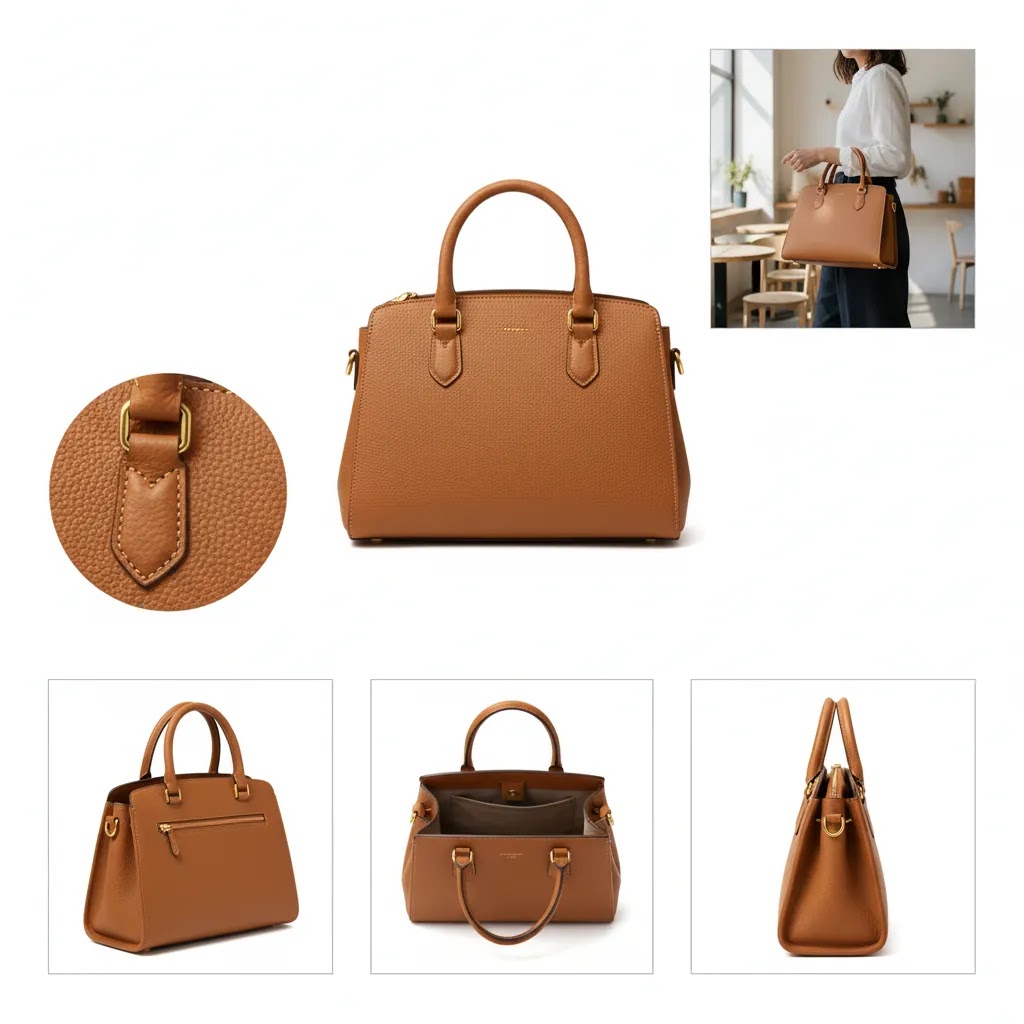
2. Show multiple angles and true detail. One image is rarely enough. Include front, back, side, top, inside, packaging, and key detail shots where relevant. Apparel stores may need fabric close-ups and fit views. Beauty stores may need swatch shots and applicator views. Home goods stores may need dimension, material, and room-context angles.
3. Include lifestyle images where context changes intent. Lifestyle photography is useful when the product’s value is easier to understand in use. Think furniture in a room, a skincare product on a vanity, or a bag worn by a person. If your category benefits from visual storytelling, review examples from Lifestyle Product Photography to see where context can improve comprehension rather than just add decoration.
4. Use video when motion or use needs explanation. Short ecommerce product videos often help when static photos cannot fully communicate fit, movement, texture shift, assembly, or interactive features. Even a simple spin, unboxing clip, or demonstration may improve confidence more than adding five extra stills.
5. Keep editing accurate, not excessive. Good retouching removes distractions and corrects technical issues. It should not mislead shoppers. Color, texture, proportions, and finishes need to remain believable. This matters for trust, returns, and post-purchase satisfaction.
6. Build an AI-assisted workflow where it genuinely saves time. AI can help with repetitive image production tasks such as background cleanup, white background creation, lifestyle scene generation, and light retouching. Based on current product data, useful options include AI Background Generator, Free White Background Generator, and Background Swap Editor. These can support faster asset production for catalog updates, seasonal campaigns, and channel-specific image variants. Pricing was not supplied in the available tool data, so verify current access terms directly with the provider.
For stores that need broader creative control, tools such as Magic Photo Editor and Creator Studio may fit better than single-purpose utilities. If your team regularly builds concept visuals before a full shoot, a mockup generator can also be useful for planning product pages, ad creative, and launch assets.
For merchants managing a growing SKU count, the best workflow is usually a blend of standard photography, light editing, and selective AI support. You still need source images that are sharp, well-lit, and commercially usable. AI may improve efficiency, but it does not remove the need for strong visual judgment.
How to Source Product Images (and Avoid Licensing Problems)
If you already have clean source photography, you are in a good place. But many Shopify store owners start with some gaps: they are launching fast, they are sourcing from a supplier, or they are adding SKUs quicker than they can shoot. Here’s the thing, getting images is not the hard part. Getting images you can legally use everywhere you plan to sell is where stores get into trouble.
Where to get product images when you do not have originals
Supplier-provided assets. If you are working with a brand or manufacturer, they may have a media kit with pack shots, lifestyle images, and sometimes video. Make sure you have explicit permission to use them on your site and in ads, not just for “resale listings.” Some suppliers restrict usage by channel or require attribution. Ask before you build your whole product page around those files.
UGC and customer photos (with permission). Customer photos can be incredibly persuasive because they answer the “what does it look like in real life?” question. But you still need permission. A repost request in a DM is better than nothing, but for ongoing use, written permission you can store is the safer approach, especially if you plan to run the images in Meta ads or reuse them on landing pages.
Hire a photographer or a small studio. For core products, especially high-margin or high-volume SKUs, paid photography often pays for itself in clarity and consistency. You can keep it simple: a half-day shoot for hero images and key details, then expand lifestyle content over time. If you are scaling, you can also build toward a repeatable in-house setup, which we touch on elsewhere in this guide.
AI-assisted variations from your own source shots. AI tools are at their best when you start with a real photo you own. From there you can create white background versions, clean up edges, or produce controlled lifestyle variations. The reality is that AI can help you stretch a limited shoot further, but you still want human review before you publish or use the output in paid campaigns.
A practical usage-rights checklist (so you do not get burned later)
Before you upload an image to Shopify, use it in a Google Shopping feed, or put it into an ad, you want clarity on rights. “Found on Google” or “saved from Pinterest” is not a licensing strategy, even if lots of stores do it.
- Written permission: Keep a simple record that you have the right to use the image for ecommerce and marketing. Email is fine. A signed agreement is better for ongoing partnerships.
- Model and property releases: If a person is clearly identifiable, or if you are using a recognizable private location, releases may be required depending on how the image is used. This comes up often in lifestyle shoots and UGC.
- Know what “royalty-free” actually means: It typically means you do not pay per use, not that there are no restrictions. Some licenses exclude advertising usage or limit how many impressions you can run.
- Rights-managed is different: Rights-managed images are licensed for specific uses, time periods, or channels. That may not fit ecommerce, where you want long-term usage across site, email, ads, and marketplaces.
- Keep source and license info tied together: Store the license, permission, or supplier agreement in the same place as your original image files, so you can prove rights later if a platform asks.
A simple approval workflow to stay consistent across Shopify, Google Shopping, and Meta
Most image issues are not creative. They are process issues. A basic approval workflow keeps you from publishing one-off images that look fine in isolation but cause problems in feeds, ads, or your collection grid.
From a practical standpoint, you can keep it lightweight:
- One folder for “approved masters”: These are the images that are cleared for use, consistent with your standards, and ready for resizing.
- One person owns final sign-off: Even if multiple people create assets, a single decision-maker reduces inconsistency.
- Channel check before publish: Confirm the hero image works on collection pages and that it is compliant for your primary acquisition channel, whether that is Google Shopping, Meta, or a marketplace.
- Version control: If you update an image, keep the prior version archived so you can roll back if performance drops or if a channel flags the new asset.
This is the kind of operational detail that looks boring, but it helps prevent brand drift as your catalog grows and keeps your images usable across the surfaces where shoppers first discover you.
Pros and Cons
Strengths
- Better product images may reduce uncertainty by showing details, scale, and use more clearly.
- Consistent image standards create a more professional store experience across collection and product pages.
- Clean visuals can support stronger click-through from search, shopping feeds, and social placements.
- Adding lifestyle shots and video often helps shoppers picture ownership, which may improve buying confidence.
- AI-assisted editing tools can save time on repetitive tasks like white background creation, background swaps, and simple enhancements.
- Well-structured image sets make it easier to reuse assets across ads, email, marketplaces, and landing pages.
Considerations
- Producing high-quality product imagery takes planning, and the process can become resource-heavy for large catalogs.
- Over-editing or unrealistic AI-generated scenes may hurt trust if the delivered product looks different from expectations.
- Some categories still need professional photography because lighting, texture, color accuracy, or model direction are hard to replicate with automation alone.
- Video and rich media may improve understanding, but they can also increase production complexity and on-site asset management.

Who Should Prioritize These Changes First
These best practices matter most for stores where product understanding drives conversion. That includes fashion, beauty, home goods, jewelry, gifting, consumer products, and any category where texture, finish, size, or real-world use affects purchase confidence. They also matter for Shopify merchants investing in paid traffic, because weak visuals can waste acquisition spend before product page copy gets a chance to do its job.
If your catalog is growing quickly, your first priority should be consistency. If your products are visually complex, your first priority should be detail and context. If you sell premium products, your first priority should be image quality and brand presentation. Stores managing in-house shoots should also assess whether a dedicated product photography studio setup would improve output consistency over time.
AcquireConvert Recommendation
At AcquireConvert, we generally recommend treating product imagery as part of your conversion system rather than a one-off design task. Giles Thomas brings a practical operator’s lens here as a Shopify Partner and Google Expert, which matters if you are balancing on-site conversion, feed performance, and production efficiency at the same time. For most store owners, the right move is not chasing the flashiest creative. It is building a repeatable image process that supports clarity, trust, and merchandising speed.
A sensible next step is to audit your current image stack by product type, traffic source, and catalog priority. Then compare where standard photography, edited lifestyle content, and AI-assisted tools each make sense. You can explore the broader E Commerce Product Photography category for related guidance, or review category-specific workflows if you are refining channel or campaign imagery.
How to Choose the Right Image Setup for Your Store
The right image strategy depends less on trends and more on your product, catalog size, traffic mix, and production capacity. Here are the criteria that usually matter most.
1. Product complexity
If your product is straightforward, such as a notebook or candle, a clean hero image plus a few supporting views may be enough. If your product has moving parts, fit considerations, texture variation, or assembly steps, you will likely need richer photo coverage and possibly short video.
2. Catalog scale
Stores with a small premium catalog can often justify custom photography for every SKU. Large stores need a repeatable workflow. That often means standardized lighting, naming conventions, background rules, editing templates, and AI support for repetitive image variations. Tools that automate background cleanup or resolution enhancement may be helpful at this stage, but only if the outputs remain commercially accurate.
3. Sales channel requirements
Your own storefront gives you more flexibility than marketplaces. Google Shopping, Amazon, and social commerce placements may require cleaner or more standardized visuals. If your acquisition strategy depends heavily on product discovery, image clarity often affects not just conversion but also traffic quality and click intent.
4. Brand presentation goals
Some brands need a premium editorial look. Others need catalog efficiency and speed. Those are different production models. A beauty brand may prioritize stylized textures and ingredient detail. A homeware brand may need room scenes. A DTC basics brand may need simple, highly consistent white background images and occasional lifestyle support.
5. Internal resources
Be realistic about what your team can maintain. If you do not have a photographer, stylist, or editor in-house, choose a workflow you can repeat without bottlenecks. In many cases, a hybrid process works best: core product shots captured well, then edited for multiple uses with selective AI tools. If your team is creating concept visuals before real shoots, mockups can help. If quality control is slipping, a more formal studio process may be the better answer.
For most merchants, the practical order of operations is simple. First, fix weak hero images. Second, add missing detail and scale shots. Third, introduce lifestyle content where it helps understanding. Fourth, test video on products that benefit from demonstration. Fifth, automate repetitive editing steps only after your source photography is solid.

Ecommerce Image Formats, Dimensions, and File Optimization (Shopify-first)
Once your image system is clear, the next lever is technical. The goal is simple: images should load fast, look sharp on mobile, and still hold up when shoppers zoom. If you get this wrong, you can end up with slow pages, soft details, and inconsistent collection grids.
Which file format should you use on Shopify?
JPEG is typically the workhorse format for product photography. It is usually the right choice for most hero images, lifestyle shots, and detail photos because it balances quality and file size well.
PNG is best when you truly need transparency, such as logos, simple graphic overlays, or certain packaging shots where a transparent background is required. For standard product photos, PNG files are often larger than they need to be.
WebP can be a strong option for storefront performance because it typically compresses well at good quality. Whether you can use WebP smoothly depends on your theme, apps, and image pipeline. Many Shopify themes handle modern formats well, but you still want to spot-check the images on mobile and across browsers, especially if you are uploading assets from multiple sources.
Now, when it comes to quality, the place you usually notice compression artifacts is on zoom and on textured products: fabric, wood grain, metallic finishes, and anything with fine print. If shoppers rely on zoom to evaluate quality, you want to avoid aggressive compression that makes details look smeared.
Dimensions and consistency: make the collection grid work
For Shopify stores, one of the most practical wins is consistent aspect ratio across a collection. If your products jump around in crop and framing, browsing feels chaotic and less premium, even if each photo is “good” on its own.
Think of it this way: choose a standard crop and stick to it. Square crops can work well for many catalogs. Vertical crops can work for apparel. What matters is consistency, so the product sits in a predictable position across the grid. This also makes it easier to reuse images in email and ads without rebuilding creative every time.
Mobile performance is the other reason to care about dimensions. Oversized images increase page weight, which can slow product pages and collection pages, especially on cellular connections. You want images large enough to look sharp on modern phones, but not so large that you are forcing every shopper to download massive files they do not need.
How to balance file size with sharpness
The way this works in practice is you compress as far as you can without damaging the details that matter. Start with your hero image and your most zoomed detail image, because those are the ones shoppers scrutinize. If you see halos around edges, smudged textures, or text that becomes unreadable, you have gone too far.
Also watch how images behave in your theme. Some themes crop, scale, or lazy-load images differently, which can change how sharp they look. Always check on a real phone, not just a desktop preview.
“Done right” standards you can document for your store
As your SKU count grows, standards reduce chaos. Even a one-page internal guideline makes it easier to keep freelancers, agencies, and internal team members aligned.
- Naming conventions: Use a consistent approach like sku-color-angle, so you can find assets quickly and avoid duplicate uploads.
- Alt text basics: Write alt text that describes what is actually in the image, including distinguishing traits like color, material, or variant. Keep it human and specific, not stuffed with keywords.
- Lightweight QA before publishing: Check crop consistency on collection pages, verify color is believable across your set, confirm zoom looks sharp, and ensure the hero image is compliant for your primary acquisition channels.
These details are not glamorous, but they remove friction. They also help you keep a single set of product assets usable across Shopify, email, and paid acquisition without constant rework.
Frequently Asked Questions
How many images should an ecommerce product page have?
There is no single correct number, but most stores benefit from enough images to answer common buying questions without overwhelming the shopper. In many cases that means a hero image, several angles, a close-up, a scale or size reference, and one or two contextual shots. The right number depends on product complexity, not a fixed template.
Do lifestyle product images really help sales?
They often help when the product’s value becomes clearer in use. Lifestyle photos can show fit, scale, mood, or outcome in a way plain catalog shots cannot. They are especially useful for apparel, beauty, home, and gifting products. They are less important when context adds little and simple specification-focused imagery does the job better.
Should every product also have a video?
Not necessarily. Video is most useful when motion, texture change, demonstration, or setup matters to the buying decision. If a still image already communicates the product clearly, video may be optional. Start with your highest-traffic or highest-consideration products and test where short clips improve understanding or shopper confidence.
Can AI replace traditional product photography?
Usually not fully. AI can support editing, background changes, mockups, and some lifestyle scene creation, but it still works best when paired with strong source imagery and human review. For products where color accuracy, material realism, or legal representation matter, traditional photography remains important. AI is best seen as workflow support, not a blanket replacement.
What makes a strong hero image for Shopify stores?
A strong hero image identifies the product immediately, looks clean on mobile, and stays visually consistent with the rest of your catalog. It should avoid clutter and present the product in a way that works on collection pages as well as product pages. On Shopify, this matters because collection-grid clarity can influence browsing efficiency and product discovery.
How important is image consistency across a catalog?
Very important. Consistent angles, backgrounds, lighting, and crop styles make your store easier to browse and more credible. They also help products feel related within a range or collection. In practical terms, consistency often matters more than artistic flair, especially for stores with many SKUs or frequent product launches.
What is the biggest mistake store owners make with product photos?
The most common mistake is assuming one attractive image is enough. Shoppers need proof, not just aesthetics. Missing detail views, unclear scale, inconsistent color, and weak context all create hesitation. Another frequent issue is over-editing, which can increase disappointment and returns if the real product does not match the visual presentation closely enough.
Should I use white backgrounds or styled backgrounds?
Use white or clean neutral backgrounds where clarity and consistency are the main goal, especially for hero shots and marketplace compatibility. Use styled or contextual backgrounds where they improve understanding or support your brand story. Most strong ecommerce image systems use both, with each format serving a different job in the funnel.
How do I decide between in-house editing and external help?
If your catalog changes often and your needs are repetitive, in-house editing or AI-assisted workflows may be more efficient. If you sell premium products, need advanced retouching, or struggle with consistency, external support may be the better choice. The decision usually comes down to volume, quality expectations, and how much control your team needs.
How do I get product images for my eCommerce website?
If you do not have original photography yet, start with supplier assets only if you have explicit permission to use them for ecommerce and marketing. You can also collect UGC or customer photos, but get written permission before using them on product pages or in ads. For core products, hiring a photographer for a small, repeatable shoot is often the cleanest path. If you already have a few strong source shots, AI tools can help generate variations like white backgrounds or controlled lifestyle scenes, but you still want human review for accuracy before publishing.
What are the latest product image trends?
For 2026, the trends that tend to be worth testing are more authentic lifestyle imagery, UGC-style product-in-hand shots, subtle motion like short loops, and simple “how it works” image sequences. Trends can backfire when they reduce trust, such as over-stylized AI scenes or inconsistent edits across a catalog. A practical approach is to test one trend on one collection first, then measure engagement and conversion behavior before rolling it out store-wide.
What are e-commerce images?
E-commerce images are the photos and videos used to sell a product online. They include hero images, angle shots, close-ups, scale references, lifestyle images, and sometimes short product videos. Their job is to replace what shoppers would normally learn by picking up the product in a store, so clarity, accuracy, and consistency matter as much as aesthetics.
Key Takeaways
- Build product imagery as a system, with hero shots, detail views, scale references, and context-based images working together.
- Use lifestyle images and video selectively where they improve product understanding, not just visual style.
- Prioritize accuracy and consistency over heavy editing or overly stylized presentation.
- Use AI tools for repetitive editing tasks where they save time, but keep human review in the process.
- Audit high-traffic and high-margin products first, then standardize your image workflow across the catalog.
Conclusion
Better ecommerce product images rarely come from one perfect shoot or one clever editing tool. They come from a repeatable visual standard that helps shoppers understand the product fast and trust what they are seeing. If you are trying to improve conversion, start with the basics: clearer hero images, stronger detail coverage, realistic editing, and context where it genuinely helps. Then refine your workflow with video, mockups, or AI support where those additions save time or improve comprehension. AcquireConvert focuses on practical ecommerce guidance for store owners making these decisions in the real world. For more help, explore our category resources on product photography and related workflows, and see how Giles Thomas’s Shopify and Google expertise informs the way high-performing stores approach visual merchandising.
This article is editorial content published by AcquireConvert for educational purposes. It is not a paid endorsement unless explicitly stated otherwise. Pricing, plan access, and tool availability are subject to change, so verify current details directly with each provider. Any performance outcomes discussed are not guaranteed and will vary based on product type, store setup, traffic quality, and execution.

Hi, I'm Giles Thomas.
Founder of AcquireConvert, the place where ecommerce entrepreneurs & marketers go to learn growth. I'm also the founder of Shopify agency Whole Design Studios.