Ecommerce Tools for Product Content (2026)


If you sell online, product content is rarely just a design task. It affects click-through rate, trust, return rate, and how fast you can launch new SKUs. The right ecommerce tools can help you remove backgrounds, create cleaner white-background shots, build lifestyle edits, sharpen low-resolution images, and speed up repetitive photography workflows without turning every update into an agency project. For Shopify merchants especially, this becomes a decision about efficiency as much as image quality. If you are still sorting out the fundamentals, start with this guide to ecommerce photography. In this evaluation, I will break down the most relevant tools for product content production, where they fit best, and where human photography or editing still makes more sense.
Contents
- What these ecommerce tools actually help with
- Common types of ecommerce tools (and where product content fits)
- Key features to evaluate
- How to evaluate AI ecommerce tools beyond features (ROI, QA, and workflow)
- Pros and Cons
- Who these tools are for
- Tools required to run an ecommerce business (minimum viable toolkit)
- AcquireConvert recommendation
- How to choose the right setup
- Frequently Asked Questions
- Key Takeaways
- Conclusion
What these ecommerce tools actually help with
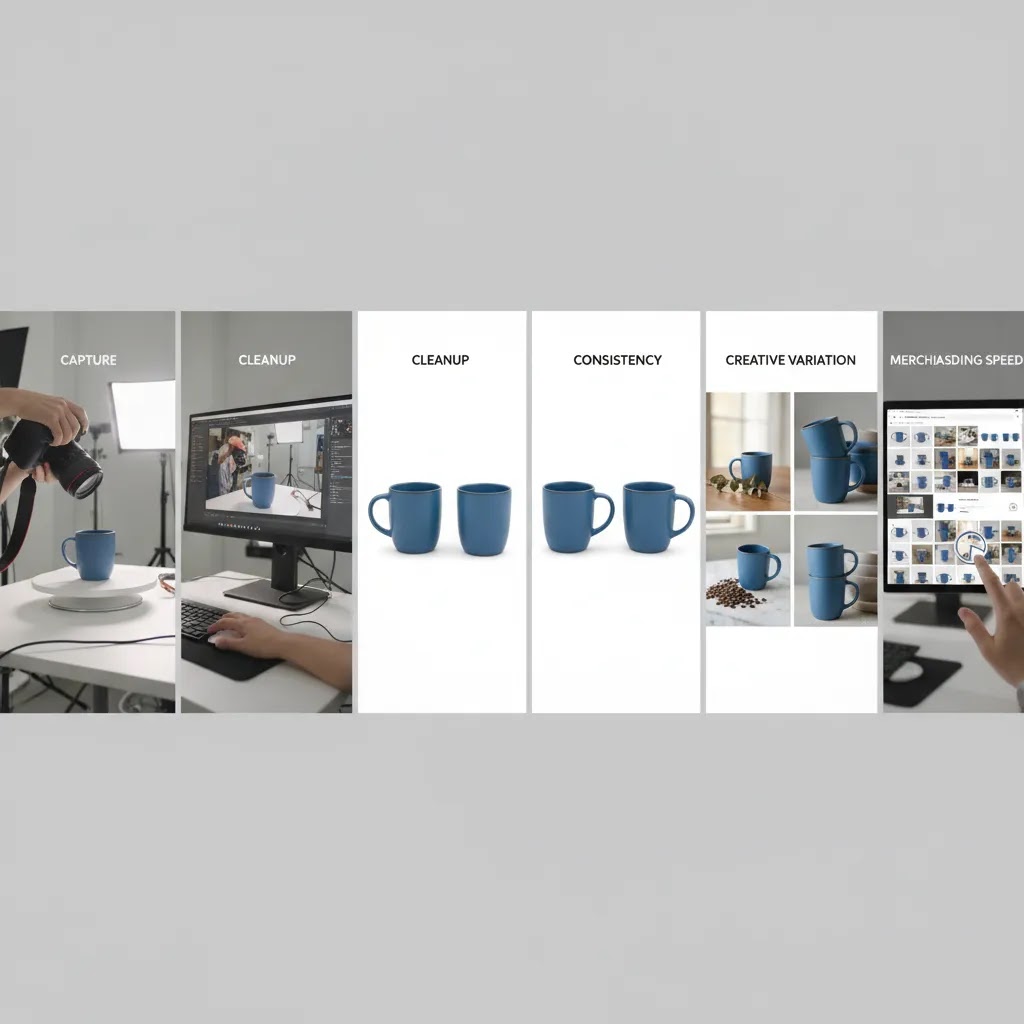
For most store owners, product content work falls into five jobs: capture, clean-up, format consistency, creative variation, and merchandising speed. The tools available from the current product set are strongest in the middle three. They are best used to refine existing photos, generate alternate backgrounds, improve clarity, and prepare assets for product pages, ads, marketplaces, and social campaigns.
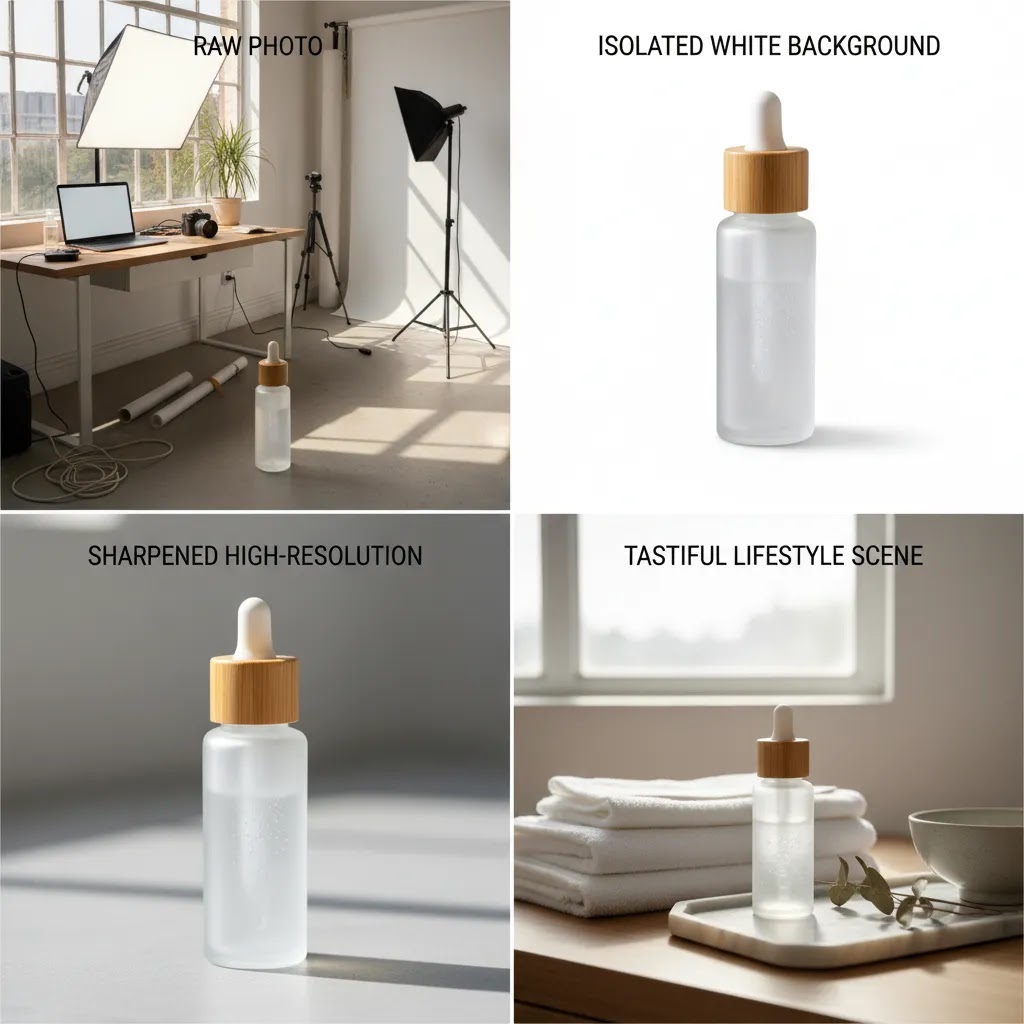
That matters because a lot of ecommerce teams do not need a full studio workflow for every SKU. They need a repeatable way to produce usable images quickly. For example, AI Background Generator and Free White Background Generator can support cleaner catalog presentation. Increase Image Resolution is relevant when supplier assets are too soft for zoom or retina displays. Background Swap Editor and Place in Hands are more useful when you need merchandising variety without arranging a full reshoot.
These tools do not replace every professional workflow. If you sell highly tactile, luxury, technical, or compliance-sensitive products, you may still need a specialist ecommerce product photographer or a dedicated product photography studio. But for many Shopify stores, AI-supported editing can reduce bottlenecks and help teams publish faster.
Common types of ecommerce tools (and where product content fits)
When people search for “ecommerce tools,” they are often talking about a whole stack, not just creative software. From a practical standpoint, most stores end up using a mix of tool types that map to the core jobs of running ecommerce.
Here is the quick breakdown most store owners recognize:
- Storefront platform: where your catalog, theme, and checkout experience live, for many merchants that is Shopify.
- Payments and checkout: how you take payment, manage fraud checks, and reduce checkout friction.
- Analytics and measurement: the tools that tell you what is working, what is not, and where customers drop off.
- Marketing and acquisition: paid ads, SEO tooling, email and SMS, and feed-based distribution such as shopping surfaces.
- Customer support: helpdesk, live chat, returns handling, and self-serve tracking.
- Operations: inventory, shipping, and fulfillment workflows that keep delivery and stock accurate.
- Product content and creative: photography, editing, video, and asset management, plus anything that helps you produce channel-ready images faster.
This page is intentionally focused on the product content and creative slice. That is not because the other categories are less important, it is because product imagery is one of the few areas where tool choice can affect both acquisition and conversion at the same time.
Think of it this way: images are not only “what your product looks like.” They influence how your ads and listings perform, how clearly your product page communicates value, and how confident a customer feels before checkout. Cleaner imagery can support higher click-through in some channels, reduce confusion on your PDP, and reduce internal back-and-forth when you are launching new SKUs. It also connects directly to feed quality, especially when you are pushing products into multiple placements with different image requirements.
The way this works in practice is simple. Your ecommerce stack should be built in layers. Measurement and channel requirements first, then content production, then creative experimentation. If you treat image tools as a standalone decision, you often end up with assets that look good in isolation but create rework when you try to publish across Shopify, marketplaces, ads, and email.
Key features to evaluate
Not every image tool belongs in the same buying conversation. For ecommerce, I would evaluate them by workflow fit rather than novelty.
1. Background control for catalog consistency
White backgrounds still matter for marketplaces, comparison shopping surfaces, and clean collection-page presentation. A tool like Free White Background Generator is useful when your store needs visual consistency across large catalogs. If your creative direction is broader than plain studio output, AI Background Generator gives more flexibility for campaign or lifestyle-style scenes.
2. Editing flexibility for merchandising teams
Single-purpose tools are efficient, but broader editors can reduce context switching. Magic Photo Editor and Creator Studio are better fits if your team needs one place to create multiple asset variations rather than using separate tools one by one.
3. Resolution and cleanup for low-quality source images
Many growing stores inherit mixed image quality from suppliers, earlier shoots, or marketplace imports. Increase Image Resolution may help make those assets more usable for PDPs and ads. Remove Text From Images is useful when you need to strip old labels, promotional overlays, or marketplace text from source assets before reuse.
4. Context generation for ads and social
Product-only imagery is not enough for every channel. Lifestyle context can improve scannability and help shoppers picture scale or use. Place in Hands is a practical example. For beauty brands, adjacent AI creative workflows such as an ai makeup generator may also support campaign testing.
5. Operational fit with your content mix
The biggest mistake is buying for one image and not the full pipeline. If you need compliant marketplace imagery, review requirements for amazon product photography. If your team handles dozens or hundreds of SKU updates each month, prioritize repeatability, output consistency, and minimal manual cleanup over novelty features. You can also browse AcquireConvert’s Background Removal & Editing resources for related workflows.
How to evaluate AI ecommerce tools beyond features (ROI, QA, and workflow)
Features are the easy part to compare. The harder part is understanding what a tool will cost you in review time, rework, and operational friction once it is part of a real Shopify workflow.
What many store owners overlook is that AI image tools often shift work rather than remove it. If generation is fast but your team spends hours rejecting outputs, cleaning edges, or re-exporting for different channels, the tool is not actually saving time.
Track cost per usable SKU, not cost per image
A practical way to evaluate ROI is to estimate your cost to produce a usable set of images for one SKU. That includes your time and your team’s time, plus any outsourcing. For example, if you typically need a hero image plus three to five supporting images, you should evaluate whether the tool reduces the time to reach that complete set, not whether it generates one good-looking image.
Turnaround time matters too. A tool that produces acceptable results in a predictable time window is often more valuable than one that sometimes produces amazing output but regularly creates delays when you are trying to launch a collection.
Set acceptance standards before you start generating
AI output variability is real. Your goal is to define what “approved” means for your brand and category so review does not become subjective and slow.
For most Shopify store owners, a simple set of standards is enough:
- Brand fit: lighting, background style, and overall mood match your storefront.
- Realism: no warped shapes, incorrect materials, or impossible reflections.
- Edge quality: clean cutouts around product boundaries, hairline details, and transparent elements.
- Shadows and grounding: the product looks like it sits in the scene, not like it is floating.
- Accuracy: color and key product attributes are not misleading.
Now, when it comes to human review, there are cases where it should be non-negotiable. If your product has compliance requirements, strict claims, regulated before-and-after expectations, or high return risk due to visual mismatch, you should assume a human must approve every image before it goes live.
Run a small batch test before you standardize
Do not migrate your whole catalog based on a few impressive samples. Pick a small batch of SKUs that reflects the messiness of real life, including tricky edges, reflective surfaces, and different colors.
Define success metrics that connect to operations, not just aesthetics:
- Time saved: total minutes from source image to Shopify-ready export.
- Error rate: how many images fail review for obvious reasons.
- Rework: how often you need a second pass or manual cleanup.
- Content throughput: how many SKUs you can publish per week without quality slipping.
- Customer impact signals: fewer support tickets about “looks different,” or fewer returns that cite misrepresentation, where you can track it.
If the batch test is a clear win, standardize. Document the workflow, name your files consistently, and define who signs off. If it is not a win, it does not mean the tool is bad. It may just mean it is better used for secondary images, ad creative testing, or seasonal campaigns rather than hero PDP assets.
Pros and Cons
Strengths
- These tools address real ecommerce image tasks such as white background creation, background replacement, text removal, and resolution improvement.
- They can help smaller Shopify teams produce more image variants without booking a new shoot for every campaign or collection refresh.
- Single-purpose tools like AI Background Generator or Free White Background Generator can fit quick catalog cleanup workflows well.
- Broader options such as Magic Photo Editor and Creator Studio may reduce switching between separate editing apps.
- Creative tools like Place in Hands can support ad testing and social merchandising where plain packshots are not enough.
- They are most useful when speed and consistency matter more than fully custom art direction.
Considerations
- Current tool data provided does not include pricing, so you will need to verify plan structure and usage limits directly with the provider.
- AI-generated or AI-edited images may still need manual review for edge quality, shadows, reflections, scale, and brand accuracy.
- These tools are not a full substitute for custom studio photography when materials, texture, fit, or regulatory detail must be shown precisely.
- Creative outputs can vary by category, so beauty, apparel, and technical products may require more QA than simple hard goods.
Who these tools are for
These ecommerce tools are a strong fit for Shopify merchants, marketplace sellers, and lean in-house teams that need to publish product content quickly. They are especially useful if you manage a growing catalog, rely on supplier images, run frequent promotions, or need multiple creative formats for PDPs, ads, and email. They can also help founders who do not have a full-time designer but still need cleaner visuals.
They are a weaker fit if your products depend on highly accurate color rendering, tactile detail, luxury positioning, or regulated visual standards. In those cases, AI editing can still support your workflow, but it should usually sit alongside professional photography rather than replace it.
Tools required to run an ecommerce business (minimum viable toolkit)
If you are building your stack from scratch, it helps to separate “tools that make the store run” from “tools that make the store look better.” Product imagery tools sit in the second category, which is important, but they should not come before measurement and channel readiness.
For most Shopify store owners, a minimum viable toolkit usually includes:
- Your store platform: Shopify handles your core catalog and storefront, and it sets the constraints for image upload formats, theme image treatment, and how your product page presents media.
- Analytics: you need a reliable way to see what traffic does on PDPs, collection pages, and checkout so you can connect content work to performance.
- Email and SMS: a baseline for retention and abandoned cart recovery, because not every sale happens on the first session.
- Paid acquisition: many stores rely on paid social or search to scale, which creates ongoing demand for image variants that match ad placements.
- Customer support and returns handling: even a simple workflow matters, because unclear product content often shows up later as tickets and returns.
- Inventory and shipping basics: accurate stock and delivery expectations protect conversion, and they also influence what your product content needs to communicate.
Now, where do product content tools fit? They sit inside a minimum viable content workflow that looks like this: capture or collect source images, clean and standardize, create channel-specific variants, upload to Shopify with a consistent naming approach, then validate how those images render on mobile and desktop.
A common mistake is over-investing in creative tooling before you have the fundamentals in place. If you are not measuring product page performance, if you do not know which channels you are prioritizing, or if you have not clarified your marketplace requirements, you can end up producing a lot of “nice” images that do not actually reduce friction in the buying journey.
Consider this a sanity check: if you cannot answer which SKUs are most viewed, which products have the highest return rate, and which traffic sources are driving the most product page sessions, your next tool purchase should probably support measurement and prioritization. Once you have that, product content tools become much easier to choose because you are solving a specific operational problem.
AcquireConvert recommendation
If you are deciding between AI-assisted editing and a more traditional photography workflow, the best next step is to map tools to the commercial job each image needs to do. Giles Thomas brings a useful perspective here as a Shopify Partner and Google Expert. That matters because product imagery is not only a creative asset. It affects shopping feed quality, paid traffic performance, on-page conversion behavior, and how consistently your catalog presents across channels.
AcquireConvert is most useful when you want specialist ecommerce guidance rather than generic design advice. Compare workflow options side by side, read deeper guidance on mockup generator use cases, and explore the broader E Commerce Product Photography category for implementation ideas. If you are weighing AI tools against reshoots, agency support, or studio production, AcquireConvert’s Shopify-focused perspective can help you choose a setup that fits your catalog size, team capacity, and merchandising goals.

How to choose the right setup
Start with your image bottleneck, not the tool name. Most store owners do not need every feature. They need the feature that removes the biggest delay in getting better product pages live.
Choose by primary use case
- If your issue is inconsistent backgrounds, start with AI Background Generator or Free White Background Generator.
- If your issue is poor source quality, look first at Increase Image Resolution.
- If your issue is outdated overlays or supplier-added text, Remove Text From Images is the relevant option.
- If your issue is channel-specific creative variation, evaluate Background Swap Editor or Place in Hands.
- If your team wants an all-in-one workspace, consider Magic Photo Editor or Creator Studio.
Match the tool to the channel
Catalog pages, Amazon listings, paid social, and email banners often need different image treatments. White-background consistency matters more for marketplace and feed-driven placements. Lifestyle or context-rich edits matter more for social ads and upper-funnel acquisition. If a tool helps one channel but creates rework for another, it may not be the right core workflow.
Think about review workload
Fast generation only helps if review stays manageable. For stores with larger catalogs, quality assurance is a real cost. Check whether your team can approve images quickly for shadows, cropping, edge detail, and realism. This is where narrower tools often outperform broader creative workflows because output is more standardized.
Use AI where variation helps, not where precision is mandatory
AI can be highly practical for secondary images, campaign assets, and concept testing. It is less dependable for exact material representation in some categories. A sensible approach is to keep hero images grounded in high-quality source photography and use AI-assisted tools for supporting visuals, variant backgrounds, and rapid creative testing.
Keep your Shopify workflow simple
For many merchants, the best stack is not the biggest stack. One cleanup tool, one creative variation tool, and a clear naming and upload process are usually enough. If you are still building that foundation, review your wider ecommerce photography process before adding more software. Stores that scale content efficiently usually standardize first, then expand.
Frequently Asked Questions
What are the best ecommerce tools for product photography work?
The best option depends on your bottleneck. For white-background consistency, Free White Background Generator is relevant. For lifestyle-style variation, AI Background Generator or Background Swap Editor may be more useful. If your existing assets are too soft, Increase Image Resolution is the clearer fit. A store owner should choose based on workflow need, not broad feature claims.
Can AI product photography tools replace a professional photographer?
Sometimes for basic catalog tasks, but not always for brand-critical work. If you need exact materials, color accuracy, scale cues, or luxury presentation, professional photography still matters. AI tools are often better as workflow accelerators than full replacements. Many merchants get the best results by combining strong source images with AI-assisted editing.
Are these tools useful for Shopify stores?
Yes, especially for Shopify merchants managing frequent product launches or campaign refreshes. Faster image cleanup and creative variation can support quicker merchandising updates and better PDP consistency. Giles Thomas’s Shopify Partner perspective is relevant here because image operations affect more than aesthetics. They can influence product page clarity, merchandising speed, and ad creative throughput.
Which tool is best for white-background product images?
Based on the current product data, Free White Background Generator is the most direct match for that job. It is a focused option for producing cleaner catalog-ready images. If you need something more creative than a white background, AI Background Generator or Background Swap Editor may be better, but they solve a slightly different problem.
What if my supplier images are low resolution?
Increase Image Resolution is the most relevant tool in this set for that issue. It may help make older or supplier-provided assets more usable for storefront presentation. Still, upscaling is not the same as capturing new detail. If the original photo is poorly lit, compressed, or badly composed, you may still need a reshoot for important products.
Do I need a full editor or just a single-purpose tool?
If your team repeats one task constantly, a single-purpose tool is often the smarter choice because it keeps the workflow clean. If you need multiple image transformations across campaigns and channels, a broader option like Magic Photo Editor or Creator Studio may save time. The right answer usually depends on team size and SKU complexity.
How do I know when to use a studio instead of AI editing?
Use a studio when precision, styling control, and brand differentiation are the priority. That is often true for beauty, fashion, jewelry, technical products, and premium DTC brands. If you are unsure, compare AI-assisted workflows against a professional ecommerce product photographer for hero images while using AI for supporting assets.
Are AI-edited product images acceptable for marketplaces like Amazon?
They can be, but only if they still meet the marketplace’s image rules. Main image requirements are usually stricter than secondary image requirements. Before using AI-generated backgrounds or edits, review channel-specific guidance. AcquireConvert’s article on amazon product photography is a sensible place to start.
Should beauty brands use specialized AI tools?
In some cases, yes. Beauty and cosmetics often need more category-specific creative treatments than general hard goods. A specialized workflow can help with campaign ideation or concept testing, but outputs still need careful review for realism and brand fit. If that is your category, this guide to an ai makeup generator may be relevant.
What are e-commerce tools?
E-commerce tools are software and services that help you run and grow an online store. Some tools handle the fundamentals, such as storefront management, checkout, payments, shipping, and support. Others help you acquire customers and improve conversion, such as analytics, email, ads, SEO tooling, and product content tools like photography and image editing software.
What are the tools required for e commerce business?
The exact mix depends on your model and channels, but most stores need a storefront platform such as Shopify, a payment setup, analytics, retention marketing (often email or SMS), an acquisition channel (paid or organic), customer support coverage, and basic operations tooling for inventory and shipping. Product imagery and editing tools become critical once you need consistent PDP assets and ongoing creative variations for ads and launches.
What are the 7 major types of eCommerce?
The seven major types are typically described as business-to-consumer (B2C), business-to-business (B2B), consumer-to-consumer (C2C), consumer-to-business (C2B), business-to-government (B2G), consumer-to-government (C2G), and direct-to-consumer (DTC) as a common retail operating model. For Shopify store owners, the day-to-day tools you need often depend less on the label and more on channel mix, catalog complexity, and how much content production you handle in-house.
What are the 5 C’s of e-commerce?
A common framework is Company, Customers, Competitors, Collaborators, and Context. Company is your offer and operations, Customers are the audience and their needs, Competitors are the alternatives shoppers compare you to, Collaborators are partners like suppliers and platforms, and Context is the market environment and constraints. In product content terms, this helps you sanity check whether your images match your brand position, reduce customer uncertainty, stand out in a crowded category, and meet platform requirements.
Key Takeaways
- Choose ecommerce tools by workflow bottleneck, such as background cleanup, resolution fixes, or creative variation.
- AI image tools work best as practical production support, not automatic replacements for every photography need.
- For Shopify stores, product content decisions affect merchandising speed, channel readiness, and conversion clarity.
- Use professional photography for precision-critical hero assets and AI tools for scale, testing, and supporting images.
- Verify current pricing, usage limits, and output quality directly with the provider before committing.
Conclusion
The best ecommerce tools for product content are the ones that remove friction from your actual merchandising workflow. For some stores, that means better white backgrounds and faster cleanup. For others, it means adding lifestyle context, improving supplier images, or creating more ad variations without a full reshoot. The current product set is strongest for those practical tasks. If you want help comparing options in a Shopify-focused context, AcquireConvert is a strong place to continue your research. Explore the full guide on E Commerce Product Photography, compare related workflows, and use Giles Thomas’s practitioner-led insights as a filter before you invest in another tool stack.
This article is editorial content created for informational purposes and is not a paid endorsement unless explicitly stated otherwise. Pricing was not available in the current tool data and may be subject to change, so verify all current plans and terms directly with the provider before making a decision. Any performance or workflow outcomes discussed are not guaranteed and may vary based on your catalog, team, and implementation process.

Hi, I'm Giles Thomas.
Founder of AcquireConvert, the place where ecommerce entrepreneurs & marketers go to learn growth. I'm also the founder of Shopify agency Whole Design Studios.