Best AI Background Remover Tools (2026 Guide)


If you sell online, clean product imagery usually affects more than aesthetics. It shapes first impressions, catalog consistency, ad readiness, and how quickly you can launch new products. An ai background remover can help you turn rough source photos into store-ready assets faster, especially if you do not have an in-house designer. The challenge is choosing a tool that fits your workflow rather than creating more editing work later. In this guide, I compare the best options from a practical ecommerce angle, with a focus on product-photo use cases, team speed, and output flexibility. If you are also comparing generation tools, this ai background generator guide is a useful next step before you commit.
Contents
- Overview
- How Background Removers Fit Into a Product Photo Workflow
- Best AI Background Remover Tools for Product Photos
- Pros and Cons
- Editor Tools You Actually Need
- Who This Guide Is For
- AcquireConvert Recommendation
- How to Choose the Right Tool
- Resolution, HD Downloads, and Where Quality Matters Most
- Frequently Asked Questions
- Key Takeaways
- Conclusion
Overview
For most ecommerce teams, background removal is not a creative nice-to-have. It is an operational task. You need product photos that work on collection pages, marketplaces, paid social, email campaigns, and sometimes printed lookbooks. That means your chosen tool should do more than erase a backdrop. It should fit a real merchandising process.
Based on the available product data, the strongest options for product-photo editing in this category are ProductAI Photo tools, including Free White Background Generator, AI Background Generator, Background Swap Editor, Magic Photo Editor, and Creator Studio.
Each serves a slightly different job. Some are better for clean white-background catalog images. Others suit lifestyle replacements, iterative creative testing, or broader editing workflows. If you are still narrowing the category, AcquireConvert’s Background Removal & Editing section and best ai photo editor guide can help you compare the wider tool set.
How Background Removers Fit Into a Product Photo Workflow
Here is the thing, background removal is rarely a single step. For most Shopify store owners, it sits inside a repeatable product-photo workflow, and the tool either supports that workflow or creates extra cleanup work that slows launches.
From a practical standpoint, a reliable workflow usually looks like this:
- Capture standards first: consistent angle, consistent lens distance, and even lighting so your collection grid does not look like a patchwork.
- Run background removal as the first editing pass, ideally in batches so you can work SKU-by-SKU or collection-by-collection.
- Do edge cleanup for the tricky products: remove halos, fix cut-off corners, and repair missing details before you export anything.
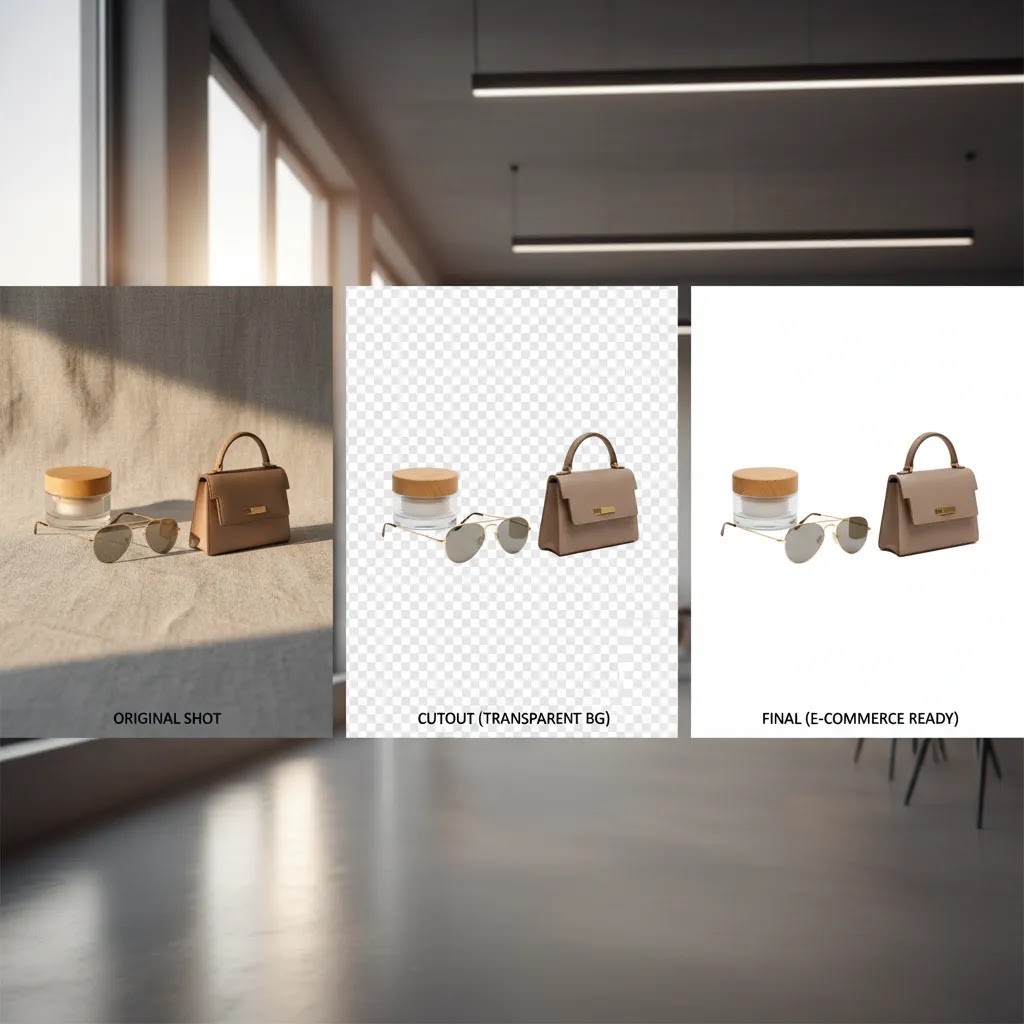
- Export the variants you actually need: a white background version for catalog use, a transparent PNG when you need to place the product on a designed background, and any channel-specific crops.
- Upload and QA in Shopify: check the product detail page, the collection grid, and mobile rendering before you process the rest of the catalog.
What many store owners overlook is that the first 10 minutes of quality control can save hours later. Before you process your whole catalog, test a small group of images that represent the problems you see most often. Include at least one item with fine edges, one reflective item, and one item shot in less-than-perfect lighting.
A simple QC checklist before you batch your full catalog
- Edge fringing and haloing: look for a light outline around the product, especially against white backgrounds.
- Shadow handling: decide whether you want to keep a natural shadow, remove it entirely, or replace it with a consistent soft shadow. Inconsistent shadows show up quickly on collection pages.
- Transparent objects: glass, clear plastic, and glossy packaging may lose realism if the mask is too aggressive.
- Color shifts: some tools slightly change exposure or saturation during processing. That can create mismatches between variants.
- Collection grid consistency: even if one image looks fine alone, check how it looks next to other products at the same thumbnail size.
Now, when it comes to outputs, file type and resolution are not minor details. In most ecommerce workflows, you will typically upload JPG or PNG source files, then export based on the job:
- JPG: usually best when you are exporting a flat white background image and do not need transparency.
- PNG: the standard choice when you need a transparent background export, or you are placing the product onto different backgrounds later.
HD versus standard resolution matters too. If you are only using images small in email or on collection tiles, standard output may be fine. If you rely on zoom, tight crops, or premium hero images on your PDP, higher resolution exports tend to hold up better and reduce visible edge artifacts.
Best AI Background Remover Tools for Product Photos
1. Free White Background Generator
This is the most direct fit if your main goal is marketplace-style product imagery with a clean, consistent background. For many Shopify merchants, this is the first requirement before anything more creative. White backgrounds remain useful for primary PDP images, Google Shopping feeds, and catalog uniformity.
What stands out is the focus. Instead of trying to be an all-purpose editor, it aims at a common ecommerce task. That can save time for smaller teams who need repeatable output rather than layered editing controls.
- Best for standardized catalog shots
- Useful when you want a fast white-background workflow
- Good fit for stores with many SKUs and frequent launches
- Simple option if your designer time is limited
2. AI Background Generator
While not a pure remover-only tool, AI Background Generator is helpful if your workflow moves from cutout to replacement scene. That matters when you need both plain product images and more styled creative for ads, landing pages, or seasonal campaigns. In practice, many merchants need both.
This option is best treated as a second-stage tool after isolation. It gives you more room to test context without arranging a full shoot every time.
- Best for combining removal with new generated backgrounds
- Helpful for campaign variation testing
- Useful for product storytelling after initial cutout work
- Can reduce reliance on repeated set builds for every promo theme
3. Background Swap Editor
Background Swap Editor is the most relevant choice if you already know you want replacement, not just removal. For ecommerce brands, this is often where the value shows up. You can take one approved product photo and adapt it across channels with different contexts, tones, or audience segments.
If your team runs frequent promotions, category refreshes, or ad creative tests, this kind of editor may be more useful than a basic remover alone.
- Best for changing scenes while keeping the product central
- Useful for merchandising and creative testing
- Supports more flexible campaign production
- Good fit for brands wanting more than plain cutouts
4. Magic Photo Editor
Magic Photo Editor looks better suited to merchants who need broader image editing beyond background cleanup. If your process includes touch-ups, composition fixes, and more general photo adjustments, a wider editor may give better long-term value than single-purpose tools.
This matters for stores where one person handles listing images, emails, and social assets. A broader editor can keep the workflow in one place.
- Best for general product image editing
- Helpful if you want one editor for multiple image tasks
- Useful for lean teams doing design in-house
- May reduce tool switching during asset preparation
5. Creator Studio
Creator Studio appears to be the broadest production environment in the current tool set. For growth-stage brands, this may be the better choice if your workflow includes multiple image variations, repeated creative batches, or collaboration across products and campaigns.
It will not be the best fit for everyone. If you only need occasional background removal, it could be more workspace than you need. But for stores treating imagery as an ongoing conversion asset, a studio-style setup can be more scalable.
- Best for larger or repeatable creative workflows
- Useful for ongoing asset production
- Better suited to teams than one-off users
- Strong option if you need workflow breadth rather than a single edit
Pros and Cons
Strengths
- AI background removal tools can speed up product-image prep for launches, promotions, and catalog refreshes.
- They are especially useful for merchants who do not have a dedicated retoucher or studio team.
- Tools in this category can help create more consistent listing imagery across Shopify collections and product pages.
- Background replacement features may support ad testing and seasonal creative without arranging new photo shoots each time.
- Specialized tools like white-background generators are practical for feed-driven channels and cleaner PDP presentation.
Considerations
- Output quality still depends heavily on the source image, lighting, edges, and product complexity.
- Some tools are better at removal, while others are better at replacement, so one tool may not cover every workflow.
- AI-edited product photos may still need human review before use on high-value PDPs or premium brand campaigns.
- Stores with reflective, transparent, or highly textured products may run into more cleanup work than expected.
Editor Tools You Actually Need
Consider this, most background removal tools look good on simple products, then fall apart on the exact SKUs that matter most for brand perception. Hair, fur, lace, fringe, glass, reflective packaging, and anything with translucency can expose the limits of a one-click workflow.
That is where editor-style controls matter. If you routinely export an image, notice the cutout is wrong, then start again from scratch, you are paying a time tax on every hero image. In many cases, a tool with basic manual controls is faster overall, even if the AI is not perfect on the first pass.
The editor capabilities that save time on real catalogs
- Erase and restore brushes: lets you quickly remove leftover background and bring back details the model cut away.
- Edge refinement controls: helpful for soft edges like hair and fuzzy fabric, and for avoiding halos on white backgrounds.
- Preview modes: switching between white, dark, and transparent previews helps you spot fringing before it reaches your Shopify theme.
- Manual touch-up options: even small fixes like straightening a cut line or correcting a missed gap can make the result look intentional, not automated.
The way this works in practice is simple. For everyday catalog images, a clean one-click output is often enough, especially if the photo was shot with clear separation between product and background. For hero PDP images, premium packaging, or bestsellers you use in ads, manual touch-ups can be worth it because those images get seen the most, cropped the most, and judged the hardest.
A useful decision rule is this: if your current process involves fixing mistakes after export more than once a day, you probably need an editor-style remover, not just a one-click tool. The goal is not to chase perfection. It is to reduce the number of images that slip through and create inconsistency across your store.

Who This Guide Is For
This guide is for ecommerce store owners, Shopify merchants, marketers, and in-house content teams choosing a practical background-removal solution for product photos. It is especially relevant if you need faster turnaround on new SKUs, cleaner catalog presentation, or more creative flexibility for campaign assets.
If your main need is a simple marketplace-ready image, a white-background tool is usually the best place to start. If you also want lifestyle scenes or ad variations, a replacement-focused editor may be the better fit. If you are still improving your image capture process itself, review your product photography studio setup before expecting software alone to solve every quality issue.
AcquireConvert Recommendation
If you are making a buying decision right now, the smartest approach is to match the tool to the actual job in your workflow. For clean catalog consistency, start with a white-background option. For campaign creativity, look at tools that combine removal and replacement. For broader editing needs, choose an editor or studio environment that can handle multiple image tasks in one place.
That practical, workflow-first approach is how AcquireConvert evaluates ecommerce tools. Giles Thomas brings the perspective of a Shopify Partner and Google Expert, which matters if your product images need to work not only on your store but also across paid acquisition, feed-based placements, and conversion-focused landing pages. To compare adjacent options, read our guides to ai background changer tools and E Commerce Product Photography. If you want the full picture, explore more visual merchandising resources across AcquireConvert before you commit.
How to Choose the Right Tool
1. Start with your primary use case. Ask whether you need removal, replacement, or a full editing workflow. A catalog-heavy store usually benefits from predictable white-background output first. A creative brand running paid campaigns may get more value from replacement and scene testing.
2. Check how well it supports your product type. Flat, opaque products are usually easier for AI to isolate. Jewelry, glass, cosmetics packaging, and textured apparel can be harder. If you sell complex products, review edited images closely before rolling them out sitewide.
3. Think about where the image will be used. Shopify PDPs, collection pages, email headers, meta ads, and marketplace listings do not all need the same background style. In many cases, you will need one clean catalog version and one or more styled creative versions. That may push you toward a tool with both removal and generation capability.
4. Consider team workflow, not just features. A solo founder may prefer a direct single-purpose tool because speed matters most. A larger team may be better served by a studio-style workspace that supports repeated asset creation and collaboration.
5. Review output before scaling. Before processing an entire catalog, test 10 to 20 representative products. Include difficult edges, shadows, reflective surfaces, and different lighting conditions. That gives you a much more accurate sense of whether the tool fits your store.
One more tip from a conversion perspective: product-image cleanup works best when it supports the buying decision. If your brand relies on showing material quality, scale, or use context, a pure white background may not be enough on its own. In that case, combine clean catalog photos with lifestyle or context-rich secondary images. If you are exploring more advanced creative workflows, our coverage of best ai photo editor tools and Background Removal & Editing resources can help you compare next-step options.

Resolution, HD Downloads, and Where Quality Matters Most
For most Shopify store owners, the resolution question shows up the moment you start cropping. A standard cutout that looks fine at full width can start to break down when you crop tight for an ad, zoom on a product page, or reuse the asset across multiple placements.
Think of “HD downloads” as insurance for reuse. You may not need HD for every product image, but you will usually notice the difference in a few high-impact places:
- PDP zoom and close-up viewing: higher resolution cutouts tend to keep edges cleaner, especially on textured products.
- Hero images and tight crops: cropping magnifies small mask mistakes like halos and jagged edges.
- Consistency on collection tiles: uneven edge softness across thumbnails can make your catalog look inconsistent, even when products are shot well.
Common failure modes at lower resolution are easy to miss until you see them on a real storefront. Jagged edges can appear on angled packaging. Haloing can show up as a faint outline around the product, especially when you export onto white. Soft masks can make details look slightly blurry, which can read as “low quality” on desktop. On mobile, those problems can be less obvious at first, but they still show up when customers pinch-zoom or when an image is reused in ads.
What many store owners overlook is output flexibility. The best tool choice is often the one that can export the versions you actually need without extra steps:
- Transparent PNG: useful when you want to place the product onto different backgrounds for ads, emails, or designed landing pages.
- Consistent white background: useful for marketplaces, Google Shopping style placements, and clean catalog presentation.
- Multiple aspect ratios: helpful if you are producing the same product for square social placements, vertical stories, and standard website images.
The reality is that “quality” is not a single setting. It is a combination of source photo quality, how cleanly the tool handles edges, and whether your export choices match the channel. If you are seeing artifacts after upload, you can often fix the workflow by switching from JPG to a transparent PNG for certain use cases, exporting a higher resolution for hero assets, or using a tool with better edge refinement before you spend time re-shooting products.
Frequently Asked Questions
What is the best ai background remover for product photos?
The best choice depends on what you need most. If you mainly want clean catalog images, a specialized white-background tool is often the strongest fit. If you also need lifestyle scenes or ad creatives, a tool that combines removal with replacement may be better. For most stores, workflow fit matters more than feature breadth alone.
Is a free ai background remover enough for a Shopify store?
It can be enough for basic tasks, especially if your products are simple and your source photography is clean. Many smaller Shopify stores start this way. Still, free tools may be less suitable when you need batch consistency, higher control, or more polished creative for premium PDPs and paid campaigns.
Can ai background remover tools replace a professional product photographer?
No, not completely. These tools can improve efficiency and reduce editing workload, but they do not replace strong source photography, lighting, and product styling. In most cases, better inputs lead to better AI edits. If your base images are weak, software may only partially improve them.
Do ai background remover tools work well for Google Shopping images?
They can, especially when used to create clean, consistent product photos with simple backgrounds. That said, you should always review the final image against current channel requirements and your own brand standards. Clean cutouts often help, but accuracy and product clarity still come first.
What products are hardest for ai background remover tools?
Transparent products, reflective packaging, fine details, fur, lace, and irregular edges are typically harder to process cleanly. These cases often need manual review or touch-up after the AI pass. If your catalog includes many of these products, test carefully before committing to one workflow.
Should I choose a remover-only tool or a full editor?
If your main task is making primary product images clean and consistent, a remover-only tool may be enough. If you also create ads, seasonal banners, email creatives, or social assets, a broader editor could offer more value. Your answer depends on how many image jobs one tool needs to cover.
Can I use ai background remover and generator tools together?
Yes, and many ecommerce teams should. A practical setup is to create a clean isolated product image first, then use a generator or swap tool to create contextual versions for campaigns. That keeps your core catalog imagery controlled while still giving you creative flexibility for marketing.
How do I test whether an ai background remover is good enough for my store?
Use a small sample set from your actual catalog. Include your easiest and hardest products, then review edges, shadows, color accuracy, and consistency across image types. Also check how the results look on your Shopify theme, collection pages, and mobile PDP layouts before scaling up.
Do these tools help with conversion rate optimization?
They may help indirectly by improving image consistency, clarity, and creative testing speed. But results depend on your category, brand positioning, theme layout, and the quality of the original photos. Better visuals can support conversion, though they are only one part of the full product page experience.
What image file types do ai background removers support (jpg, jpeg, png)?
Most tools in this category typically support JPG, JPEG, and PNG. If you are seeing upload errors, convert the file to a standard JPG or PNG, and double-check that the image is not corrupted and is saved in a common color profile. If you are processing a lot of product images, using consistent input file types can reduce failure messages and batch inconsistency.
Can an ai background remover create a transparent background (png)?
Yes, many background removers can export with transparency, usually as a PNG. A transparent export is useful when you want to place the product on different backgrounds later, for example ad creatives, email designs, or a background swap workflow. If you only need a clean white background for your main catalog image, a JPG export is often enough.
Why does my tool say it cannot identify the foreground, and how do I fix it?
This message usually means the subject is not distinct enough from the background. Low contrast, heavy shadows, busy backdrops, and motion blur can all confuse the model. A practical fix is to retry with a cleaner source photo, increase separation between product and background during capture, or use a tool that lets you manually mark or brush the areas to keep. Cropping closer to the product before upload can also help in many cases, since it reduces the amount of background the tool has to interpret.
What is the difference between standard and hd background removal downloads?
Standard downloads are typically lower resolution exports that work for smaller placements. HD downloads are higher resolution exports that tend to hold up better when you crop tight, use zoom on a Shopify PDP, or reuse the image across multiple channels. The right choice depends on where the image will be used. For hero images and ads, higher resolution is often worth testing. For smaller thumbnails, standard may be fine.
Key Takeaways
- Choose the tool based on the job you need done: white-background cleanup, replacement scenes, or broader editing.
- Test with real catalog images before processing your full product library.
- For Shopify stores, keep both conversion use and channel requirements in mind.
- AI tools work best when paired with solid source photography and consistent merchandising standards.
- Use clean primary images and styled secondary images together for a more complete ecommerce visual strategy.
Conclusion
The best ai background remover for your store is the one that removes friction from your image workflow without creating new quality problems. For some brands, that means a simple white-background tool. For others, it means a broader editor that can handle cutouts, replacements, and campaign-ready creative in one place. The right choice depends on your catalog complexity, team setup, and where your images need to perform.
If you want a sharper decision before investing more time, compare options side by side on AcquireConvert and explore our practical guides on AI editing, product photography, and visual conversion strategy. Giles Thomas’s perspective as a Shopify Partner and Google Expert is especially useful if your images need to support both onsite conversion and acquisition channels.
This article is editorial content for informational purposes only and is not a paid endorsement unless explicitly stated otherwise. Pricing, product availability, and feature sets are subject to change, so verify current details directly with the provider before making a decision. Any workflow or conversion impact discussed here is not guaranteed and will vary based on your store, products, and implementation quality.

Hi, I'm Giles Thomas.
Founder of AcquireConvert, the place where ecommerce entrepreneurs & marketers go to learn growth. I'm also the founder of Shopify agency Whole Design Studios.