Amazon Photo Editing Services (2026 Review)


Amazon photo editing services help FBA sellers turn raw product shots into marketplace-ready images that meet Amazon standards and present products more clearly. For most sellers, the best option is not a generic retouching company. It is a service or tool built around ecommerce image workflows such as white background cleanup, resolution improvement, background swaps, and catalog consistency. Based on the currently available product data, ProductAI Photo offers several focused tools that suit Amazon listing preparation, especially for solo sellers and lean teams that need speed without hiring a full studio. If you sell on Amazon and also run a Shopify store, this matters even more because stronger images can support both channels. You can browse related ecommerce tools if you are still evaluating your stack.
Contents
- Overview
- Trust and Credibility
- Key Features
- Amazon Image Requirements That Your Editor Must Support
- Pricing and Costs
- Outsourced Editing vs AI Tools: Turnaround, Quality Control, and When to Choose Each
- Who It's Best For
- How to Get Started
- High-Volume Catalog Workflow (Bulk Editing, Templates, and Consistency at Scale)
- Pros and Cons
- Frequently Asked Questions
Overview
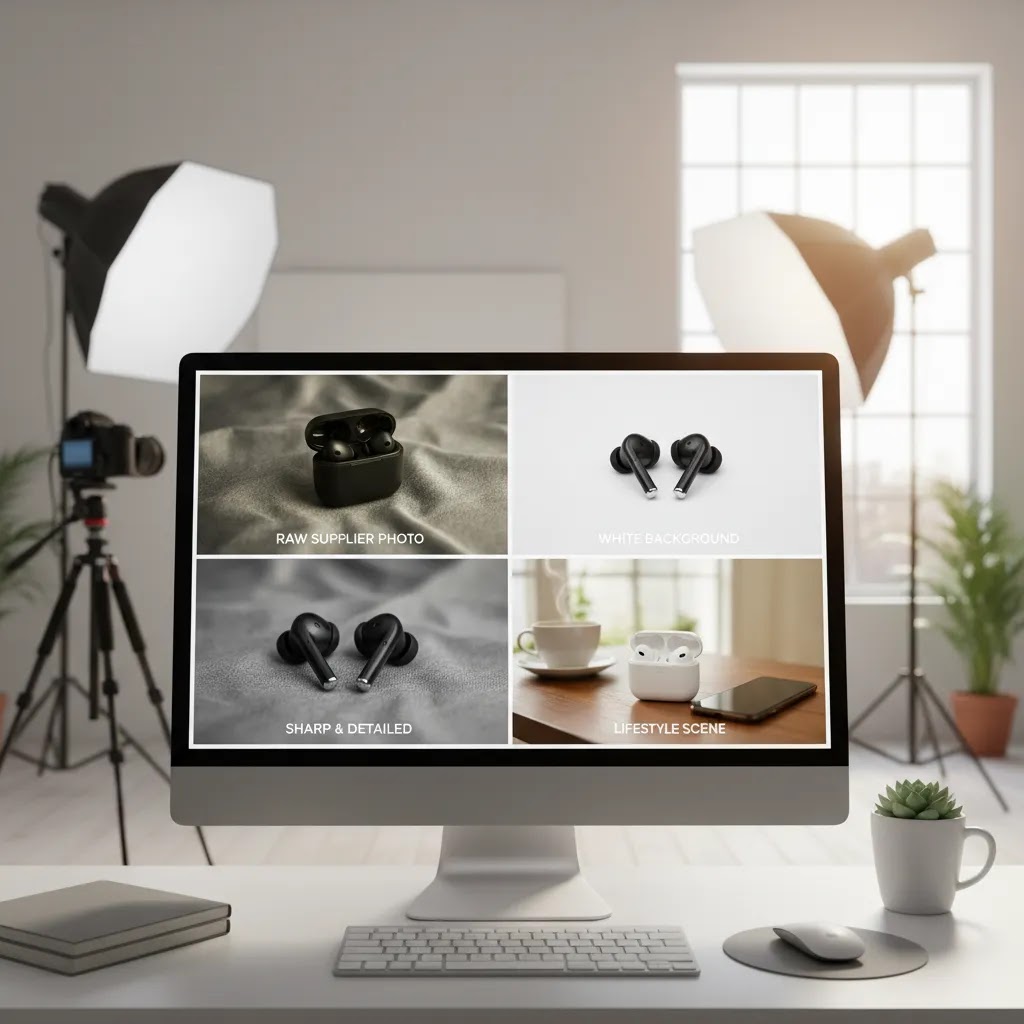
If you search for amazon photo editing services, you are usually trying to solve one of four problems: getting a true white background for the main image, improving image sharpness, creating secondary lifestyle visuals, or fixing inconsistent supplier photography. Those are not minor cosmetic issues. They affect click-through rate, listing trust, and how professional your catalog looks next to competing offers.
From the live product data available, the most relevant options are ProductAI Photo tools including Free White Background Generator, AI Background Generator, Increase Image Resolution, Remove Text From Images, Background Swap Editor, Place in Hands, Magic Photo Editor, and Creator Studio.
These are better viewed as a practical photo editing service stack than a single done-for-you agency. That distinction matters. If you want total outsourcing, you may still prefer an ecommerce product photographer or a full product photography studio. If you already have usable source images and need them cleaned up for Amazon, AI-assisted editing tools can be faster and more cost-efficient for day-to-day listing work.
Trust and Credibility
For FBA sellers, trust comes from practical reliability rather than marketing language. You need image tools that address common marketplace requirements and reduce manual editing time. The current data confirms that ProductAI Photo offers focused utilities for background generation, white background cleanup, image resolution enhancement, text removal, and editable creative tools for product presentation.
AcquireConvert evaluates tools through an ecommerce performance lens. Giles Thomas, the expert behind the site, is a Shopify Partner and Google Expert, which is relevant here because product imagery affects both on-store conversion rate optimization and marketplace click performance. The goal is not to praise every AI image tool. It is to identify what actually helps lean ecommerce teams produce cleaner catalog assets with fewer bottlenecks.
One caution is important. Amazon image compliance can change, and sellers are still responsible for checking marketplace rules before publishing. A tool can help prepare an image, but it does not replace your own compliance review.
Key Features
White background cleanup is the first requirement for most Amazon main images. The Free White Background Generator is the most directly relevant option in the current dataset. If your supplier images have gray, shadowed, or inconsistent backgrounds, this tool may help standardize them quickly for listing use.
Resolution improvement matters when your original images are too small or soft for zoom-friendly product pages. Increase Image Resolution is useful when you need to sharpen presentation without arranging a reshoot immediately. This is especially practical for older Amazon catalogs or imported SKUs with weak source files.
Background variation matters more for secondary images than for main images. AI Background Generator and Background Swap Editor can help create contextual visuals for gallery slots, A+ Content, or off-Amazon assets. If you also sell direct to consumer, pairing edited marketplace images with a mockup generator can help extend the same assets into ads, PDPs, and social campaigns.
Object cleanup and text removal can save a surprising amount of time. Remove Text From Images is useful when supplier photos include embedded labels, watermarks, or promotional text that does not belong on a clean listing image.
Lifestyle composition tools like Place in Hands and Magic Photo Editor are more relevant for supporting images. They can help explain scale, show usage context, or make a product feel more tangible. That said, sellers should use these carefully and keep realism in mind.
Workflow centralization through Creator Studio could be valuable for teams managing larger SKU counts. Instead of stitching together separate editing steps, you can work within one creative environment for multiple image tasks. For sellers trying to understand how imagery supports sales performance, this ties closely to why product photos increase conversion rate across ecommerce channels.
Amazon Image Requirements That Your Editor Must Support
Here is the thing: the editing choices that look great on a Shopify product page can still get you into trouble on Amazon if you apply them to the wrong image slot. Most Amazon image issues happen because sellers blur the line between a compliant main image and a more creative secondary image.
From a practical standpoint, your editor or tool needs to support the main image basics that impact how you edit:
- A clean, pure white background look for the main image, with no visible seams, gradients, or gray cast.
- No extra props, no text overlays, no badges, and no graphic callouts on the main image.
- Consistent cropping and scale so the product fills the frame appropriately, without being cut off.
- Clean edges around the product, especially when background removal is involved.
Think of it this way: you want to create two different “lanes” for your image workflow. Lane one is your main image edits, which should be conservative and compliance-first: white background cleanup, accurate color, careful sharpening, and minimal retouching that keeps the product looking real. Lane two is your secondary image creative, where background swaps, lifestyle scenes, and compositing can be useful for explaining benefits and usage, as long as the output still looks believable and matches what the customer will receive.
What many store owners overlook is quality assurance. Even if a tool outputs a white background, you still want to check for common failure points that can hurt trust or trigger rework:
- Over-smoothing that removes real texture, such as fabric weave or brushed metal grain.
- Artificial shadows that look pasted on, or shadows that do not match the product’s contact points.
- Halo edges from background removal, especially around hairline details, transparent plastics, or reflective surfaces.
- Color shifts where the product looks brighter, cooler, or more saturated than reality.
If you separate main image edits from secondary creative, and you do a quick QA pass before uploading, you avoid most of the headaches sellers associate with “Amazon image compliance.”
Pricing and Costs
The live product data provided includes URLs and feature-oriented tool names, but it does not include current pricing tiers for these ProductAI Photo tools. Because AcquireConvert does not invent pricing, the only accurate guidance is that you should click through and confirm the latest costs directly on the product pages before committing.
For Amazon sellers, the real cost question is broader than subscription price alone. You should compare:
- How many images you need edited each month
- Whether you need one-off fixes or an ongoing workflow
- The cost of reshooting products versus improving existing assets
- The value of doing edits in-house versus outsourcing
If you only need occasional cleanup for a handful of SKUs, point tools such as white background generation or resolution enhancement may be enough. If you manage a wider catalog, Creator Studio or a combined workflow may make more sense. Sellers who need frequent lifestyle scenes or branded creative may also benefit from broader editing capabilities rather than a single-purpose service.
If your store sells on Shopify as well as Amazon, it can be worth reviewing the wider E Commerce Product Photography category and the Background Removal & Editing category to compare workflows that support both marketplaces and your own storefront.

Outsourced Editing vs AI Tools: Turnaround, Quality Control, and When to Choose Each
Now, when it comes to choosing between outsourced editing and AI tools, the “best” option depends on what your bottleneck is. Some sellers need speed and iteration. Others need consistency without having to think about it. In reality, you can also mix both, for example, use tools for day-to-day cleanup and outsource complex SKUs.
Outsourced editing is typically a better fit when you want a predictable process: you send a batch, you get a batch back, and you review for compliance. Many editing teams work from templates, which usually means standardized cropping, consistent alignment, background consistency, and a repeatable shadow style across the whole catalog. That template-based approach matters when your Amazon storefront has dozens of near-identical products and you want the grid view to look clean and intentional.
AI tools are often a better fit when you need fast iteration and control. If you are uploading new products weekly, testing new packaging, or updating older images, tools let you move without waiting on an external queue. They can also reduce the back-and-forth for simple tasks like background cleanup or resizing, as long as you have someone who can do a quick QA pass.
Regardless of which route you choose, you will get better results if you treat quality control as part of the workflow, not an afterthought:
- Run a small sample batch first, such as 10 to 20 images, before committing a whole catalog.
- Define what “done” looks like: cropping rules, white background standard, shadow style, and acceptable retouching level.
- Expect a revision loop. Even good editors and good AI outputs need corrections, especially on reflective or transparent products.
- Keep a consistent “house style” across SKUs so your listings look like one brand, not a collection of unrelated photos.
The way this works in practice is simple: the more your images need to look identical across a category, the more you should prioritize templates and consistency checks. The more you need speed and experimentation, the more tools tend to make sense, as long as you take review seriously.
Who It's Best For
These Amazon photo editing options are best for FBA sellers who already have product images but need to improve presentation without hiring a full creative team. That includes private label sellers, resellers cleaning up inconsistent supplier shots, and ecommerce brands managing both Amazon and Shopify listings.
They are especially suited to lean operations with limited design resources. If you are comfortable reviewing and approving your own images, AI-assisted editing can be a practical middle ground between raw DIY editing and full-service outsourcing.
If you need completely original photography, highly controlled lighting, or premium brand storytelling, a professional photographer or studio is still the stronger choice. These tools are best for editing and enhancement, not replacing every part of commercial photography.
How to Get Started
Start with your highest-priority SKUs, not your full catalog. Choose 5 to 10 products that already generate traffic but have weak images. Then follow this workflow:
- Audit your current listing images for background issues, soft resolution, inconsistent cropping, or unwanted text.
- Use Free White Background Generator for main image cleanup where needed.
- Use Increase Image Resolution on undersized or older source images that need clearer presentation.
- Create secondary visual variants with AI Background Generator, Background Swap Editor, or Place in Hands, but keep them realistic and relevant to the product.
- Review every final image against Amazon's current image rules before uploading.
- Track whether improved imagery changes engagement over time, while remembering results vary by niche, competition, pricing, and listing quality.
If your product line needs high-volume visual consistency, Creator Studio is the tool most likely to support a repeatable process. If you are still deciding between software and outsourced help, compare the time savings against what it would take to brief an editor manually for each SKU.

High-Volume Catalog Workflow (Bulk Editing, Templates, and Consistency at Scale)
For most Shopify store owners who also sell on Amazon, the “image problem” is not one listing. It is a catalog. Once you get past a few dozen SKUs, your workflow matters as much as your editing tool.
Consider this approach if you have hundreds or thousands of images to process. Start by batching similar products together, such as products with the same packaging size or the same photography angle. Then standardize the operational basics: consistent file naming, consistent target dimensions, and repeatable specs for background tone, shadow style, and crop rules. This is where template thinking pays off, because it reduces subjective decisions on every single image.
If you are evaluating a service for volume, look for practical operational signals, not just “we do photo editing.” You want clear expectations around turnaround targets, how revisions are handled, and how consistency is checked across batches. Some sellers also benefit from agreeing a preset or template per product type, so the editor or tool is not guessing how tight the crop should be or how heavy the shadow should look.
To measure whether your workflow is actually improving, track a few simple metrics over time:
- Defect rate, meaning the percentage of images that need rework after your first review.
- Time per SKU, including review and revisions, not just the editing time.
- Consistency across listings, especially when customers scroll search results and compare you against other offers.
If you manage editing like a production system instead of a one-off creative task, you typically get fewer surprises, fewer reuploads, and a catalog that looks like a real brand.
Pros and Cons
Strengths
- Strong fit for common Amazon image tasks such as white background cleanup and resolution enhancement.
- Useful for sellers who need faster turnaround than traditional manual photo editing services.
- Flexible range of tools, from simple cleanup to more advanced creative editing and scene generation.
- Can support both Amazon listings and Shopify product page assets, which is helpful for multichannel brands.
- Good option for lean teams that want more control over image output without hiring a dedicated editor.
Considerations
- Current live data does not include pricing, so cost comparison requires checking each tool page directly.
- AI-edited lifestyle or composited images may need careful review to avoid unrealistic results.
- These tools help with editing, but they do not replace the quality advantage of strong original photography.
- Amazon compliance remains the seller's responsibility, especially for main image rules and category-specific standards.
Frequently Asked Questions
What are amazon photo editing services, exactly?
They are services or tools used to improve product images for Amazon listings. That usually includes white background editing, retouching, shadow cleanup, cropping, resolution enhancement, and secondary lifestyle image creation. Some sellers use done-for-you editors, while others use AI-assisted tools to handle the same tasks more quickly in-house.
Are these tools suitable for Amazon main images?
They can be, especially for background cleanup and image sharpening. The main requirement is that your final image still meets Amazon's current standards. A tool may help you create a compliant image, but it does not guarantee compliance. You should always review the final output before publishing the listing.
Can I use the same edited images on Shopify too?
Yes, in many cases that is one of the biggest advantages. White background images, cleaned-up packshots, and some secondary visuals can work across Amazon and Shopify. For direct-to-consumer storefronts, you may want extra variation in your image set, but the core edited assets are often reusable across channels.
How do these compare with hiring a professional editor?
AI-assisted tools are usually faster for repetitive tasks and small teams. A professional editor or studio may still deliver better control for premium brands, difficult materials, or complex retouching. If you need speed and scale, tools make sense. If you need highly polished brand photography, human specialists may still be worth the added cost.
Do photo edits improve conversion rates on Amazon?
They may, particularly if your current images are weak, inconsistent, or unclear. Better images can improve perceived trust and make product details easier to understand. Still, outcomes depend on many factors including price, reviews, competition, title quality, and overall listing strength. Image improvement should be treated as one part of a broader optimization process.
Which ProductAI Photo tools are most relevant for FBA sellers?
For most Amazon sellers, the most relevant tools are Free White Background Generator, Increase Image Resolution, Remove Text From Images, and Background Swap Editor. Creator Studio may be the better option if you want a broader workflow. Lifestyle-focused tools such as Place in Hands are more useful for gallery and brand content than for the main product image.
Should smaller sellers start with a service or a full studio workflow?
Smaller sellers should usually start with the narrowest tool that solves their biggest image problem. If your catalog only needs cleaner backgrounds, use that tool first. If your images are also low quality or inconsistent, add resolution and editing tools next. You do not need a full studio-style workflow on day one unless your volume requires it.
Does Amazon Photos have an editor?
Amazon Photos is mainly a storage and backup product for your personal photo library. It is not designed as a dedicated product photo editor for Amazon listings. If you need marketplace-ready packshots, white background cleanup, and consistent crops across a catalog, you will typically want a purpose-built editing workflow rather than a storage app.
Does Amazon have a photo service?
Amazon offers a range of photo-related products, but FBA sellers usually mean one of two things when they ask this: either a place to store photos, or a way to produce compliant listing images. For listing work, most sellers use either a dedicated editor or a dedicated toolset focused on ecommerce tasks like background cleanup, retouching, and image consistency.
Is Shutterfly or Amazon Photos better?
They are built for different use cases. Shutterfly is generally focused on printing and photo products. Amazon Photos is generally focused on storing and organizing personal photos. Neither is a direct replacement for an ecommerce-focused editing workflow for Amazon listings, where you need consistent backgrounds, crops, and compliance-minded output.
Which photo editor is 100% free?
Some photo editors offer free tiers or free trials, and some tools are free with limitations. The tradeoff is usually export limits, watermarks, lower resolution output, or fewer features. For Amazon listing images, what matters is not just cost. It is whether the tool can consistently produce clean, realistic edits that hold up to zoom and keep your catalog consistent.
Key Takeaways
- Amazon photo editing services are most valuable when they solve specific listing issues such as white backgrounds, poor resolution, or inconsistent product presentation.
- Based on current live data, ProductAI Photo offers several relevant editing tools for FBA sellers, including white background, resolution, text removal, and creative editing options.
- These tools are best for sellers with usable source images who want faster in-house improvement rather than full outsourced production.
- Pricing is not available in the current dataset, so sellers should verify live costs before choosing a workflow.
- Always review final images for Amazon compliance, realism, and brand consistency before uploading.
Conclusion
For most FBA sellers, the right amazon photo editing services are the ones that remove bottlenecks without compromising listing quality. The current ProductAI Photo lineup looks most useful for practical editing jobs such as white background cleanup, image enhancement, and secondary image creation. That makes it a sensible option for lean ecommerce teams and multichannel brands that sell on both Amazon and Shopify. If you need a fully managed creative process or original commercial photography, hold off and consider a studio or photographer instead. If your issue is editing rather than shooting, start with your highest-traffic SKUs, test the relevant tool, and build a repeatable image workflow from there. That is usually the most efficient next step.
AcquireConvert may receive affiliate compensation from some links mentioned in this article. We only cover tools and resources that appear relevant to ecommerce use cases. Image quality and business results vary based on your source photography, niche, competition, implementation quality, and marketplace compliance review. No tool can guarantee approval, higher conversion rates, or sales outcomes.

Hi, I'm Giles Thomas.
Founder of AcquireConvert, the place where ecommerce entrepreneurs & marketers go to learn growth. I'm also the founder of Shopify agency Whole Design Studios.